AI agent orchestration

AI agents as workflow steps, with a person in the loop

Run AI agents as governed workflow steps: granted tools only, structured outputs, human review tasks for low-confidence results, run history and traces — and an MCP server for AI assistants.

The problem

Agents are useful. Unsupervised agents are a risk.

A model can classify a document, draft a reply or pick the next step in seconds — but it can also be wrong, call a tool it should not, or leave no trace of why it decided what it did. Most teams need agents inside a process, not instead of one.

  • Agents with broad credentials and no permission boundary
  • No review step for uncertain or high-impact answers
  • Prompts, tool calls and results nobody can audit afterwards
How UserTasks solves it

The workflow decides what the agent may do, and when a person checks it.

A Run Agent node calls a model with instructions, granted tools and an output schema. The structured result goes into workflow variables, so the next node can branch on it — continue automatically when the answer is clear, or create a review task when it is not.

  • Any OpenAI-compatible model, connected as an AI connector
  • Only the tools you grant: references, workflows, external MCP servers
  • Structured outputs that conditions and decision tables can route on
  • Every run, step, tool call and token count recorded; prompts never exported

Architecture

How the pieces fit

AI agent orchestration architectureEmails, webhooks and schedules start workflows, and AI assistants connect through the MCP server. UserTasks runs the agent step with only its granted tools, routes its structured output through a condition, creates a human review task when needed and records run history. The agent calls the model and your APIs, and events go to your log platform.TRIGGERSInbound email or webhookDocuments, ticketsScheduleBatch triageAI assistantMCP serverCALLED BY THE AGENTModelOpenAI-compatible APIYour APIsGranted referencesEvent streamagent.run.* eventsUserTasks engineRun Agent: granted tools onlyStructured output → conditionHuman review taskRun history and traces
Emails, webhooks and schedules start workflows, and AI assistants connect through the MCP server. UserTasks runs the agent step with only its granted tools, routes its structured output through a condition, creates a human review task when needed and records run history. The agent calls the model and your APIs, and events go to your log platform.

In practice

Run an agent, or let your assistant drive the engine

Execute an agent on demand from the CLI, or connect an MCP client with an API key or OAuth.

shell
# Run an agent on demand (add --set async:=true to queue it)
usertasks agents execute <agent-id> --set message="Classify invoice INV-1042"

# Connect an MCP client (Claude Desktop, Cursor, …)
{
  "mcpServers": {
    "usertasks": {
      "url": "https://usertasks.com/api/mcp",
      "headers": { "Authorization": "Bearer <your-api-key>" }
    }
  }
}
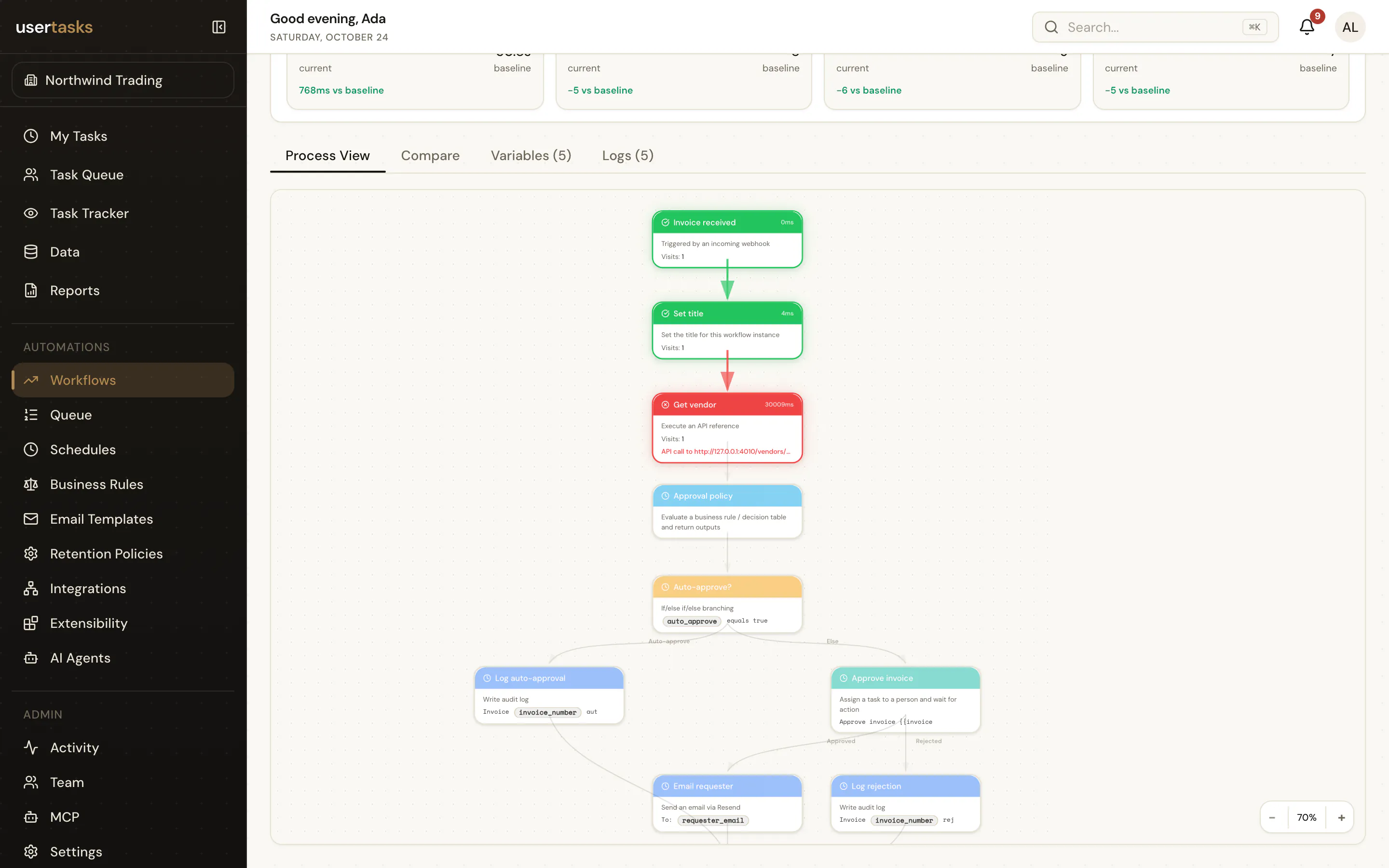
A UserTasks run detail page showing the path taken and the status and duration of each step
Every run keeps its path, each step’s status and duration, and the error if one failed.

Frequently asked questions

Which models can agents use?

Any chat-completions endpoint that is OpenAI-compatible and supports tool calling — for example OpenAI, Azure OpenAI, Groq, Together, Ollama, or an Anthropic-compatible proxy.

How do I stop an agent doing something it should not?

Agents can only call the tools you grant, and those tools run with permission checks. Put a User Task after the agent so a person approves high-impact actions, and branch on the structured output so uncertain answers always go to review.

Are prompts and model outputs sent to my log platform?

No. Agent runs, steps, tool calls, token counts and errors are recorded and emitted as agent.run.* events, but prompts and model outputs are not included in exported events.

Do I have to use AI at all?

No. Agents are optional; every other feature works without them.

Related use cases

Build it on an engine you control.

Open source under Apache-2.0. Use the cloud, or self-host it next to your own systems.