Approvals and compliance

Multi-step approvals you can prove

Build finance, HR and procurement approvals with decision-table approval matrices, SLAs, reminders, escalation, audit trails, retention policies and role-based governance.

The problem

Approvals are easy to start and hard to govern.

Who can approve what changes every quarter. Requests stall when an approver is away. And when the auditor asks why an invoice was paid, the answer is spread across inboxes, spreadsheets and a chat thread.

  • Approval limits hard-coded in scripts or kept in a spreadsheet
  • No deadline, so requests wait until someone chases them
  • Evidence that is incomplete, editable or gone when it is needed
How UserTasks solves it

Rules, people and evidence in one process.

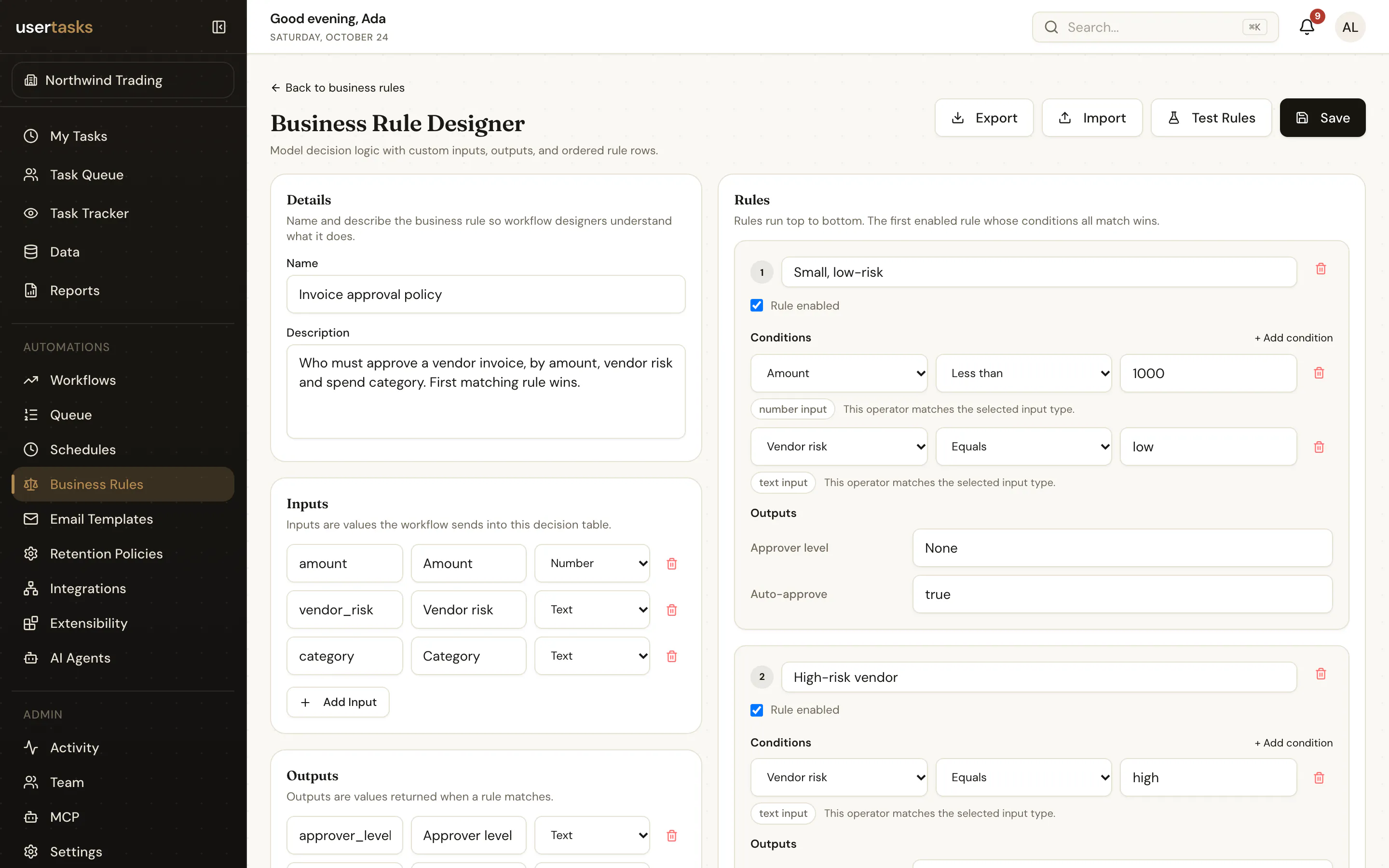
A decision table holds the approval matrix: amount bands, departments, cost centres and the approvers they require. The workflow creates approval tasks in the right order, with deadlines, reminders and escalation, and every step, decision and permission change is recorded.

  • Approval matrices as decision tables that finance or HR can change and test
  • Sequential or parallel approvers, team queues and multi-assignee tasks
  • SLAs, reminders and escalation to a person, a team or the manager
  • Audit log, run history, retention policies with review and purge, and SSO

Architecture

How the pieces fit

Approval and compliance workflow architectureRequests arrive from a form, an API call or a business system. UserTasks evaluates the approval matrix in a decision table, creates approver tasks with SLAs, escalates overdue work and records audit evidence under retention policies. It then updates the ERP or HR system, stores the approval record and ships events to the log platform.REQUESTSPurchase or invoiceERP · API · webhookLeave or hiring requestHR system · your formPolicy exceptionYour portalOUTCOMESERP or HRIS updatedReferences · SQLApproval recordWord or PDF documentSIEM and log platformSplunk · Datadog · OTelUserTasks engineDecision table: approval matrixApprover tasks with SLAsReminders and escalationAudit trail and retention
Requests arrive from a form, an API call or a business system. UserTasks evaluates the approval matrix in a decision table, creates approver tasks with SLAs, escalates overdue work and records audit evidence under retention policies. It then updates the ERP or HR system, stores the approval record and ships events to the log platform.

In practice

Test the approval matrix before you publish it

Decision tables are testable from the CLI or API, so a rule change can be checked in CI before it reaches a live approval.

shell
# Who approves a 72k purchase in Finance?
usertasks decision-tables test <matrix-id> \
  --set values:='{"amount":72000,"department":"Finance"}'

# Follow approvals and escalations as they happen
usertasks logs tail --type 'task.*'

# Approve from a script (or your own UI)
usertasks tasks complete <task-id> --outcome Approve --set approved_amount:=72000
A UserTasks decision table with amount bands and the approvers each band requires
An approval matrix as a decision table: ordered rules, typed inputs and outputs.

Frequently asked questions

Can business users change approval limits without a developer?

Yes. Approval limits live in decision tables that people with the right permission can edit and test. The workflow reads the table at run time, so a rule change does not need a new workflow version.

What evidence does UserTasks keep?

Each run keeps its path, step logs, variables and the task outcomes with who completed them and when. Permission changes, sign-ins and key usage are audited as security events, and everything can be exported to your log platform.

How do retention policies work?

Retention policies select records by age and type, can require a review before anything is purged, and send deletions through a queue that checks dependencies first.

What if an approver is unavailable?

Tasks can escalate after a set time to a named person, a team or the assignee’s manager, send reminders before or after the due date, and be redirected by the assignee when that is allowed.

Related use cases

Build it on an engine you control.

Open source under Apache-2.0. Use the cloud, or self-host it next to your own systems.