Headless task management

Human tasks and approvals inside your own app

Put approvals and human work inside your own portal or React app. UserTasks runs the workflow, creates typed tasks with outcomes, queues and SLAs, and exposes them through a REST API, TypeScript SDK and MCP server.

The problem

Your users already have an app. The workflow should live there.

Customer portals, internal tools and line-of-business apps all need human steps: someone approves a refund, checks a document, fills in missing details. Sending people to a separate workflow product breaks the experience, and building assignment, deadlines, escalation and history yourself is a project of its own.

  • Approvals buried in email threads with no deadline or audit trail
  • A second UI that users have to learn and log in to
  • Home-grown task tables that never get escalation, reminders or reporting
How UserTasks solves it

UserTasks runs the process; your UI shows the work.

A workflow reaches a User Task node, creates a task with typed fields and outcomes, and waits. Your app lists the tasks for the signed-in person, renders the fields in your own components and completes the task with an outcome and values. The run continues on that outcome’s path.

  • Typed task fields and named outcomes, validated by the engine
  • Individual or team assignment, queues, due dates, reminders and escalation
  • List and complete tasks from the REST API, the TypeScript SDK, the CLI or MCP
  • Task and run events over Server-Sent Events or signed webhooks to refresh your UI

Architecture

How the pieces fit

Headless task management architectureYour web app, mobile app and AI assistants call the UserTasks API and MCP server. UserTasks runs the workflow, creates user tasks with fields and outcomes, applies queues and SLAs, and records events. It pushes events to your UI, sends notifications and updates your systems of record.YOUR FRONT ENDSReact app or portalREST API · SDKMobile appREST APIAI assistantMCP serverOUT TO YOUR STACKLive UI updatesSSE · signed webhooksNotificationsEmail templatesSystems of recordREST · OData · SQLUserTasks engineWorkflow runUser Task: fields + outcomesQueues, SLAs, escalationEvent stream
Your web app, mobile app and AI assistants call the UserTasks API and MCP server. UserTasks runs the workflow, creates user tasks with fields and outcomes, applies queues and SLAs, and records events. It pushes events to your UI, sends notifications and updates your systems of record.

In practice

Your server lists and completes tasks

Call the API from your back end (keep the API key off the browser), then render the fields with your own components.

ts
import { apiKeyAuth, createClient } from '@usertasks/sdk'

const ut = createClient({
  baseUrl: process.env.USERTASKS_URL!,
  auth: apiKeyAuth(process.env.USERTASKS_API_KEY!),
})

// Open tasks for the inbox in your app
const { tasks } = await ut.GET('/tasks/assigned', { query: { status: 'todo,in_progress' } })

// The person clicks "Approve" in your UI
await ut.POST('/tasks/{id}/action', {
  path: { id: tasks[0].id },
  body: { action: 'complete', outcome: 'Approve', values: { approved_amount: 4200 } },
})
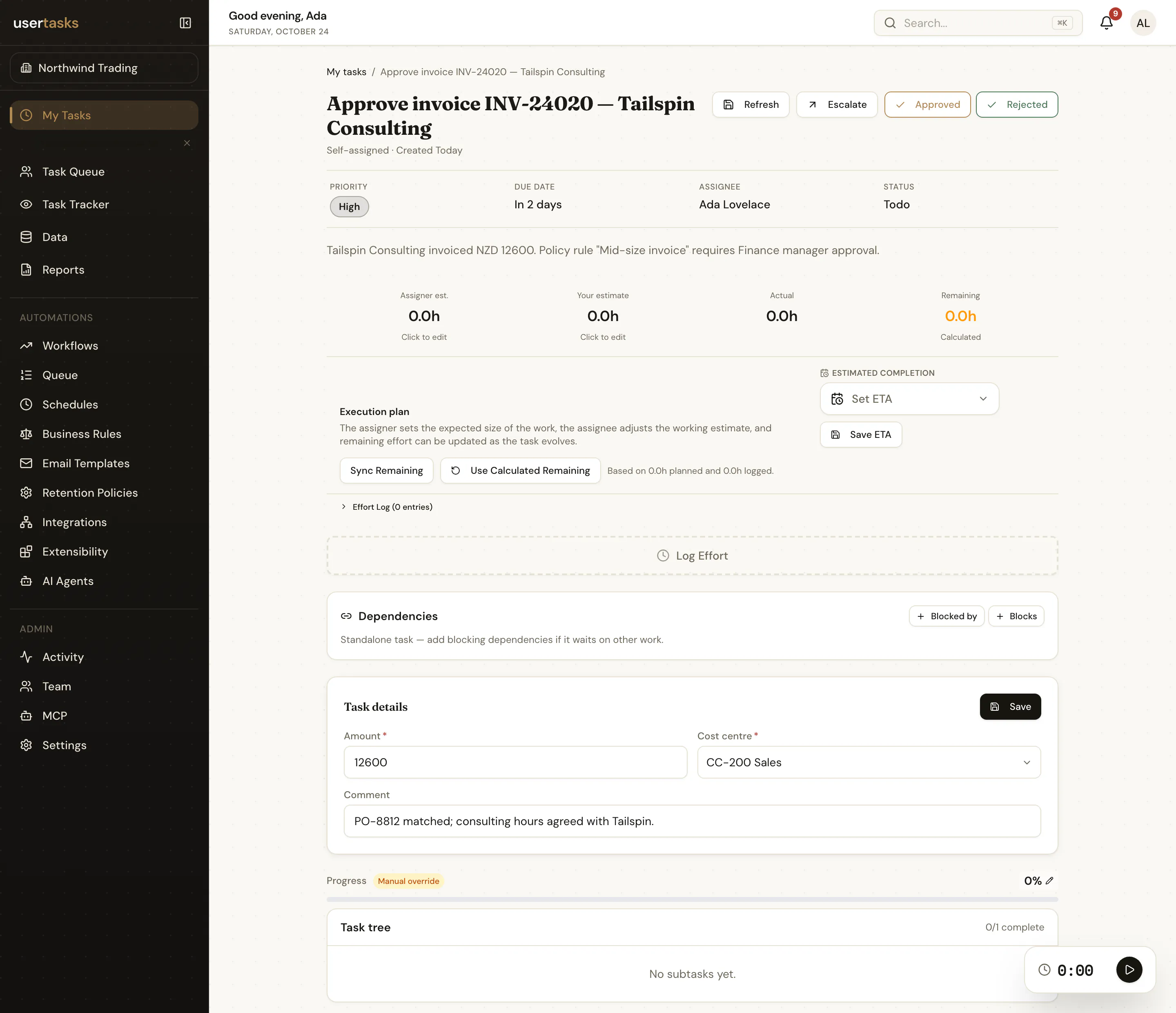
A UserTasks task with typed fields and Approve and Reject outcome buttons
The same task in the built-in task list: fields, outcomes, notes and history. Your app can render it however it likes.

Frequently asked questions

Do my users need a UserTasks login?

Not if your back end calls the API with an API key or OAuth token and acts for them. Tasks can still be assigned to individual UserTasks users or teams when you want the built-in task list, SSO and per-user permissions.

How does my UI find out that a task changed?

Subscribe to the Server-Sent Events stream at /api/v1/events/stream, or ship task and run events to a signed webhook destination. Workflows can also call your API directly at any step.

Can I use it from a framework other than React?

Yes. Everything is plain REST described by OpenAPI 3.1, so any language works. The TypeScript SDK is a convenience for Node.js and other fetch-capable runtimes.

What happens to a waiting task when I publish a new workflow version?

Running instances stay on the version they started with. You can move live instances to the new version from the designer, the API or the CLI, choosing the node where each one continues.

Related use cases

Build it on an engine you control.

Open source under Apache-2.0. Use the cloud, or self-host it next to your own systems.