SharePoint workflow replacement

Replacing SharePoint 2010 and 2013 workflows

Microsoft has retired SharePoint 2010 and SharePoint 2013 workflows in SharePoint Online. Map approval, collect-feedback and list-item workflows to UserTasks tasks, decision tables, webhooks and the SharePoint connector.

UserTasks is an independent product and is not affiliated with or endorsed by the vendors named on this page. Product names are trademarks of their respective owners.

The problem

The workflows behind many SharePoint sites have been switched off.

Approvals, feedback rounds and list-driven processes built with SharePoint Designer ran on the SharePoint 2010 and 2013 workflow engines. Microsoft has retired both in SharePoint Online, so those processes need a new home — and the definitions, task lists and history that went with them need to be rebuilt somewhere supported.

  • Approval and feedback workflows that no longer run
  • Task lists and workflow history lists with no engine behind them
  • Business rules hidden in SharePoint Designer conditions
How UserTasks solves it

Rebuild the process; keep SharePoint for content.

Your sites, lists and libraries stay in SharePoint. The process moves to UserTasks: approvals become User Tasks with outcomes and deadlines, conditions become decision tables, and the SharePoint connector reads and writes list items and files through Microsoft Graph.

  • SharePoint connector: list items, files, folders, libraries and search via Microsoft Graph
  • Approvals with outcomes, SLAs, reminders and escalation instead of task lists
  • Decision tables for the routing rules that lived in Designer conditions
  • Run history, audit and log export in place of workflow history lists

Architecture

How the pieces fit

SharePoint workflow replacement architectureSharePoint lists and libraries, scheduled checks and line-of-business systems start workflows in UserTasks through a schedule trigger, the SharePoint connector or an inbound webhook. UserTasks routes with decision tables, creates approval tasks with SLAs and records history. It writes status back to SharePoint list items and files, sends email and exports events.STARTS FROMSharePoint list or libraryPolled via Get List ItemsLine-of-business systemInbound webhookPerson in your portalAPI · task listWRITES BACKSharePoint list itemsCreate · update via GraphDocumentsUpload to a libraryEmailEmail templatesUserTasks engineDecision table: routing rulesApproval tasks with SLAsReminders and escalationRun history and audit
SharePoint lists and libraries, scheduled checks and line-of-business systems start workflows in UserTasks through a schedule trigger, the SharePoint connector or an inbound webhook. UserTasks routes with decision tables, creates approval tasks with SLAs and records history. It writes status back to SharePoint list items and files, sends email and exports events.

Timeline

What Microsoft has announced

Microsoft’s published timeline for SharePoint Online (Microsoft 365). Microsoft recommends migrating to Power Automate or another supported workflow orchestration solution. SharePoint Server on premises follows its own support lifecycle; check Microsoft’s pages for your version.

  1. August 1, 2020

    SharePoint 2010 workflows turned off for newly created tenants.

  2. November 1, 2020

    SharePoint 2010 workflow services removed from existing tenants.

  3. April 2, 2024

    SharePoint 2013 workflows turned off for new tenants.

  4. April 2, 2026

    SharePoint 2013 workflows removed from existing tenants and fully retired.

Sources: Microsoft Support: SharePoint 2010 workflow retirement · Microsoft Support: SharePoint 2013 workflow retirement

Concept map

Common SharePoint workflow patterns in UserTasks

Rebuild by pattern rather than action by action. Most SharePoint Designer workflows are one of a handful of shapes.

SharePoint workflow patternIn UserTasks
Approval workflow (approve / reject)User Task with Approve and Reject outcomes, assignees or a team queue, due date and escalation Docs →
Collect FeedbackUser Task with typed comment fields, assigned to several people; the run continues when they respond Docs →
Workflow started when an item is created or changedSchedule trigger with the SharePoint connector’s Get List Items, or an inbound webhook from the system that writes the item Docs →
Conditions and lookups in SharePoint DesignerCondition and Switch nodes, and decision tables for rules the business maintains Docs →
Update list item / create list itemSharePoint connector: Create List Item and Update List Item Docs →
Pause for duration / pause until dateDelay and Pause Until nodes, resumed from the durable queue Docs →
Send an emailSend Email node with reusable email templates Docs →
Task list and workflow history listThe task list or your own UI, plus run history, audit and log export Docs →

In practice

Connect the site, import the rebuilt workflow

The SharePoint connector uses a Microsoft Entra app registration with Microsoft Graph permissions. Workflows are plain JSON you can review and version.

shell
usertasks connectors catalog                 # includes SharePoint
usertasks connectors create -f sharepoint-hr-site.yaml
usertasks connectors test <id>

usertasks workflows create -f leave-approval.json
usertasks workflows publish <id> --set notes="Replaces the SharePoint 2013 leave approval"
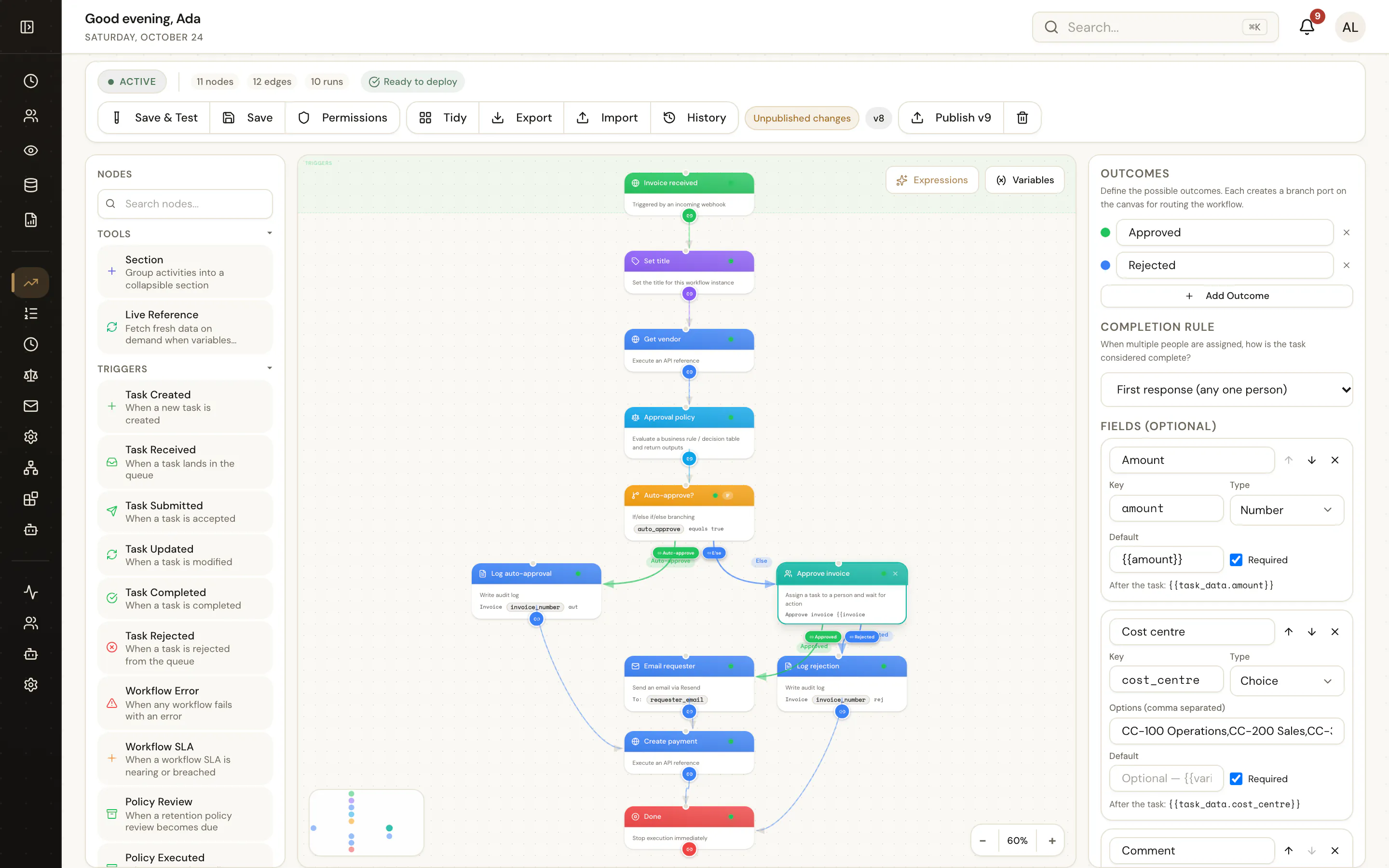
The UserTasks workflow designer showing an approval workflow with the User Task settings panel open
An approval rebuilt in the designer: trigger, decision, approval task and the update back to the list.

Plan

A migration path that holds up

  1. STEP 1

    Inventory

    List the workflows in each site with Microsoft’s assessment tooling, with owners, volumes and the lists they touch.

  2. STEP 2

    Group by pattern

    Sort them into approvals, feedback, notifications and list updates; retire the ones nobody uses.

  3. STEP 3

    Rebuild one per pattern

    Connect the site once, build a workflow per pattern and reuse it with different lists and rules.

  4. STEP 4

    Cut over by site

    Point users at the new tasks, check results against the list, then remove the old workflow associations.

Frequently asked questions

Do I have to move my lists and documents out of SharePoint?

No. Content can stay in SharePoint. UserTasks reads and writes list items and files through the SharePoint connector, which uses Microsoft Graph.

Can UserTasks import SharePoint Designer workflow files?

No. Workflows are rebuilt, usually by pattern. Most Designer workflows are approvals, feedback rounds or list updates, which map to a small number of reusable UserTasks workflows.

What does Microsoft recommend?

Microsoft recommends migrating to Power Automate or other supported workflow orchestration solutions. UserTasks is one option when you want an open-source engine with an API, CLI and on-premises deployment.

What about SharePoint Server on premises?

On-premises support follows each SharePoint Server version’s lifecycle, as described on Microsoft’s retirement pages. UserTasks can be self-hosted next to an on-premises farm, but its SharePoint connector targets SharePoint Online through Microsoft Graph.

Related use cases

Build it on an engine you control.

Open source under Apache-2.0. Use the cloud, or self-host it next to your own systems.