Nintex migration guide

Moving Nintex workflows to UserTasks

A neutral guide to moving Nintex workflows to UserTasks: how forms, workflows, tasks, connectors, document generation and rules map, and a wave-based migration plan.

UserTasks is an independent product and is not affiliated with or endorsed by the vendors named on this page. Product names are trademarks of their respective owners.

The problem

A migration is a chance to simplify, not just to copy.

Teams move off a workflow platform for many reasons: licensing models, deployment requirements, a wish to own the user interface, or wanting processes in code review. Whatever the reason, the hard part is the same — inventory, rebuild, prove the result and retire the old automation safely.

  • Hundreds of workflows of varying age, ownership and value
  • Forms coupled to the workflow that runs behind them
  • Connections, credentials and schedules spread across the estate
How UserTasks solves it

Map concepts, rebuild by outcome, move in waves.

UserTasks covers the workflow layer — workflows, approvals, human tasks, connectors, document generation and governance — through a REST API, MCP server and CLI. User interfaces are built in your own front end, or people use the built-in task list.

  • Visual designer plus JSON definitions you can review and version
  • Tasks with typed fields and outcomes, queues, SLAs and escalation
  • Integrations, OpenAPI import and pre-built connectors
  • Open source under Apache-2.0, in the cloud or self-hosted

Architecture

How the pieces fit

Nintex to UserTasks migration architectureForms move to your own UI or the UserTasks task list, workflows move to the designer, and connectors move to integrations. During a parallel run, tasks from the existing engine can be ingested through the tasks ingest API so people work from one inbox. UserTasks calls the same business systems, generates documents and exports events.WHAT YOU HAVEForms→ your UI or task listWorkflows and tasks→ designer and user tasksConnectors→ integrationsCONNECTED TOBusiness systemsREST · OData · SQLGenerated documentsWord · Excel · PowerPointYour log platformEvent exportUserTasks engineWorkflows and sub-workflowsUser tasks with SLAsDecision tablesTasks ingest for parallel runs
Forms move to your own UI or the UserTasks task list, workflows move to the designer, and connectors move to integrations. During a parallel run, tasks from the existing engine can be ingested through the tasks ingest API so people work from one inbox. UserTasks calls the same business systems, generates documents and exports events.

Concept map

Nintex concepts and their UserTasks equivalents

A starting point for a capability inventory. Check each workflow’s actual behaviour; names alone rarely tell the whole story.

In NintexIn UserTasks
FormsYour own UI against the Tasks API (headless), or the built-in task list with typed fields Docs →
Workflows and componentsWorkflows in the visual designer, and reusable sub-workflows Docs →
Assign a task / request approvalUser Task nodes with outcomes, team queues, SLAs, reminders and escalation Docs →
Connectors and extensionsIntegrations, references, pre-built connectors and OpenAPI import Docs →
Document generationWord, Excel and PowerPoint document nodes Docs →
Conditions and business rulesCondition and Switch nodes, and decision tables Docs →
Workflow history and reportingRun history, reports with a reporting API, and log export Docs →
Desktop RPA botsNot included. Call existing bots or their APIs from a workflow step Docs →

In practice

One inbox during the parallel run

While some processes still run on the old platform, post their human steps to UserTasks so people work from one task list.

shell
usertasks tasks ingest \
  --set title="Approve PO-88213 (legacy workflow)" \
  --set assignee_email=ap.lead@example.com \
  --set idempotency_key=legacy-po-88213

# Rebuilt workflows are files you review and promote
usertasks workflows create -f purchase-order-approval.json
usertasks --profile prod config diff ./config --exit-code
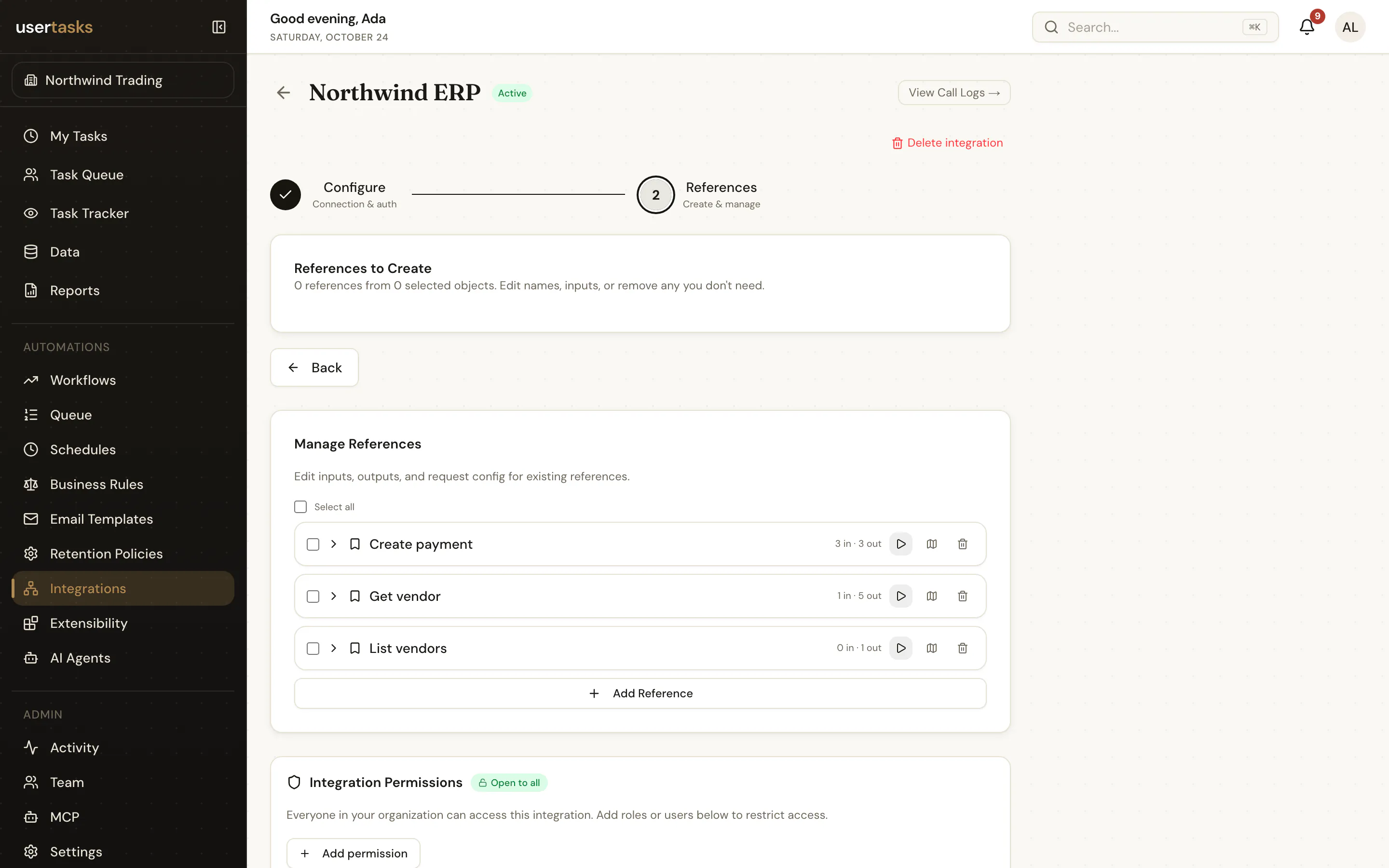
The UserTasks integrations page listing connected systems and their references
Integrations: one connection per system, with reusable references for workflows, agents and reports.

Plan

A migration path that holds up

  1. STEP 1

    Inventory

    Catalog workflows, forms, connectors, owners, schedules, volumes and dependencies — and decide where each user interface will live.

  2. STEP 2

    Rationalize

    Retire unused automation and combine duplicated patterns before rebuilding.

  3. STEP 3

    Build the foundation

    Create shared integrations, references, decision tables, roles and reports first.

  4. STEP 4

    Migrate and reconcile

    Move processes in waves with scenario tests, owner sign-off, monitoring and a rollback window.

Frequently asked questions

Can UserTasks import Nintex workflow files?

No. Workflows are rebuilt. A capability inventory and a pattern-based rebuild usually produce fewer, simpler workflows than a one-to-one conversion.

What replaces Nintex forms?

UserTasks is headless: build the screens in your own front end against the Tasks API, or use the built-in task list, which renders typed fields and outcome buttons.

Can both platforms run side by side?

Yes. Rebuilt processes run in UserTasks while the rest stay where they are. The tasks ingest API can bring human steps from the existing engine into the UserTasks task list during the transition.

How is UserTasks licensed?

The engine is open source under Apache-2.0 and can be self-hosted, or used as a managed cloud service. Compare infrastructure, support and migration effort against your current agreement.

Related use cases

Build it on an engine you control.

Open source under Apache-2.0. Use the cloud, or self-host it next to your own systems.