K2 migration guide

Moving K2 applications to UserTasks

A neutral guide to moving K2 applications to UserTasks: how SmartForms, workflows, worklists, SmartObjects, service instances and rules map, and how to migrate in waves.

UserTasks is an independent product and is not affiliated with or endorsed by the vendors named on this page. Product names are trademarks of their respective owners.

The problem

K2 applications bundle forms, process and data.

A typical K2 application combines SmartForms, a workflow, SmartObjects over several data sources, roles and reports. Moving it is application modernisation rather than file conversion: the process intent has to survive while the coupling between screens, data and workflow is redesigned.

  • Forms, workflow and data access tightly coupled
  • Service instances and environment settings that only one person understands
  • Long-running instances that must finish or move cleanly
How UserTasks solves it

Separate the layers, then rebuild each one.

UserTasks replaces the process layer — workflows, worklists, rules, roles and governed data access — behind a REST API, MCP server and CLI. SmartForms screens are rebuilt in your own front end, or replaced by the built-in task list where a typed task form is enough.

  • Workflows and sub-workflows in the designer, as reviewable JSON
  • Worklists as task inboxes and team queues with SLAs and escalation
  • SmartObject-style data access through objects, data tables and references
  • Config as code and environment profiles in place of environment fields

Architecture

How the pieces fit

K2 to UserTasks migration architectureSmartForms move to your own UI or the UserTasks task list, workflows to the designer, and SmartObjects to objects, data tables and references. UserTasks runs workflows, worklist tasks with SLAs and decision tables, and calls the same SQL databases and services. Configuration moves between environments as code.WHAT YOU HAVESmartForms→ your UI or task listWorkflows and worklists→ designer and tasksSmartObjects→ objects and referencesCONNECTED TOSQL databasesSQL Server · PostgresServicesREST · ODataEnvironmentsConfig as codeUserTasks engineWorkflows and sub-workflowsTask inbox and team queuesDecision tablesObjects and data tables
SmartForms move to your own UI or the UserTasks task list, workflows to the designer, and SmartObjects to objects, data tables and references. UserTasks runs workflows, worklist tasks with SLAs and decision tables, and calls the same SQL databases and services. Configuration moves between environments as code.

Concept map

K2 concepts and their UserTasks equivalents

Start with a capability inventory rather than screen-by-screen recreation.

In K2In UserTasks
SmartForms and viewsYour own UI against the Tasks API, or the built-in task list with typed fields Docs →
Workflows, activities and eventsWorkflows in the designer: triggers, logic, actions, waits and sub-workflows Docs →
Worklist and worklist itemsTask inbox, team queues, outcomes, SLAs and escalation Docs →
SmartObjectsBusiness objects over data tables and integration references Docs →
Service types and service instancesIntegrations and references: REST, OData and SQL databases with stored credentials Docs →
Roles and groupsTeams, roles and fine-grained permissions, with SSO and directory sync Docs →
Rules and inline functionsExpressions and functions, conditions and decision tables Docs →
Environment fields and deployment packagesConfig as code: export, diff and apply per environment profile; GitHub sync Docs →

In practice

Rebuild the data contract first

Start with the data and integration layer the application depends on, then build the workflow and screens on top of it.

shell
# The database the K2 SmartObjects read from
usertasks integrations create -f erp-sql.yaml
usertasks references create -f get-vendor.yaml

# Workflow and rules as reviewable files
usertasks decision-tables import -f vendor-approval-matrix.json
usertasks workflows create -f vendor-onboarding.json
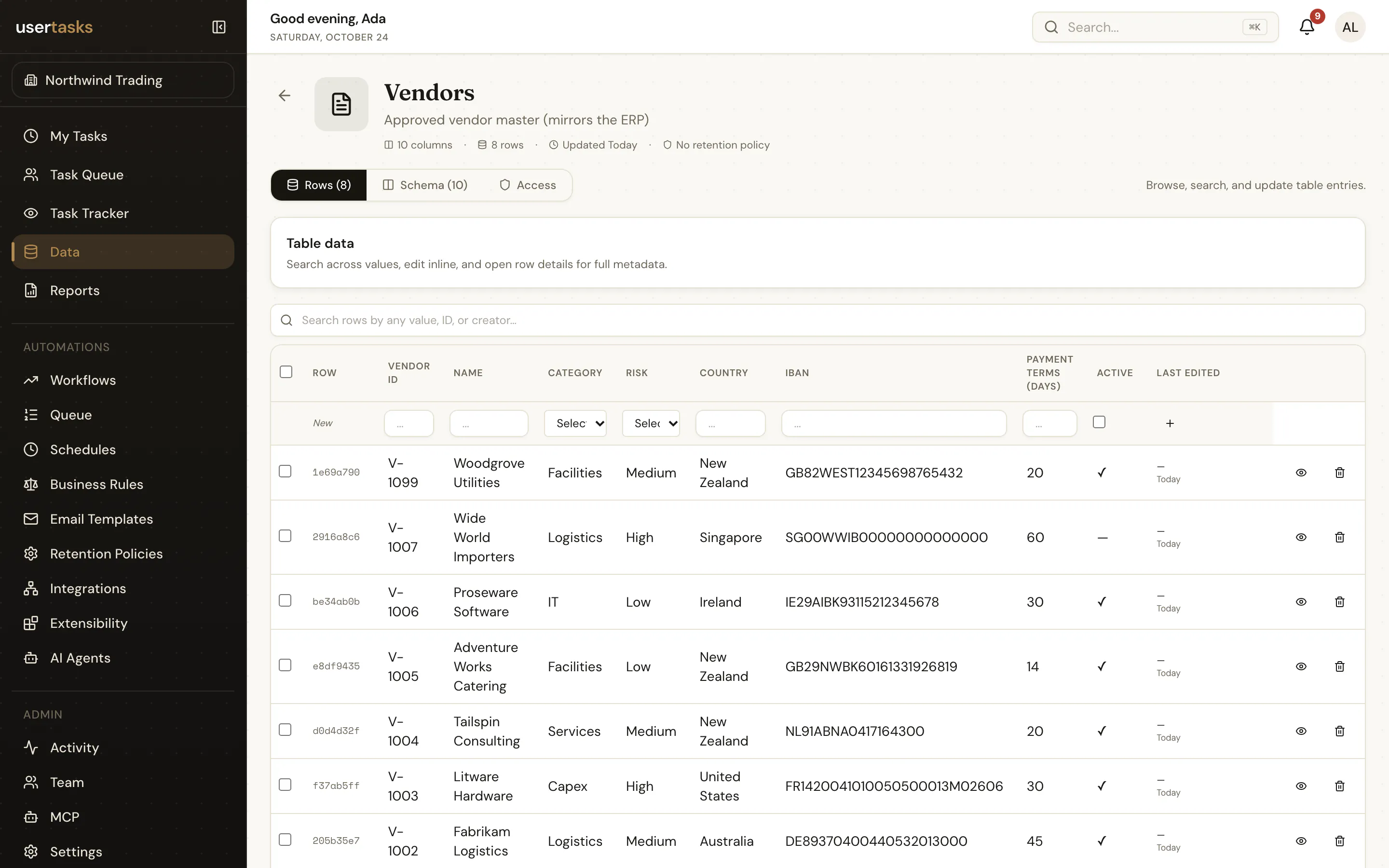
A UserTasks data table with typed columns and rows
A data table: typed columns, row events that start workflows, and an OData endpoint.

Plan

A migration path that holds up

  1. STEP 1

    Portfolio assessment

    Classify K2 applications by complexity, usage, business impact, integrations and retirement potential.

  2. STEP 2

    Capability mapping

    Map workflows, worklists, SmartObjects, roles, reports, schedules and custom code — and decide where each screen will live.

  3. STEP 3

    Pilot migration

    Rebuild one representative application to produce reusable patterns, tests and estimates.

  4. STEP 4

    Wave-based cutover

    Migrate groups of applications with reconciliation, rollback, owner acceptance and retirement controls.

Frequently asked questions

What parts of a K2 application does UserTasks replace?

The process layer: workflows, worklists and tasks, rules, roles and SmartObject-style data access. SmartForms screens are rebuilt in your own front end, or replaced by the built-in task list.

What replaces SmartObjects?

Business objects combine a data table or reference with joined sources into one entity, and expose governed list, get, insert, update and delete operations to workflows, reports, the API and agents.

Can the result run on premises?

Yes. The engine is open source under Apache-2.0 and can be self-hosted on your own servers or cloud account, next to the databases your applications use.

What happens to instances still running in K2?

Let them finish where they are while new requests start in UserTasks, or bring their open human steps into the UserTasks task list through the tasks ingest API during the transition.

Related use cases

Build it on an engine you control.

Open source under Apache-2.0. Use the cloud, or self-host it next to your own systems.