Granted tools
Any integration reference, starting a workflow, tools from MCP servers you register, and built-in tools — only what you grant.
Integrations and AI
Import an API from its OpenAPI document, connect a database, start from a ready-made connector or call any endpoint — once, with encrypted credentials — and use those operations in every workflow, agent, report and MCP client. Then put any AI model to work on the same governed connections.
Any REST or OData API
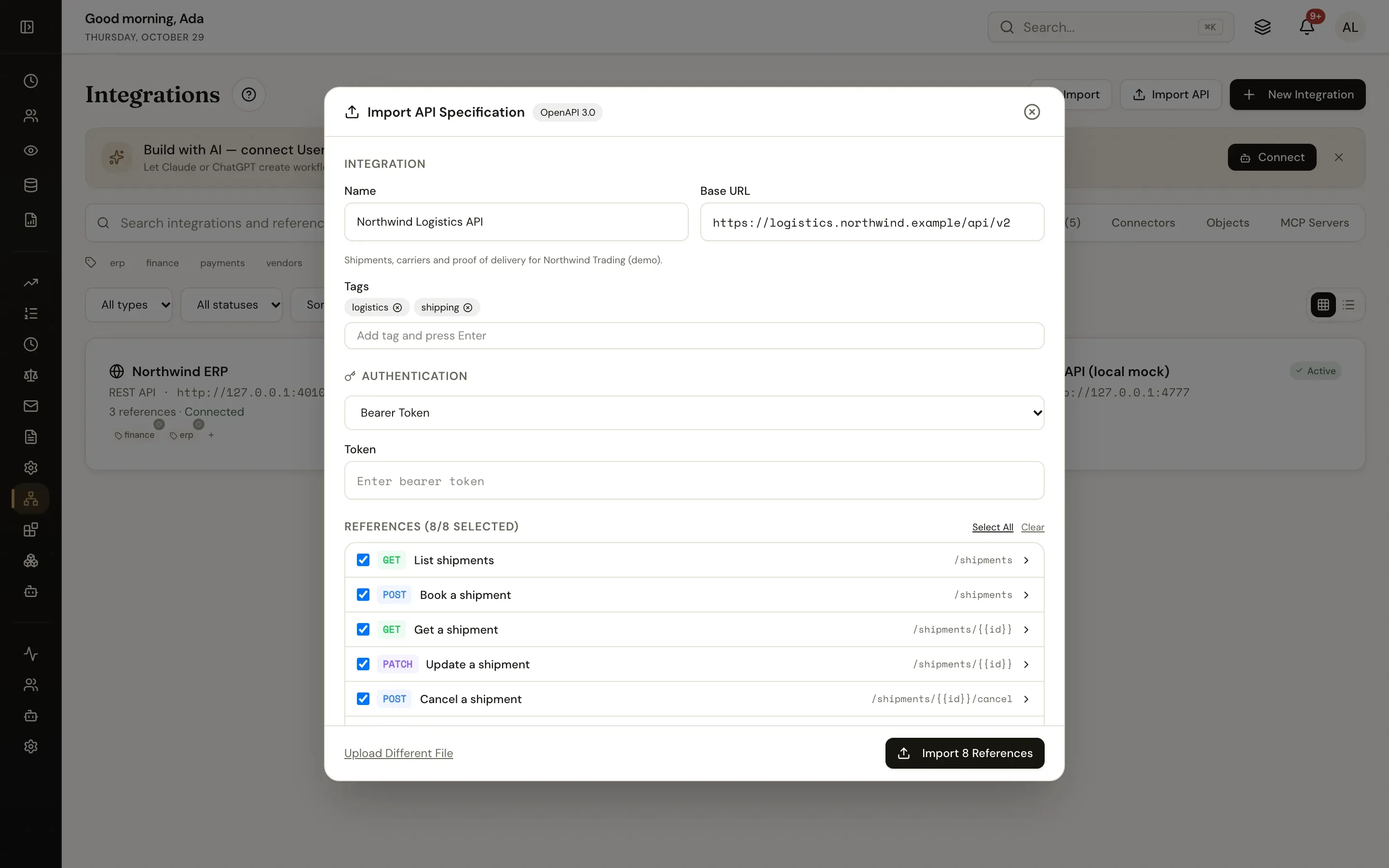
Drop in an OpenAPI 2 or 3 document or a Postman collection: UserTasks previews every operation, creates the integration from its server and security scheme, and one reference per operation with typed inputs.
Response models and the data picker
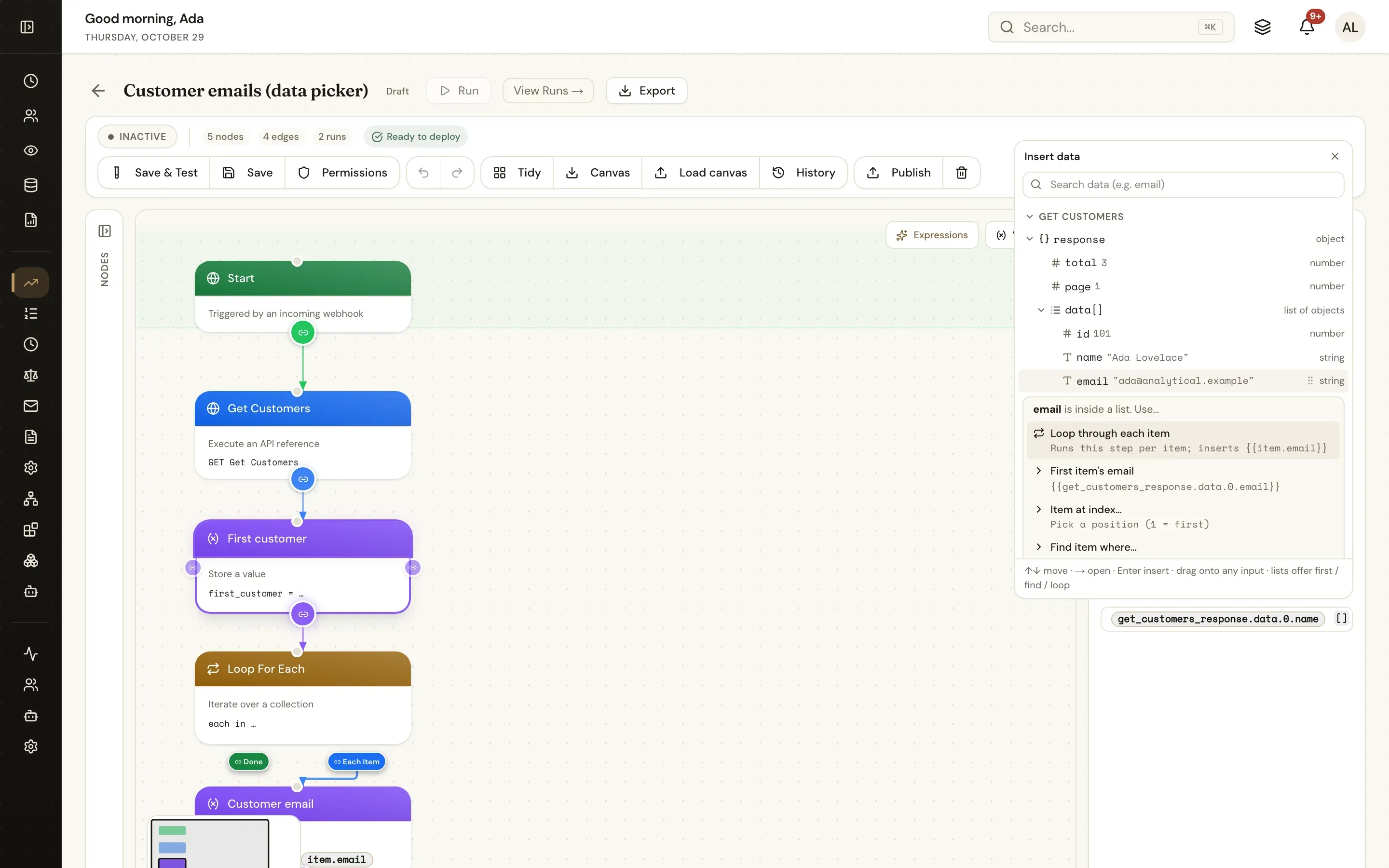
Every reference knows the shape of its response: from the OpenAPI schema, the table columns, the connector’s outputs or a real test call. Workflows browse it in the data picker.
response › data[] › email and choose: loop through each item, the first item, or one that matchesConnectors
A connector asks only for that service’s settings and credentials, tests the connection with a service-specific check and creates ready-made references. This list is generated from the product’s connector registry.
Read and update the systems of record your processes run through.
Query, insert, update and delete with typed parameters — no SQL pasted into workflows.
Upload, download and move the documents a process produces.
Notify people where they already work.
Signatures, shared documents, task lists and other automation tools.
Charge, pay out and reconcile.
The big systems of record have connectors with their common operations ready — and their REST and OData APIs stay fully reachable as references, so nothing is out of bounds. The gallery has working packages for them.
Databases, webhooks and HTTP
PostgreSQL, SQL Server, MySQL, Oracle, Snowflake and MongoDB as integrations: saved, parameterised operations with response models from the table columns. Self-hosted servers can reach databases on private networks.
A Webhook trigger starts a run as soon as it is queued; a Middleware trigger keeps the request open and answers with the run’s variables, so a workflow can validate or enrich a request in line.
curl -X POST "$USERTASKS_URL/api/webhooks/inbound?hook=invoice-intake" \
-H "Authorization: Bearer <secret>" -d @invoice.jsonWebhook integrations and HTTP Request steps call other systems. Failed deliveries are retried and dead-lettered with an event; every call is logged with method, host, status and duration, headers redacted.
AI models and agents
An agent is a model, instructions, the tools you grant it and an output schema. Run it as a workflow step or on demand. Nothing it does bypasses permissions, and every run is traced.
Any integration reference, starting a workflow, tools from MCP servers you register, and built-in tools — only what you grant.
Hand an agent the files from a form or a loop: images and PDFs to models that read them, extracted text from Word, Excel and PowerPoint for the rest.
Declare the outputs; the agent’s answer is parsed into typed variables the next step can branch on.
Follow the agent with a User Task, so a person approves, corrects or rejects before anything irreversible happens.
Runs, steps, tool calls, token counts and errors are recorded and emitted as events; prompts and model outputs are not exported. Rate limits apply per workspace, and models can run on your own hardware with Ollama.
usertasks agents execute <agent-id> \
  --set message="Classify invoice INV-20931 and check the vendor"
usertasks agents execute <agent-id> --set message="…" --set async:=true
MCP, both ways
Claude, ChatGPT, Cursor and other MCP clients connect to /api/mcp with an API key or MCP OAuth. They list and start workflows, act on tasks, build workflows, decision tables and reports, and read the event stream — within the credential’s permissions, every change audited.
{ "mcpServers": { "usertasks": {
  "url": "https://tasks.example.com/api/mcp",
"headers": { "Authorization": "Bearer <your-api-key>" } } } }Register external MCP servers under Integrations and grant their tools to an agent next to your references and workflows. The agent sees each tool’s name, description and input schema; the run trace shows every call.
For your own code and your platform
Every screen is an endpoint described by OpenAPI 3.1; a typed TypeScript SDK and the usertasks CLI cover all of it.
Export a workspace to files, review it in a pull request, diff and apply it — or let GitHub sync do it. Secrets stay out of Git.
Bundle a workflow and everything it uses into a signed, versioned file and install it in other environments — or from the gallery. Credentials never travel.
OIDC and SAML sign-in; people, groups and managers from Entra ID, Okta, Google Workspace, LDAP or SCIM.
Scoped keys, limited to chosen workflows or tables if you like, and OAuth apps with scopes for other applications.
Runs, steps, integration calls, agent runs and audit events to Splunk, Datadog, OpenTelemetry or a signed webhook.
import { apiKeyAuth, createClient } from '@usertasks/sdk'

const client = createClient({ baseUrl: 'https://tasks.example.com',
  auth: apiKeyAuth(process.env.USERTASKS_API_KEY!) })

await client.POST('/workflows/start', {
  body: { workflow_id: '<id>', variables: { amount: 1200 }, async: true },
})
Start runs, complete tasks and read results from your own applications, scripts and CI — with the same permissions as every other client.
Yes. Any HTTP/JSON API is a REST integration: import its OpenAPI 2 or 3 document or Postman collection to get one reference per operation, or define references by hand. OData v2/v4 services, SQL and MongoDB databases and outbound webhooks are integration types of their own. Connectors only add a setup form, a connection test and ready-made references on top.
Credentials are encrypted at rest and write-only: the API, exports and packages return a placeholder instead of the value. OAuth 2.0 connections use authorization code with PKCE and refresh tokens automatically. Outbound calls to private and cloud-metadata addresses are blocked unless a self-hosted server allows private egress, and every call is logged with headers redacted.
Any model behind an OpenAI-compatible chat-completions endpoint with tool calling. Ready-made connectors cover OpenAI, Azure OpenAI, Claude, Google Gemini, Mistral, DeepSeek, Groq, Together, Perplexity and Ollama for models on your own hardware.
Yes. UserTasks runs an MCP server at /api/mcp. Claude, ChatGPT, Cursor and other MCP clients can list and start workflows, act on tasks, build workflows, decision tables and reports and read the event stream — always within the permissions of the API key or OAuth token they use.
No. Agent runs, tool calls, token counts and errors are recorded and emitted as events, but prompts and model outputs are not included in exported events, and file contents never reach logs.
The same references serve workflows, agents, reports, lookups on forms and MCP clients — tested, logged and governed in one place.