Branch by Condition
If, else-if and else, each branch a set of AND / OR rules over any variable or expression.
Workflows
Real processes branch, loop, wait for people, run steps side by side, call other processes and fail in interesting ways. Model all of it on one canvas — or as JSON — test it with the real forms, publish it as a version and move live runs forward when the process changes. 78 node types, durable runs, every step recorded.
Control flow
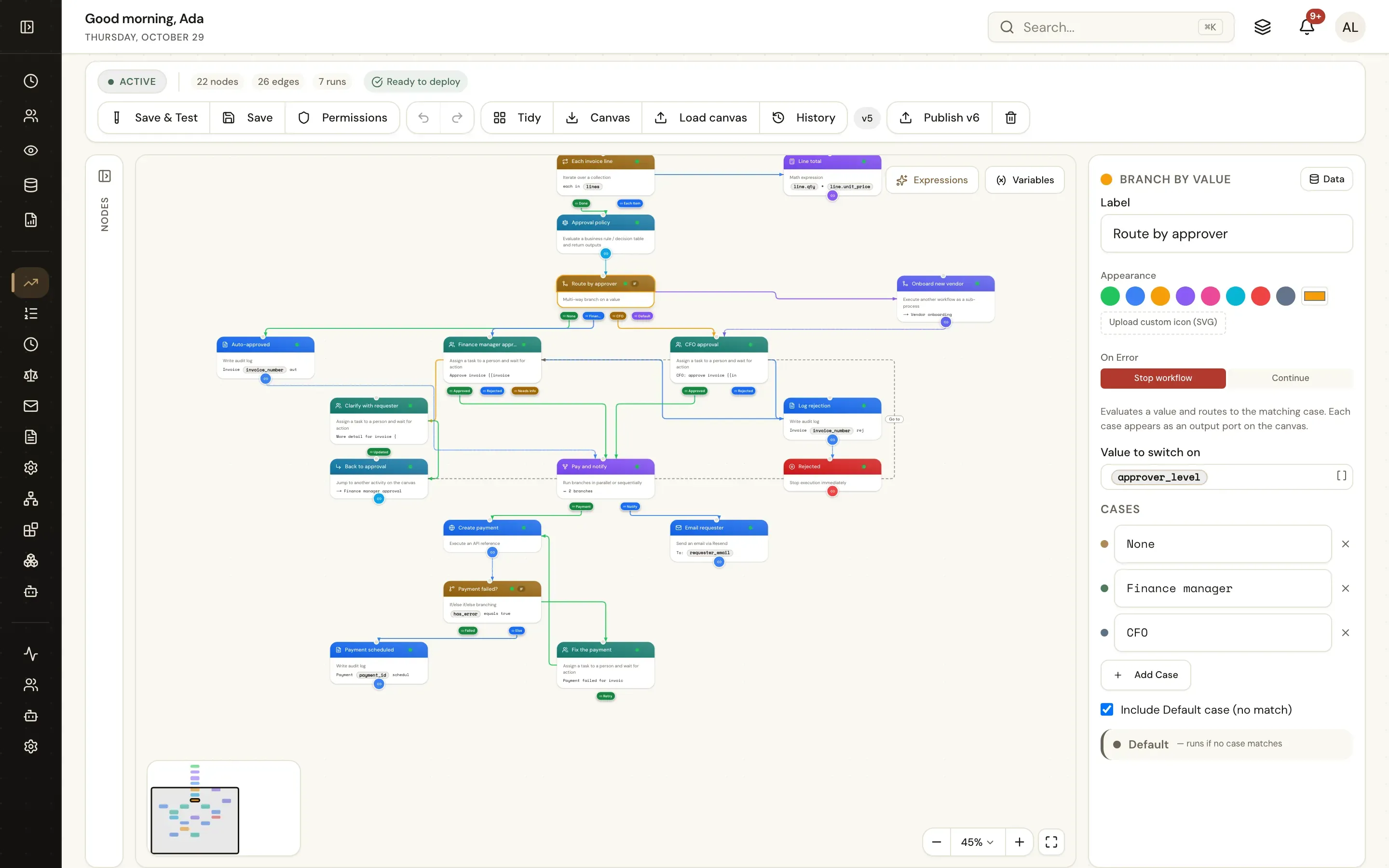
Each node shows a one-line summary of its settings, so a published flow reads like a specification. Group related steps in sections; sketch with placeholders before every system exists.
If, else-if and else, each branch a set of AND / OR rules over any variable or expression.
One outgoing path per value — approver level, region, status — plus a default.
For each item in a list (lines, files, rows) or N times, with the current item in the data picker.
Fan out to two or more branches at once, or one after another.
Call a shared workflow as a step: wait for its variables, or start it and carry on.
Send work back for rework and approve again, without long edges across the canvas.
Ordered, typed rules — first match wins — that analysts change without touching the flow.
Stop a path deliberately with a reason in the run log.
Sub-workflows, loops and parallel paths The designer Node reference
Business rules
A decision table takes typed inputs, checks ordered rules and returns typed outputs. The workflow branches on the result; the policy changes without a new workflow version.
{{approver_level}}, {{rule_label}} — for the next step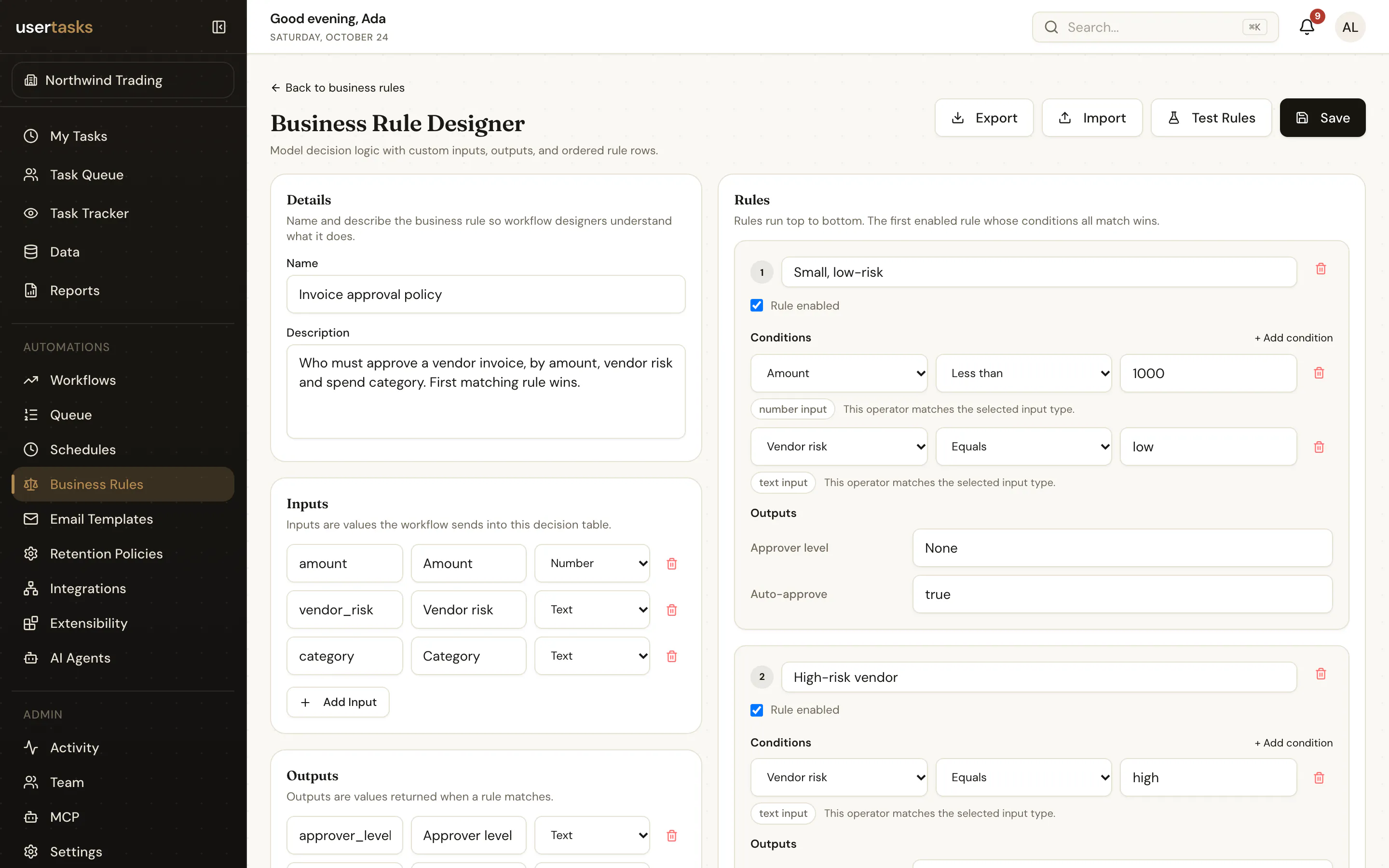
People in the loop
A User Task waits for a person and continues on the outcome they choose. Each outcome is an edge on the canvas, and every field they fill in is a typed variable downstream.
Grid forms with lookups and attachments, and outcomes such as Approved, Rejected or Needs info.
A person, a variable, a team or a queue. Several assignees with first response, all, consensus, unanimous or custom rules.
Relative or fixed due dates, reminders, escalation and redirection.
Managers see their reports’ work and can act on their behalf, with a recorded reason.
Time, SLAs and events
Pause for a duration or until a date — {{=ADD_DAYS(due_date, -3)}}. Long waits hold nothing in memory: the run is parked and the queue wakes it. A run can also wait for an external event and resume with its values.
usertasks events complete <event-id> \
--set return_variables:='{"payment_status":"settled"}'Set SLA gives a run a deadline and a warning threshold. Warnings and breaches start Workflow SLA triggers, appear in run lists and reports, and go to your log platform as events.
Error paths and retries
Every node either stops the run or continues on error. Continue, and the next steps see what failed — so the flow can retry, compensate or hand the problem to a person.
Create payment          onError: continue
Payment failed?         {{has_error}} equals true
  Failed → Fix the payment (User Task) → Retry → Create payment
  Else   → Payment scheduled

{{last_error}} {{last_error_node}} {{last_error_node_type}}Save & Test
Save & Test runs the draft with saved test cases. When the run reaches a User Task, the task appears right there in test mode — fill it in, choose an outcome and watch the run continue.
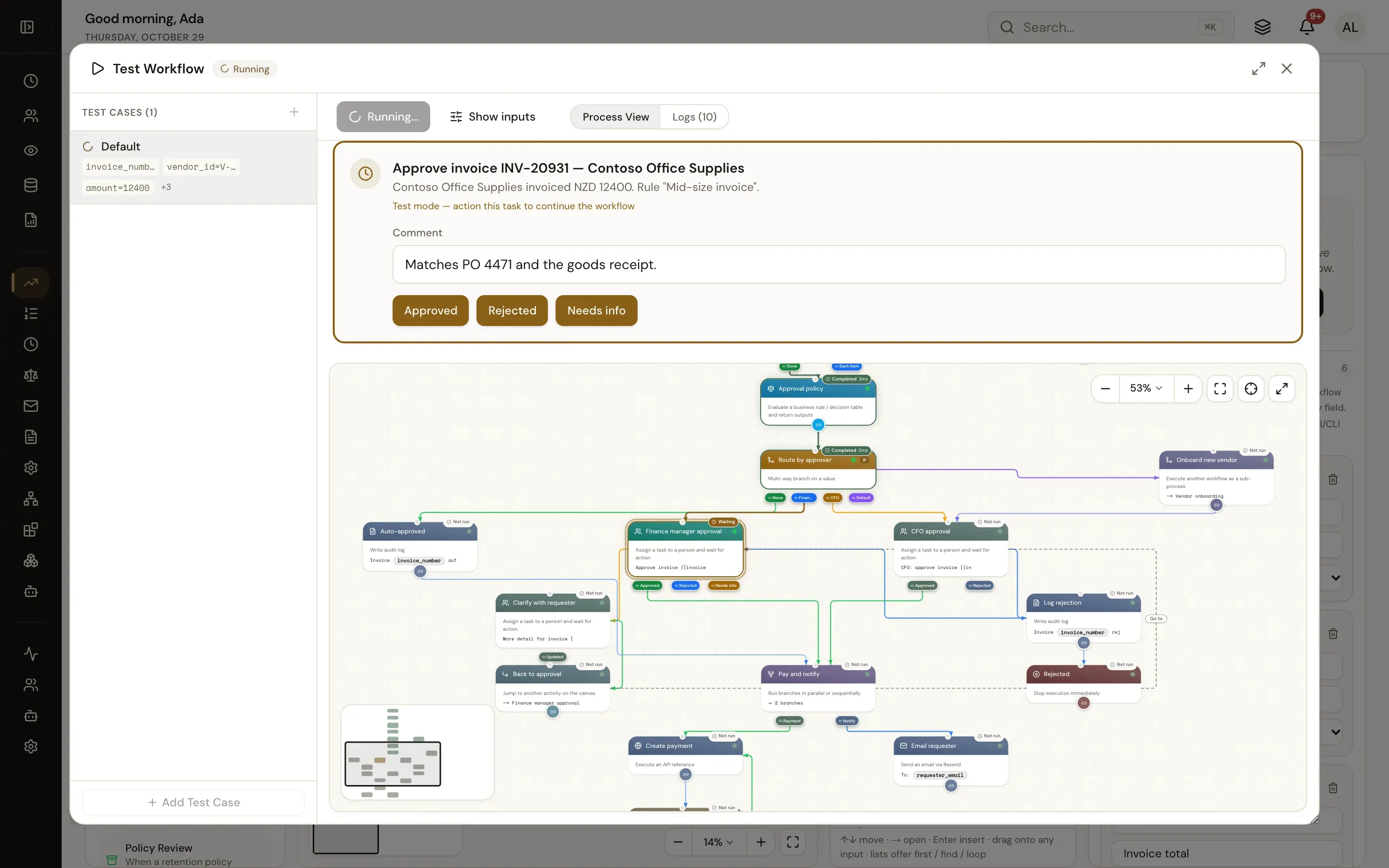
Named sets of inputs that are kept with the workflow. Run one or all.
Start forms and task forms drawn exactly as people see them and checked on the server.
The path taken, each step’s input, output and log. Test runs stay out of reports.
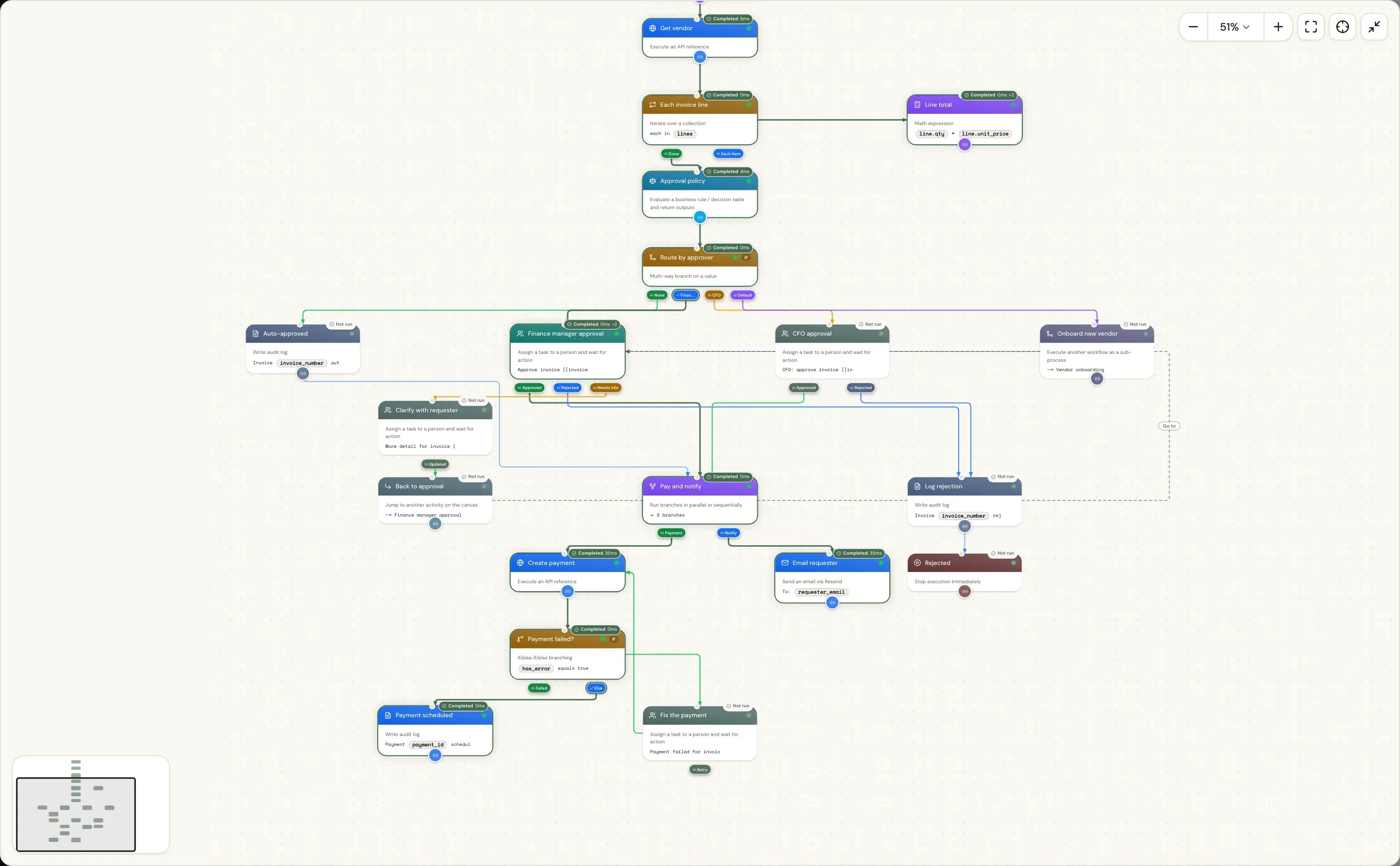
Every run, on the canvas
The process view draws a run on its own workflow: completed steps with their timings, steps that did not run, loops with their visit counts and the step that is waiting.
usertasks logs tail, or ship every event to Splunk, Datadog or OpenTelemetryVersions and live migration
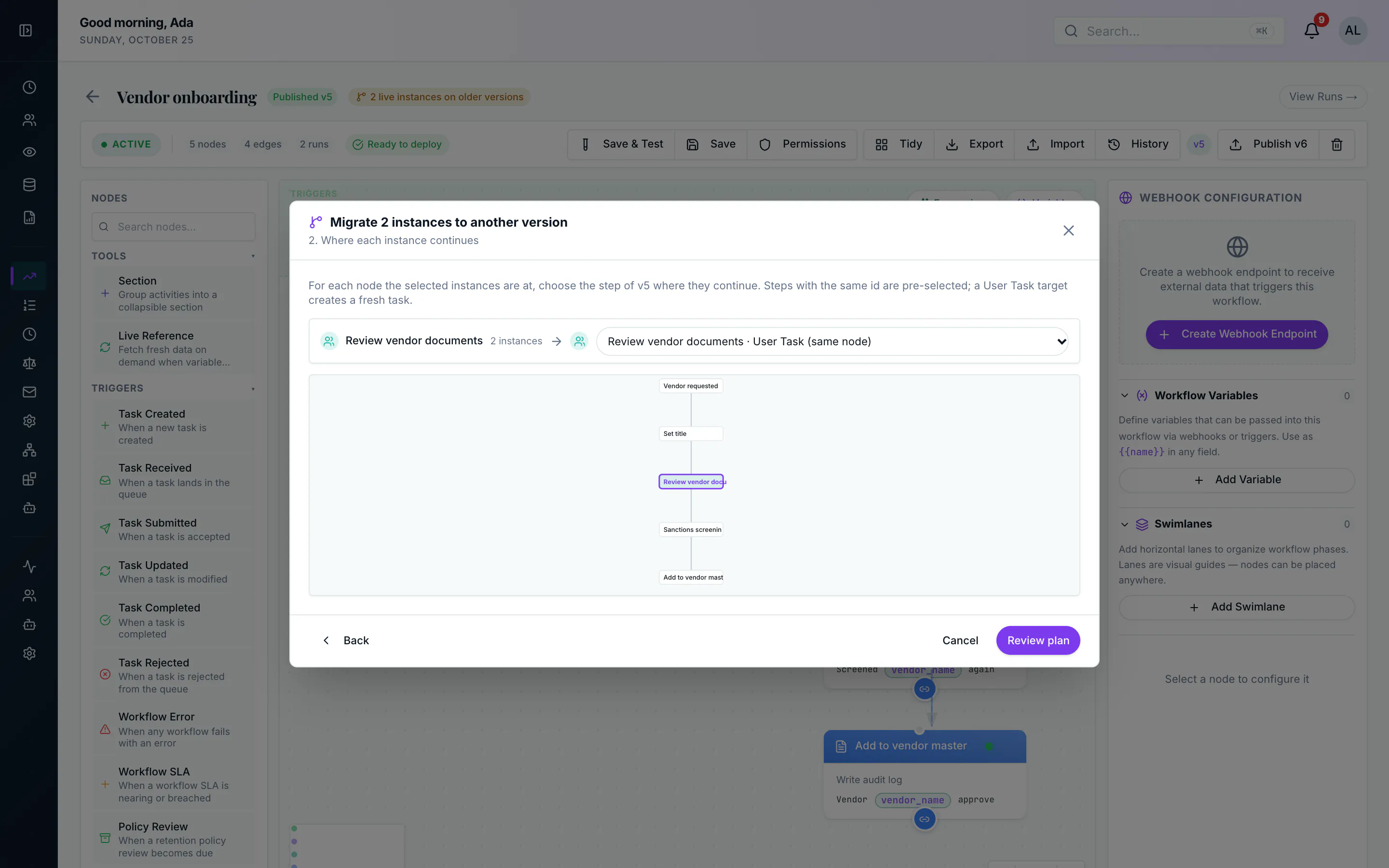
Publishing freezes the draft as a numbered version. Runs in progress finish on the version they started — or you move them forward.
Designer or JSON
The designer and the API share one definition — nodes, edges and variables. Edit it in your editor, review it in a pull request, or let Claude or ChatGPT build it through the MCP server.
Authoring as JSON MCP server 44 connectors and any API Workflow automation for people and systems
usertasks workflows definition <id> -o json > invoice.json
$EDITOR invoice.json
usertasks workflows update <id> -f invoice.json
usertasks workflows publish <id> --set notes="CFO step for new vendors"
usertasks workflows migrate-instances <id> --to <version-id> --all --dry-runThere is no fixed limit on steps or branches. Workflows combine conditions and value switches, loops, parallel and sequential paths, rework jumps, sub-workflows called synchronously or asynchronously, decision tables, User Tasks, timers, external events and error paths. Shared stages live in sub-workflows so a large process stays readable.
Save & Test runs the draft with saved test cases. Start forms and User Task forms appear exactly as people see them, you act on tasks inside the test, and the process view shows the path taken with each step’s input, output and log. Test runs are marked as tests and stay out of reports.
Runs in progress stay on the version they started with. To move waiting or paused runs to the new version, choose the step in the new version where each group continues, review a dry run, and migrate. The old run is closed out and a new run carries its variables, task and trace forward.
Yes. Put policy in a decision table: ordered, typed rules that analysts edit and test on their own. The workflow reads the table when it runs and branches on the outputs.
Yes. The designer and the API share one JSON definition. Create, update, publish and migrate workflows with the REST API, the usertasks CLI or config as code, or let Claude, ChatGPT and other MCP clients build them through the MCP server.
Start in the cloud or self-host it next to your systems. Open source under Apache-2.0.