Document review and sign-off

Policy and contract review with redlines, approvals and a signed sign-off

Review a policy or contract PDF in the browser, comment with rich-text redlines, route it to reviewers and legal, and finish with a drawn signature, a sign-off certificate, an audit log and a retention policy.

The problem

Review rounds live in email threads and attachments.

Drafts go back and forth as attachments, comments arrive in five places, nobody is sure which version legal approved, and the sign-off is a reply saying "approved". When an auditor asks, the trail has to be rebuilt.

  • Versions and comments scattered across email
  • Approvals without a record of who saw which version
  • No register of what is due for review

How UserTasks solves it

One review route per document type, with the PDF in every task.

The owner submits the PDF and a summary of the changes. The document type sets the route: reviewers, legal when needed and the retention period. Each reviewer reads the PDF in the task, writes redline comments and approves or asks for changes, which send it back to the owner for a new version. The final sign-off is signed, a certificate is generated, and every step is written to an audit log.

  • PDF viewer, Rich text, Signature, Chart and Saved report controls
  • Review routes per document type as a data table
  • Request changes loops back to the owner with an SLA
  • Audit log, document register and a retention policy

Architecture

How the pieces fit

Policy and contract review architectureThe owner submits a PDF. UserTasks routes it by document type to reviewers and legal, each reading it in the task and approving or requesting changes, then collects a signed sign-off, generates a certificate and writes every step to an audit log.INSubmission formPDF · summary of changesDocument typesReview routesOUTAudit logData table · retentionDocument registerDashboard · reportsUserTasks engineReviewer tasks with PDF viewerChanges back to the ownerLegal review when neededSigned sign-off and certificate
The owner submits a PDF. UserTasks routes it by document type to reviewers and legal, each reading it in the task and approving or requesting changes, then collects a signed sign-off, generates a certificate and writes every step to an audit log.

In practice

The PDF viewer shows another field's file

Map the viewer's Document context to the field that holds the uploaded PDF; reviewers read it without downloading anything.

json
{
  "key": "document_view",
  "type": "custom",
  "label": "The document",
  "custom": {
    "tag": "ut-pdf-viewer",
    "version": "1.0.0",
    "props": { "allow_upload": false },
    "context_map": { "document": "document" }
  }
}
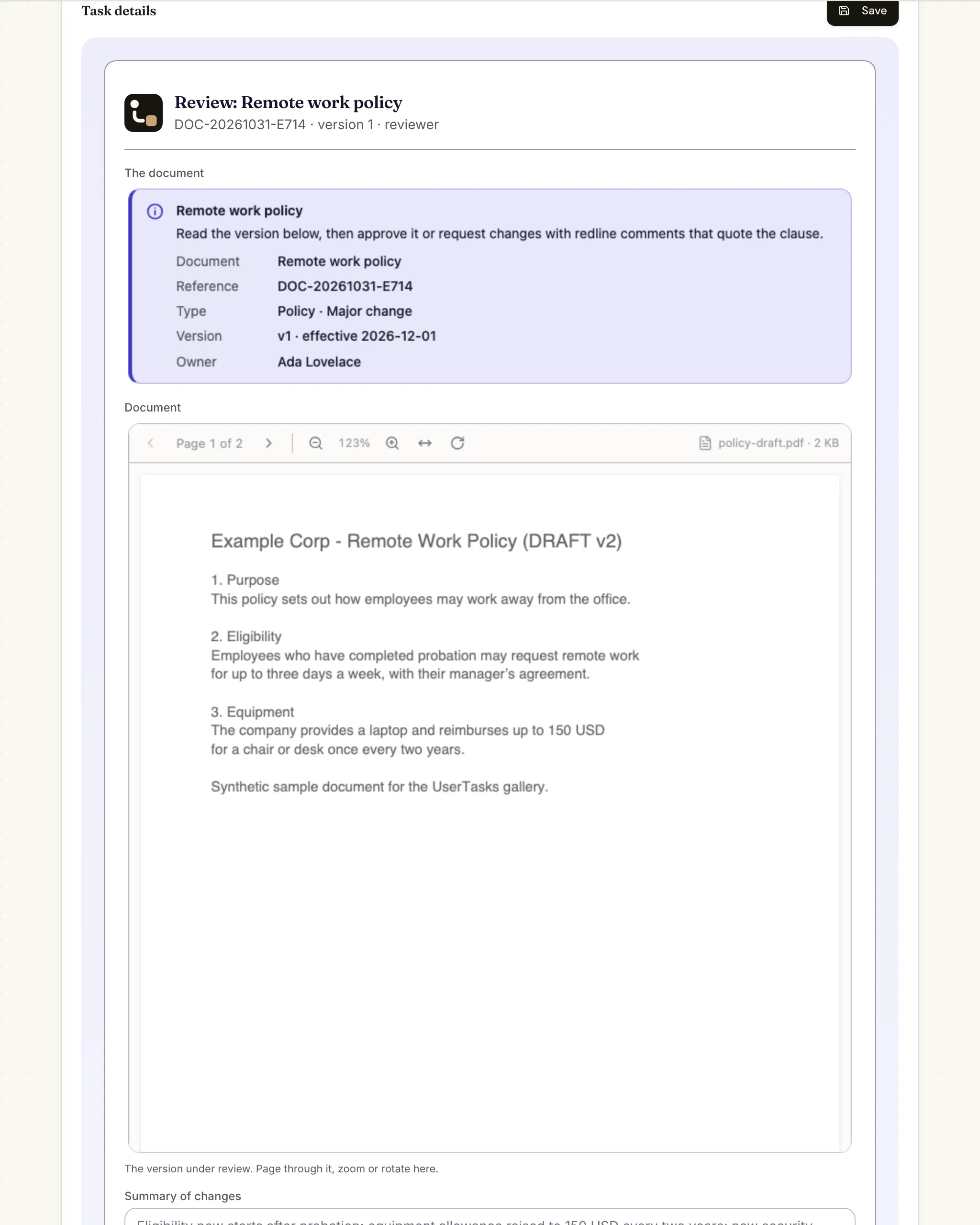
A review task for a remote work policy: a document card with reference, type, version and owner, and the policy PDF in the viewer with page and zoom controls
The reviewer reads the PDF in the task; below it are the summary of changes, a rich-text box for redline comments and the Approve and Request changes buttons.

The flow

From draft to signed off

  1. STEP 1

    Submit

    The owner uploads the PDF, picks the document type and summarises the changes.

  2. STEP 2

    Review

    Reviewers read the PDF in the task and approve or request changes with redline comments.

  3. STEP 3

    Revise

    Requested changes go back to the owner for a new version, with an SLA, and round again.

  4. STEP 4

    Sign off

    The final sign-off is signed, a certificate PDF is generated and every step is in the audit log.

Ready-made package

Contract and policy review with internal e-sign

Submit a policy, contract or procedure as a PDF; reviewers read it in a PDF viewer and redline it, legal checks it when needed, and the owner e-signs. Every step is audit-logged.

Starts from a form · needs · about 10 minutes to set up · signed, free to install

See the package

Frequently asked questions

Is this an e-signature service?

It is an internal sign-off: the drawn or typed signature is stored with the signer, time and document version in the audit log. For agreements with external parties that need a regulated e-signature, send the approved PDF to a signature service.

Can reviewers mark up the PDF itself?

Comments are written next to the PDF in rich text, quoting the clause. The PDF is not edited, so the version that was approved is exactly the one that was reviewed.

How long is the audit log kept?

The package includes a retention policy (seven years by default) for the audit log; change it to match your records schedule.

Related use cases

Building blocks:Complex workflows Integrations and AI Forms and attachments Document actions Images, audio and video Package gallery Deploy anywhere

Build it on an engine you control.

Open source under Apache-2.0. Use the cloud, or self-host it next to your own systems.