Safety inspections

Site inspections where every failed item becomes a tracked action

Inspect a site with an editable checklist table, photos, a severity rating and the inspector's signature; every failed item becomes a corrective-action task with an SLA and a signed-off fix, and open actions are reported by site.

The problem

Failed checks end up on paper. Fixes are never confirmed.

Inspections are done on paper or in a spreadsheet, failed items are emailed to whoever might fix them, and nobody can say how many actions are open, which site is worst, or who confirmed the fix.

  • Checklists that cannot be reported on
  • Failed items without an owner or a deadline
  • No evidence that a fix was done and checked
How UserTasks solves it

One inspection form, one task per failed item, one place to see what is open.

The inspector picks the site, works through a checklist table with pass, fail or N/A, severity and notes, adds photos and signs. The workflow counts the failures, a decision table sets the outcome and the deadlines, and each failed item becomes a corrective-action task with an SLA, a photo of the fix and a signed sign-off. An overview page shows open actions by site and severity.

  • Editable table, Rating, Signature, Progress and Info card controls
  • Outcome bands and deadlines per severity in a decision table
  • Each corrective action signed off with evidence
  • Open actions by site from data tables and saved reports

Architecture

How the pieces fit

Site inspection and corrective action architectureAn inspector submits the checklist with photos and a signature. UserTasks counts the failed items, sets the outcome with a decision table, records the inspection and creates a corrective-action task per failed item, each signed off when fixed.INInspection formChecklist table · photosInspector signatureForm controlOUTSite managerInspection report emailOverview pageOpen actions · reportsUserTasks engineCount failed itemsDecision table: outcome, SLACorrective action per itemSigned-off fix
An inspector submits the checklist with photos and a signature. UserTasks counts the failed items, sets the outcome with a decision table, records the inspection and creates a corrective-action task per failed item, each signed off when fixed.

In practice

Failed rows of the checklist table, in one expression

The checklist is an array of rows; the workflow filters the failures and loops over them.

json
{
  "type": "set_variable",
  "label": "Failed items",
  "config": {
    "name": "failed_items",
    "expression": "{{=FILTER_WHERE(form.checklist, \"status\", \"Fail\")}}"
  }
}
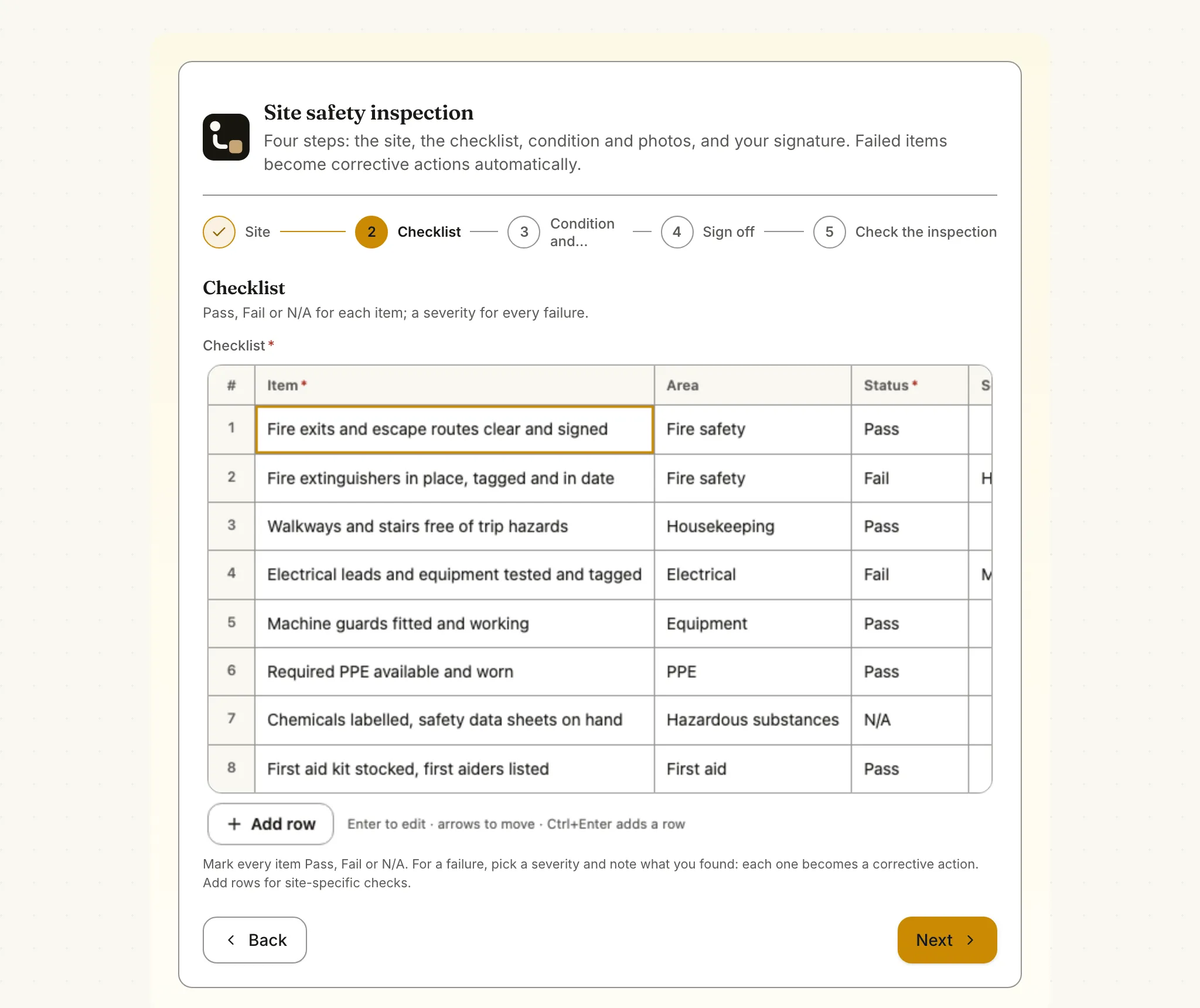
The checklist step of the site safety inspection form: an editable table of eight checks with their area and Pass, Fail or N/A status
The checklist step: an editable table of standard checks. Each Fail row, with its severity and notes, becomes a corrective action.

The flow

From inspection to fixed

  1. STEP 1

    Inspect

    Site lookup, checklist table with pass, fail or N/A, severity, photos and the inspector's signature.

  2. STEP 2

    Assess

    Failed items are counted and a decision table sets the outcome and deadlines; stop-work outcomes alert at once.

  3. STEP 3

    Fix

    Each failed item becomes a corrective action with an SLA, fixed with a photo and a signed sign-off.

  4. STEP 4

    Review

    The overview page shows open actions by site and severity, and the inspection history.

Ready-made package

Site inspection with corrective actions

A four-step inspection page with a checklist table, star rating, photos and signature; a decision table sets the outcome band and every failed item becomes a signed-off corrective action.

Starts from a form · needs · about 10 minutes to set up · signed, free to install

See the package

Frequently asked questions

Does it work on a tablet on site?

Yes. The form, the checklist table and the signature pad work with touch, and photos can be taken with the device camera from the upload field. The page needs a connection to submit.

Can I change the checklist?

Yes. The default checklist rows are a property of the table control; edit them in the form designer, or keep separate forms per site type.

Does it make us compliant with safety regulations?

It records inspections, actions and sign-offs consistently; what you must inspect and how often depends on your regulator and your own risk assessment.

Related use cases

Building blocks:Complex workflows Integrations and AI Forms and attachments Document actions Images, audio and video Package gallery Deploy anywhere

Build it on an engine you control.

Open source under Apache-2.0. Use the cloud, or self-host it next to your own systems.