Meeting minutes

Meeting recordings to minutes, action items and owners

Upload a meeting recording and get a transcript with speakers, AI-drafted minutes the organiser checks, a task for each action owner and the minutes emailed with SRT subtitles.

The problem

Minutes are late, and action items fall through the gap.

Someone has to listen back, write the minutes and chase every owner. When nobody does, decisions get re-argued and actions live only in the memory of whoever was in the room.

  • Hours spent writing up a one-hour meeting
  • Actions with no owner, no date and no follow-up
  • Note-taking bots that assign work without anyone checking
How UserTasks solves it

AI drafts. The organiser checks. Owners get tasks.

Transcribe Audio / Video separates the speakers and writes SRT and VTT files; an agent drafts the summary, decisions and action items with the names said in the meeting. The organiser corrects the draft and picks each owner from the workspace people, and each action becomes a task with its due date.

  • Speaker labels, timestamps and subtitle files from your own AI provider key
  • Structured agent output: summary, decisions and actions with suggested owners
  • A person assigns every action: the agent only suggests names
  • Minutes as PDF plus SRT by email; actions tracked in a data table

Architecture

How the pieces fit

Meeting minutes architectureThe organiser uploads a recording on a form page. UserTasks transcribes it with speakers, an agent drafts the minutes and actions, the organiser reviews them in a task and each action becomes a task for its owner. The minutes go out by email.INMeeting recordingForm page uploadAttendees and recipientsForm fieldsOUTMinutes PDF and SRTEmailAction itemsTasks · data tableYour AI providerTranscription · modelUserTasks engineTranscribe with speakersAgent drafts minutesOrganiser review taskTask per action owner
The organiser uploads a recording on a form page. UserTasks transcribes it with speakers, an agent drafts the minutes and actions, the organiser reviews them in a task and each action becomes a task for its owner. The minutes go out by email.

In practice

Transcript with speakers in one step

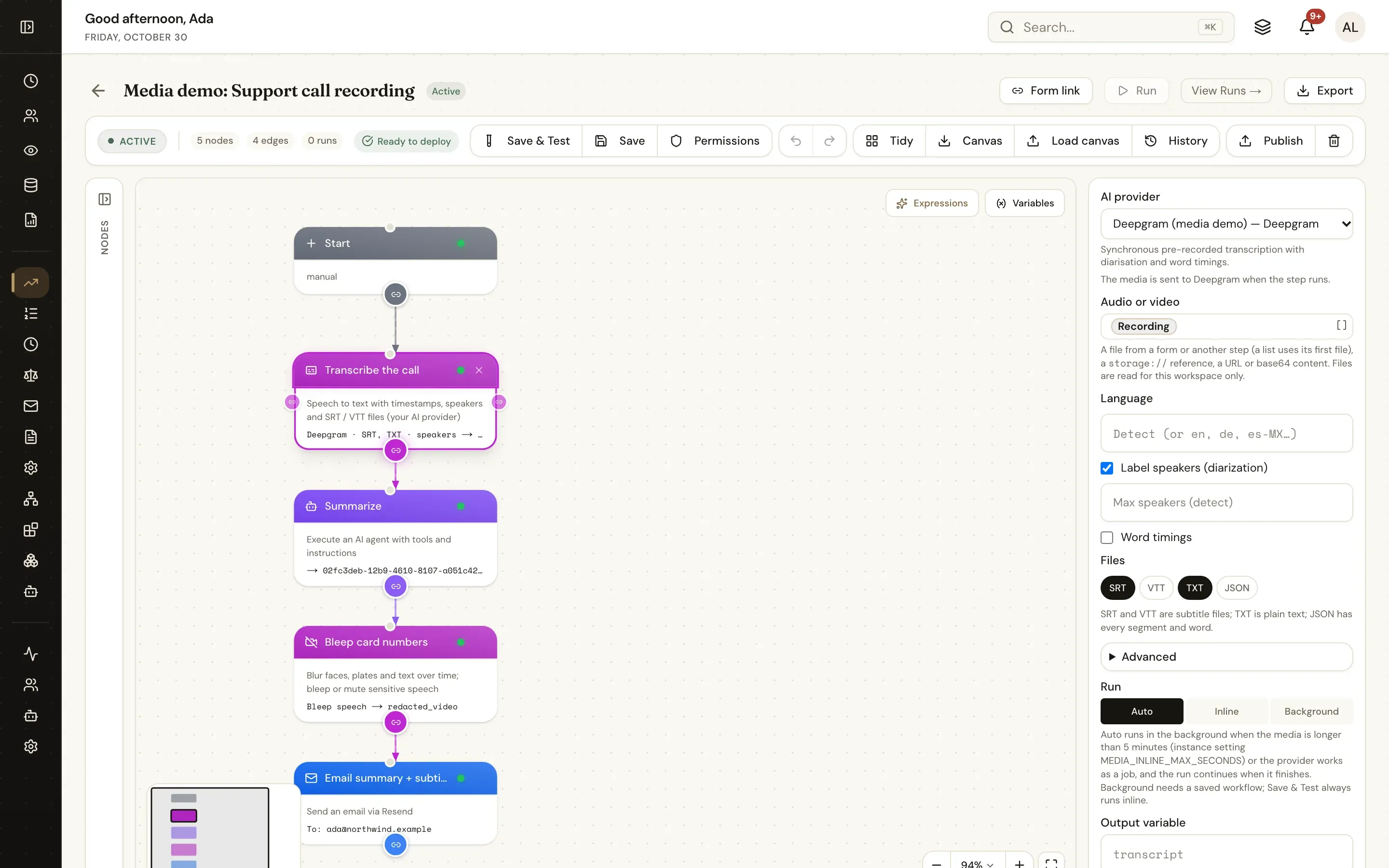
The recording comes straight from the form’s attachments field; the transcript, segments and files are variables the next steps use.

json
{
  "type": "media_transcribe",
  "config": {
    "integration_id": "<your media AI provider>",
    "source": "{{form.recording}}",
    "diarize": true,
    "formats": ["srt", "vtt", "txt"],
    "output_var": "transcript"
  }
}
The Transcribe Audio / Video step in the workflow designer with speaker and subtitle settings
Transcribe with speakers and subtitle files, then hand the text to an agent.

The flow

From recording to follow-up

  1. STEP 1

    Upload

    The organiser uploads the recording with the meeting details and confirms everyone agreed to it.

  2. STEP 2

    Transcribe and draft

    Speakers and timestamps, then an agent drafts the summary, decisions and up to three actions.

  3. STEP 3

    Check and assign

    The organiser edits the draft and picks an owner and due date for each action.

  4. STEP 4

    Send and follow up

    Owners get tasks; the minutes go out as a PDF with the SRT attached.

Ready-made package

Meeting recording to minutes and action items

Upload a meeting recording: transcript with speakers, AI-drafted minutes the organiser checks, a task for each action owner and the minutes emailed with an SRT.

Starts from a form · needs Media AI provider, AI model, Email · about 15 minutes to set up · signed, free to install

See the package

Frequently asked questions

Can the agent assign tasks to people?

No. It suggests owners by the names said in the meeting; the organiser picks the actual person from the workspace people before any task is created.

Which providers can transcribe?

Google Gemini by default, and any provider with transcription: OpenAI, Azure AI Speech, Deepgram, AssemblyAI, ElevenLabs or AWS Transcribe, each with your own key.

What about consent?

The form asks the organiser to confirm everyone agreed to being recorded and transcribed. Follow your own policy and local law on recording meetings.

Related use cases

Building blocks:Complex workflows Integrations and AI Forms and attachments Document actions Images, audio and video Package gallery Deploy anywhere

Build it on an engine you control.

Open source under Apache-2.0. Use the cloud, or self-host it next to your own systems.