Public records and evidence redaction

Public records requests with AI-assisted redaction and a person who approves every release

Handle FOIA, state public records and Official Information Act requests from intake to release: statutory deadlines and SLAs, body-cam video, photos, audio and documents redacted for review, an exemptions log, legal approval and a release package.

Automated redaction is an aid for reviewers and can miss things; a person must check every redaction before release. Nothing on this page is legal advice.

The problem

Requests have deadlines. Video takes hours to redact by hand.

Public records requests arrive by email and web forms, each with a statutory clock. Responsive records are increasingly body-worn camera and CCTV video, photos and interview audio, and every face, licence plate and spoken phone number of a bystander has to be found before release. Doing that frame by frame is slow, and the reasons for each redaction are easy to lose.

  • Deadlines tracked in a spreadsheet, extensions noticed too late
  • Hours of manual blurring per minute of video, bleeping audio by ear
  • Exemptions and approvals that are hard to reconstruct when a decision is reviewed
How UserTasks solves it

Automation finds what to redact. People decide what is released.

A request form starts the workflow: the deadline comes from a rules table you configure, an SLA and acknowledgement follow, and a records officer attaches the responsive records. Redact Video, Redact Image, Transcribe and Redact Document prepare redacted copies and propose exemptions; a legal reviewer compares every original with its redacted copy and approves a full or partial release, or denies it. Only then is the release package built and sent.

  • Statutory days, day types and default exemption codes as an editable decision table (examples, not legal advice)
  • Faces, licence plates and on-screen ID numbers blurred over time; spoken personal details bleeped from the transcript
  • An exemptions log per item and a cover letter, merged into a PDF release package
  • Originals stay restricted to the request; every step is written to an audit trail with a retention policy

Architecture

How the pieces fit

Public records request and evidence redaction architectureA request form starts the run. UserTasks sets the deadline and SLA, gathers records from a records officer, prepares redacted copies of video, photos, audio and documents with your own AI provider key, and waits for a legal reviewer. Approved releases are sent as a package or download link; every step is logged.REQUESTS AND RECORDSRequest formForm page · APIBody-cam and CCTV videoAttachmentsPhotos, audio, documentsAttachmentsOUTRequesterLetters · package · linkYour AI providerGemini, OpenAI, Azure, AWSAudit trailData table · retentionUserTasks engineDeadline rules → SLARedact video, image, audio, textExemptions logLegal review taskRelease package
A request form starts the run. UserTasks sets the deadline and SLA, gathers records from a records officer, prepares redacted copies of video, photos, audio and documents with your own AI provider key, and waits for a legal reviewer. Approved releases are sent as a package or download link; every step is logged.

In practice

One step blurs faces and plates and bleeps the speech

Redact Video samples frames, tracks what it finds and writes a redacted copy; long clips run in the background and the run resumes when the job is done. The original stays where it was attached.

json
{
  "type": "media_redact_video",
  "label": "Redact Video: faces, plates, text, speech",
  "config": {
    "integration_id": "<your media AI provider>",
    "source": "{{evidence.bodycam_video}}",
    "targets": ["faces", "plates", "text_pii"],
    "audio": "bleep",
    "audio_info_types": ["@high", "phone", "email"],
    "style": "blur",
    "run_mode": "background",
    "output_var": "redacted_video"
  }
}
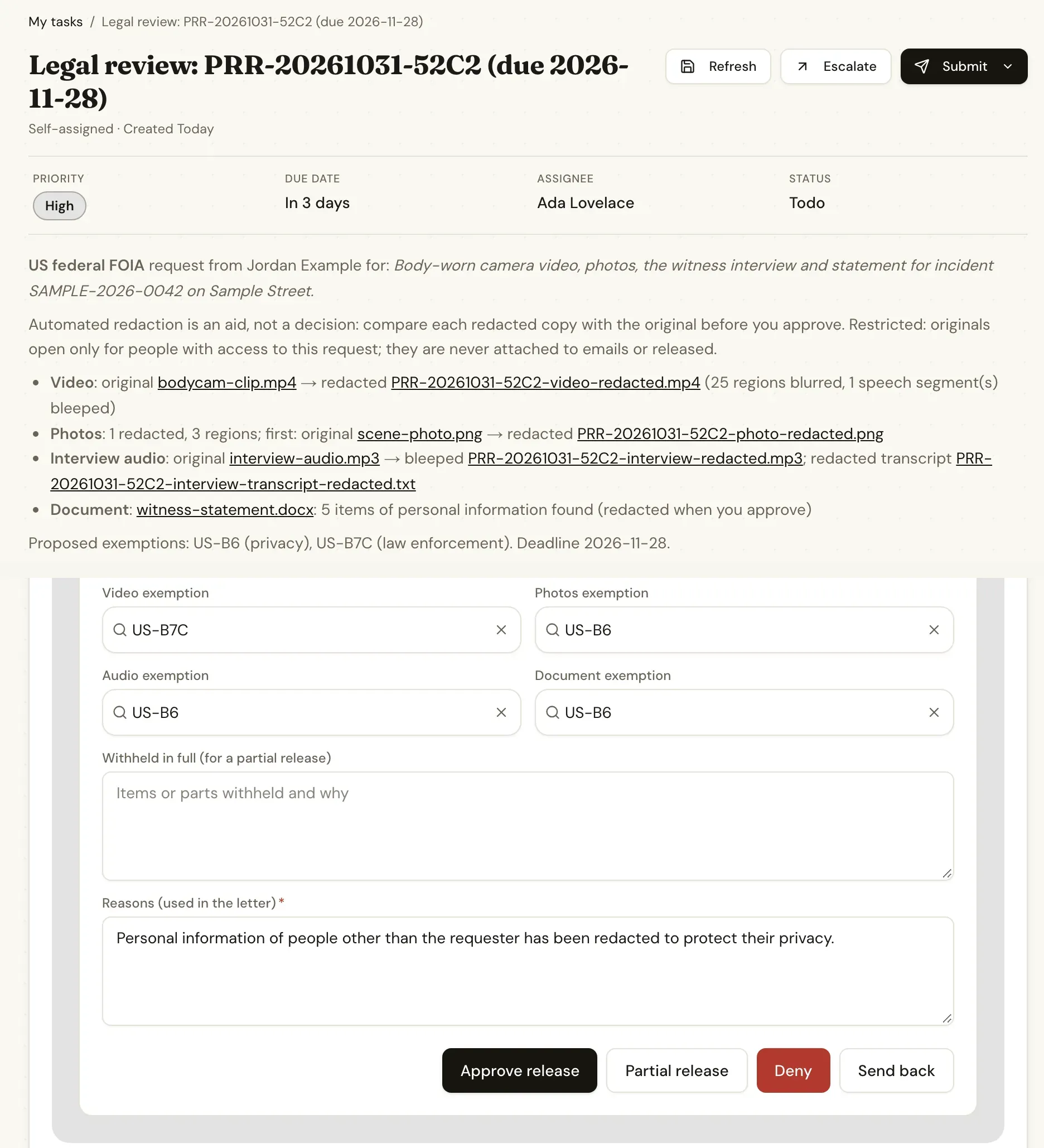
A legal review task for a public records request with links to each original and its redacted copy, exemption codes and Approve release, Partial release, Deny and Send back buttons
The legal reviewer compares each original with its redacted copy and confirms the exemptions before anything is released.

The flow

From request to release

  1. STEP 1

    Request and deadline

    The request form starts the run; the rules table gives the statutory days (for example 20 business days under the US FOIA or 20 working days under the NZ OIA), an SLA and an acknowledgement email.

  2. STEP 2

    Gather records

    The records officer attaches video, photos, interview audio and documents, or answers no records or extend deadline, which send their own letters.

  3. STEP 3

    Prepare redactions

    Faces, plates and on-screen text are blurred, personal details bleeped from the audio, the transcript and document checked, and each item gets a proposed exemption.

  4. STEP 4

    Approve and release

    A legal reviewer approves, approves in part, denies or sends back. Approved releases become a PDF package with cover letter and exemption log, sent by email or download link.

Ready-made package

FOIA / public records request: evidence redaction and release

Public records requests from a form to release: statutory SLA, evidence gathering, AI-assisted redaction of video, photos, audio and documents, legal approval and an exemptions log.

Starts from a form · needs Media AI provider, REST API, Assignees, Email · about 30 minutes to set up · signed, free to install

See the package

Frequently asked questions

Does the AI decide what is released?

No. The media steps find faces, licence plates, on-screen numbers and spoken personal details and prepare redacted copies. A legal reviewer compares every original with its redacted copy, confirms the exemption codes and approves, approves in part or denies. Nothing is sent before that decision.

Are the deadlines and exemption codes correct for my jurisdiction?

They are configurable examples, not legal advice. The package ships rows for the US federal FOIA, an example US state act, the New Zealand Official Information Act and the UK Freedom of Information Act; check day counting, holidays, extensions and exemptions with your counsel and edit the tables to match.

Where does the video go?

Media is sent to the AI provider you connect with your own key (Google Gemini by default; OpenAI, Azure AI, AWS and others are supported) to find what to redact. Originals stay as restricted attachments of the request and are never attached to emails; redacted copies are stored in your workspace storage.

How long can the video be?

Redact Video handles clips up to MEDIA_VIDEO_REDACT_MAX_SECONDS (10 minutes by default) and runs long ones in the background with FFmpeg. Split longer recordings or raise the limit on a self-hosted instance with the resources for it.

Related use cases

Building blocks:Complex workflows Integrations and AI Forms and attachments Document actions Images, audio and video Package gallery Deploy anywhere

Build it on an engine you control.

Open source under Apache-2.0. Use the cloud, or self-host it next to your own systems.