Media (images, audio, video)
Transcribe Audio / Video
Speech to text with timestamps, speaker labels, word timings and SRT, VTT, TXT or JSON transcript files, using your own transcription provider.
Transcribe Audio / Video (media_transcribe) turns the speech in an audio or video file into text, timed segments and subtitle files.
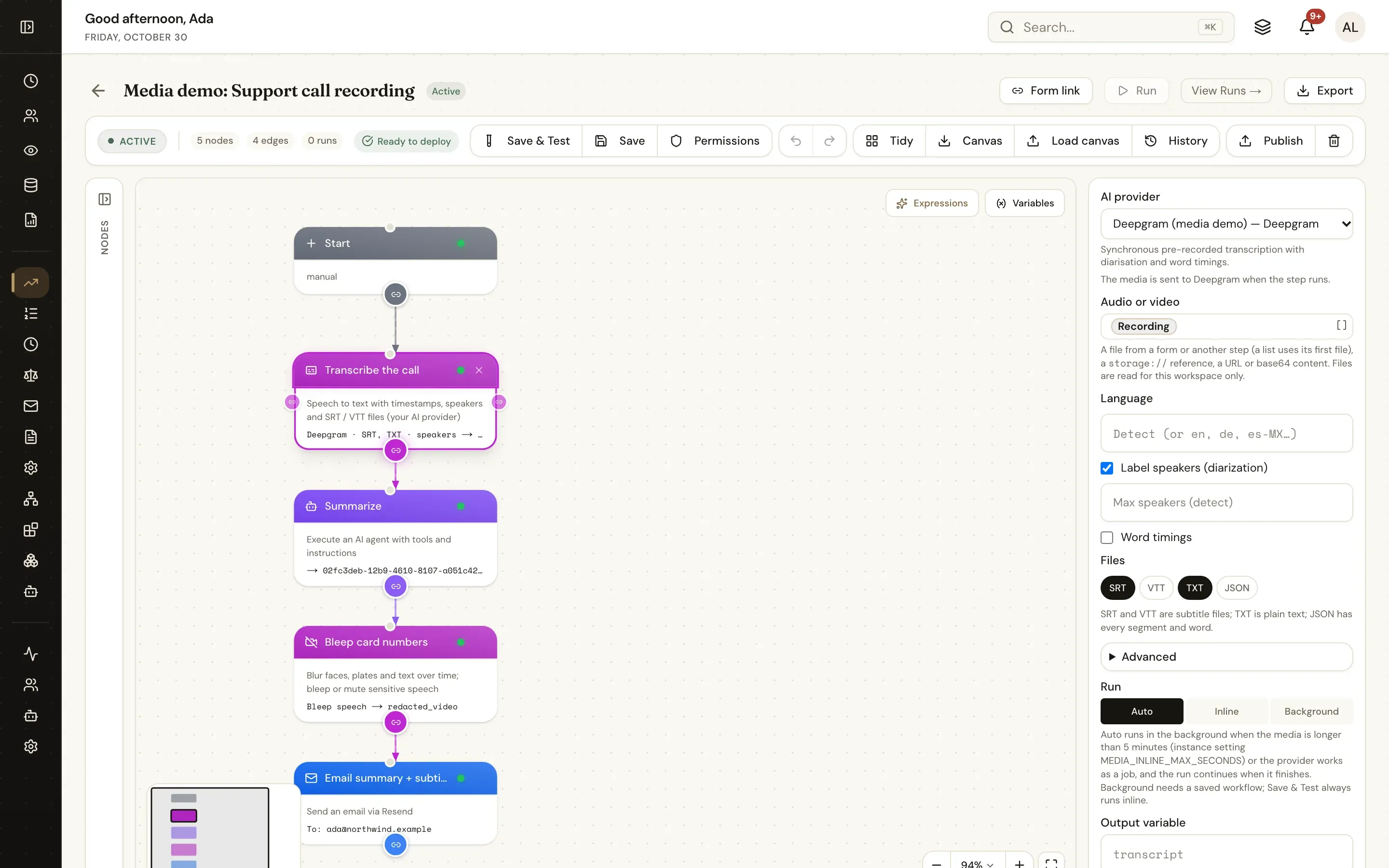
Inputs
AI provider (integration_id): one of the workspace's integrations made from a media-capable connector — see Provider setup. It is chosen in the designer (not an expression). The picker lists only connections that can do the step, and warns when the chosen provider cannot do a feature you picked.
Audio or video (source): A file object (a form's Attachments field such as {{form.recording}}, or a file from another step), a list of files (the first is used), a storage:// reference, an http(s) URL (fetched through the egress guard) or base64 content. Files are read for the run's workspace only — the same rules as the document actions.
Options
| Setting | Key | Default | What it does |
|---|---|---|---|
| Language | language | detect | A language code such as en, de or es-MX; empty detects it |
| Label speakers | diarize | off | Adds a speaker label to each segment |
| Max speakers | max_speakers | detect | A hint for speaker labelling |
| Word timings | word_timestamps | off | Adds words with start and end times |
| Vocabulary hint | prompt | — | Names and terms the provider should expect |
| Files | formats | ["srt"] | Any of srt, vtt, txt, json |
| Model | model | the provider's default | Override the model |
| Output file name | output_name | from the source | Base name of the transcript files |
| Run | run_mode | auto | auto, inline or background |
| Output variable | output_var | transcript | Where the result goes |
Run (run_mode): auto (default) runs the step in the background when the media is longer than MEDIA_INLINE_MAX_SECONDS (300 seconds) or the provider works as an asynchronous job, and the run continues when it finishes; inline always waits in the step; background always hands it to a job. Background needs a saved workflow run — Save & Test always runs inline.
Outputs
| Variable | Contents |
|---|---|
{{transcript}} | text, language, duration, segments (id, start, end, text, speaker, confidence, words), words, speakers, files (srt, vtt, txt, json), provider, model, chunks, cost |
{{transcript_text}} | The full transcript |
{{transcript_segments}} | Timed segments — loop over them |
{{transcript_files}} | Every transcript file — attach them to an email |
{{transcript_srt}}, {{transcript_vtt}}, {{transcript_txt}}, {{transcript_json}} | One file per chosen format |
Times are seconds from the start.
Example
{
  "type": "media_transcribe",
  "label": "Transcribe meeting",
  "config": {
    "integration_id": "<integration-id>",
    "source": "{{form.recording}}",
    "diarize": true,
    "formats": ["srt", "txt"],
    "output_var": "transcript"
  }
}
Then use {{transcript_text}} in a Run Agent prompt to summarise it, or burn {{transcript_srt}} into the video with Media Utilities.
Notes
- Long audio is split into chunks when the provider has an upload limit (needs FFmpeg);
chunkssays how many. - The run history shows the duration, language, segment count and a 200-character preview — never the full transcript.