Customer satisfaction and NPS

A customer survey that calls back every unhappy customer

Run a CSAT and Net Promoter Score survey on your own form page: star rating, 0-10 slider, Likert matrix and comment, every answer classified by a decision table, detractors called back within an SLA, and NPS charted by month.

The problem

Survey tools collect scores. Nobody calls the detractors.

Scores land in a survey tool, a spreadsheet or a monthly slide. The customer who gave you a 2 last Tuesday hears nothing back, the reasons behind low scores are never recorded, and NPS is worked out by hand once a quarter.

  • Low scores with no owner and no deadline
  • Reasons for detractors lost in free-text exports
  • NPS calculated by hand, long after it could help
How UserTasks solves it

Every answer is classified, saved and, when it is low, followed up.

Customers answer a three-step survey page with a progress bar and a review step. A decision table turns the 0-10 score into promoter, passive or detractor and decides how fast someone follows up; the answer is saved in a data table, and detractors become a call task with an SLA, reminders and escalation. A results page charts NPS by month and lists the open follow-ups.

  • Rating, Slider, Likert scale and Rich text controls on a stepped form page
  • Thresholds and follow-up hours as an editable decision table
  • Root cause, call notes and what was agreed recorded on the follow-up, and emailed to the customer
  • NPS trend, category split and open follow-ups on a results page

Architecture

How the pieces fit

Customer satisfaction survey architectureA customer submits the survey page. UserTasks classifies the answer with a decision table, saves it in a data table, creates a follow-up call task with an SLA for detractors and emails the customer. A results page charts NPS from the data table and shows saved reports.INSurvey pageForm page · APIRating, slider, LikertForm controlsOUTCustomerThank-you and follow-up emailResults pageCharts · saved reportsUserTasks engineDecision table: NPS categorySave to Survey responsesFollow-up task with SLAMonthly summary
A customer submits the survey page. UserTasks classifies the answer with a decision table, saves it in a data table, creates a follow-up call task with an SLA for detractors and emails the customer. A results page charts NPS from the data table and shows saved reports.

In practice

A 0-10 slider is one field on the form

Official controls are fields like any other: the value is a number the decision table reads as {{form.nps}}.

json
{
  "key": "nps",
  "type": "custom",
  "label": "How likely are you to recommend us to a friend or colleague?",
  "required": true,
  "custom": {
    "tag": "ut-slider",
    "version": "1.0.0",
    "props": { "min": 0, "max": 10, "step": 1, "marks": ["0 Not at all likely", "5", "10 Extremely likely"] }
  }
}
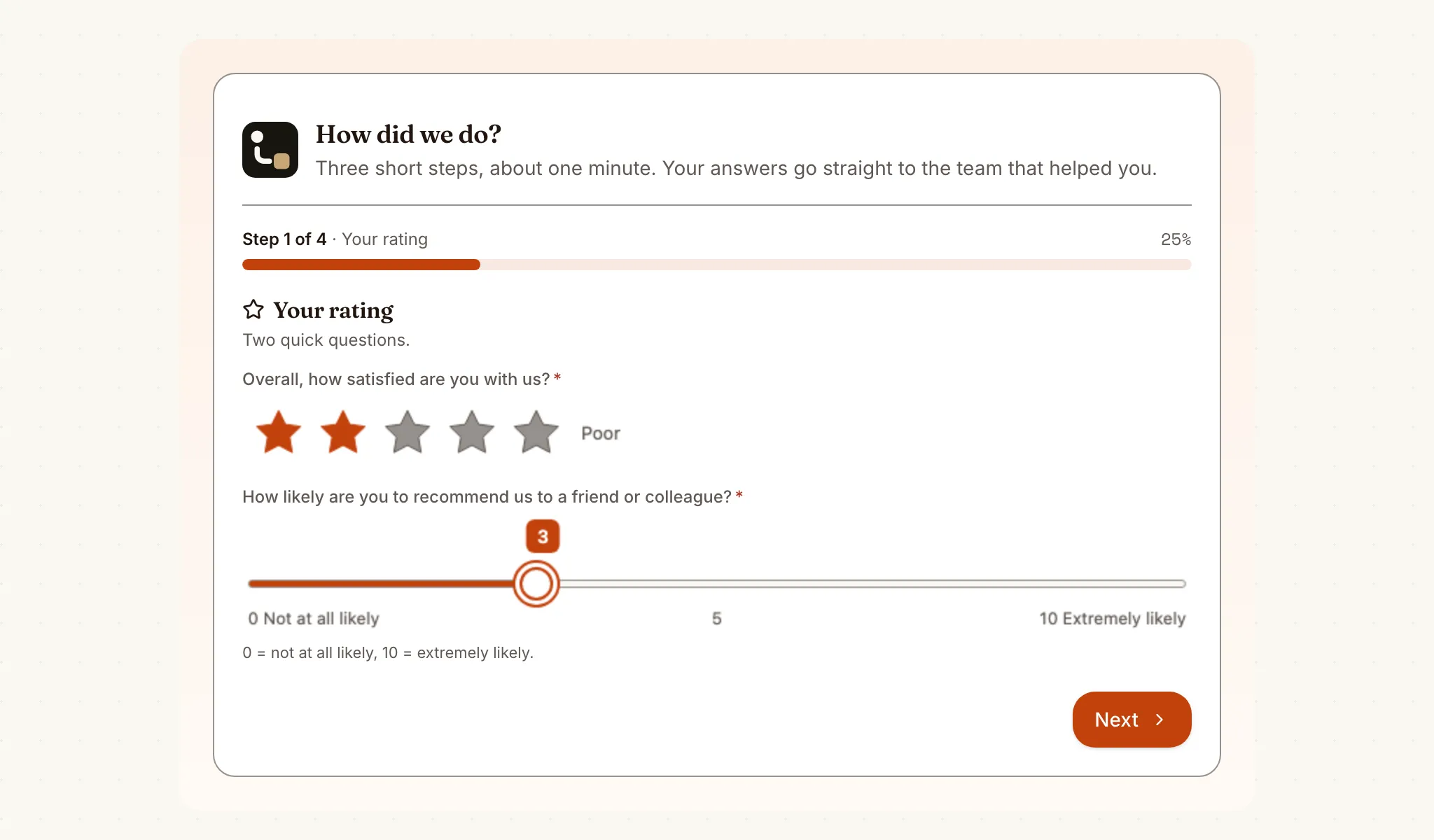
The customer satisfaction survey page: a progress bar, five-star rating and a 0-10 slider for how likely the customer is to recommend the company
The survey page: star rating and 0-10 slider on the first of three steps, with a progress bar and a review step at the end.

The flow

From answer to call-back

  1. STEP 1

    Customer answers

    Star rating, 0-10 slider, a Likert matrix on the experience and a comment, across three steps with a review.

  2. STEP 2

    Classify and save

    The decision table sets promoter, passive or detractor and the follow-up hours; the answer goes into Survey responses.

  3. STEP 3

    Call back

    Detractors get a call task with an SLA; what was agreed is recorded and emailed to the customer.

  4. STEP 4

    Watch the trend

    The results page charts NPS by month, the category split and the open follow-ups.

Ready-made package

Customer satisfaction (CSAT / NPS) survey

A three-step survey page with star rating, 0-10 NPS slider, Likert matrix and rich-text comment; a decision table classifies each answer and detractors get a follow-up call with an SLA.

Starts from a form · needs · about 5 minutes to set up · signed, free to install

See the package

Frequently asked questions

Do customers need an account?

Form pages are for people signed in to your workspace. For customers outside it, submit the same form from your own site or app with POST /api/v1/forms/{id}/submit and the workflow runs the same way.

How is the NPS worked out?

Each answer gets +100 (promoter, 9-10), 0 (passive, 7-8) or -100 (detractor, 0-6). The average of those points is the NPS: the percentage of promoters minus the percentage of detractors. The thresholds are in a decision table you can edit.

Can I change the questions?

Yes. The survey is a normal form: change the Likert statements, add steps or fields in the form designer. Renaming a Likert statement changes the key its answer is stored under, so update any expression that reads it.

Related use cases

Building blocks:Complex workflows Integrations and AI Forms and attachments Document actions Images, audio and video Package gallery Deploy anywhere

Build it on an engine you control.

Open source under Apache-2.0. Use the cloud, or self-host it next to your own systems.