Employee engagement

Pulse surveys that turn low scores into a manager conversation

Run an employee engagement pulse survey in steps with Likert matrices per section, an anonymous option and an eNPS slider; scores by department on a results page, and managers asked to follow up on low, non-anonymous scores.

The problem

The annual survey is too late, and the results go nowhere.

Engagement surveys run once a year, arrive as a slide deck months later, and rarely lead to a conversation with the people who scored low. Anonymous answers are mixed with named ones, so people do not trust them either way.

  • Results long after anything could change
  • No follow-up owner for low scores
  • Unclear what is anonymous and what is not
How UserTasks solves it

Short, regular pulses with a clear anonymous option and a follow-up.

Employees answer a short questionnaire in steps with a progress bar: a Likert matrix per section, an eNPS slider and an overall mood rating. Section scores and an engagement score are worked out in the workflow, a decision table sets the band, and a low score from someone who did not choose to be anonymous becomes a follow-up task for their manager with an action plan. Anonymous answers are only counted.

  • Likert matrices per section, eNPS Slider, Rating and Rich text
  • Anonymous answers stored without a name, and never routed to a manager
  • Action plans as an editable table on the manager's task
  • Engagement by department and eNPS by round on a results page

Architecture

How the pieces fit

Employee pulse survey architectureAn employee submits the pulse questionnaire. UserTasks scores each section, bands the result with a decision table, saves it, and for low named scores gives the manager a follow-up task with an action plan. A results page charts engagement by department.INPulse questionnaireSteps · progress barLikert, slider, ratingForm controlsOUTManagerAction plan taskResults pageCharts · saved reportsUserTasks engineSection and engagement scoresDecision table: bandSave to Pulse responsesManager follow-up task
An employee submits the pulse questionnaire. UserTasks scores each section, bands the result with a decision table, saves it, and for low named scores gives the manager a follow-up task with an action plan. A results page charts engagement by department.

In practice

A Likert matrix stores one number per statement

The answer is an object keyed by the statement, so the workflow can average a section with plain expressions.

json
{
  "key": "wellbeing",
  "type": "custom",
  "label": "Wellbeing",
  "custom": {
    "tag": "ut-likert",
    "version": "1.0.0",
    "props": {
      "scale": "agree5",
      "statements": ["I have the energy I need for my work", "I can switch off after work"]
    }
  }
}
// value: { "i_have_the_energy_i_need_for_my_work": 4, "i_can_switch_off_after_work": 2 }
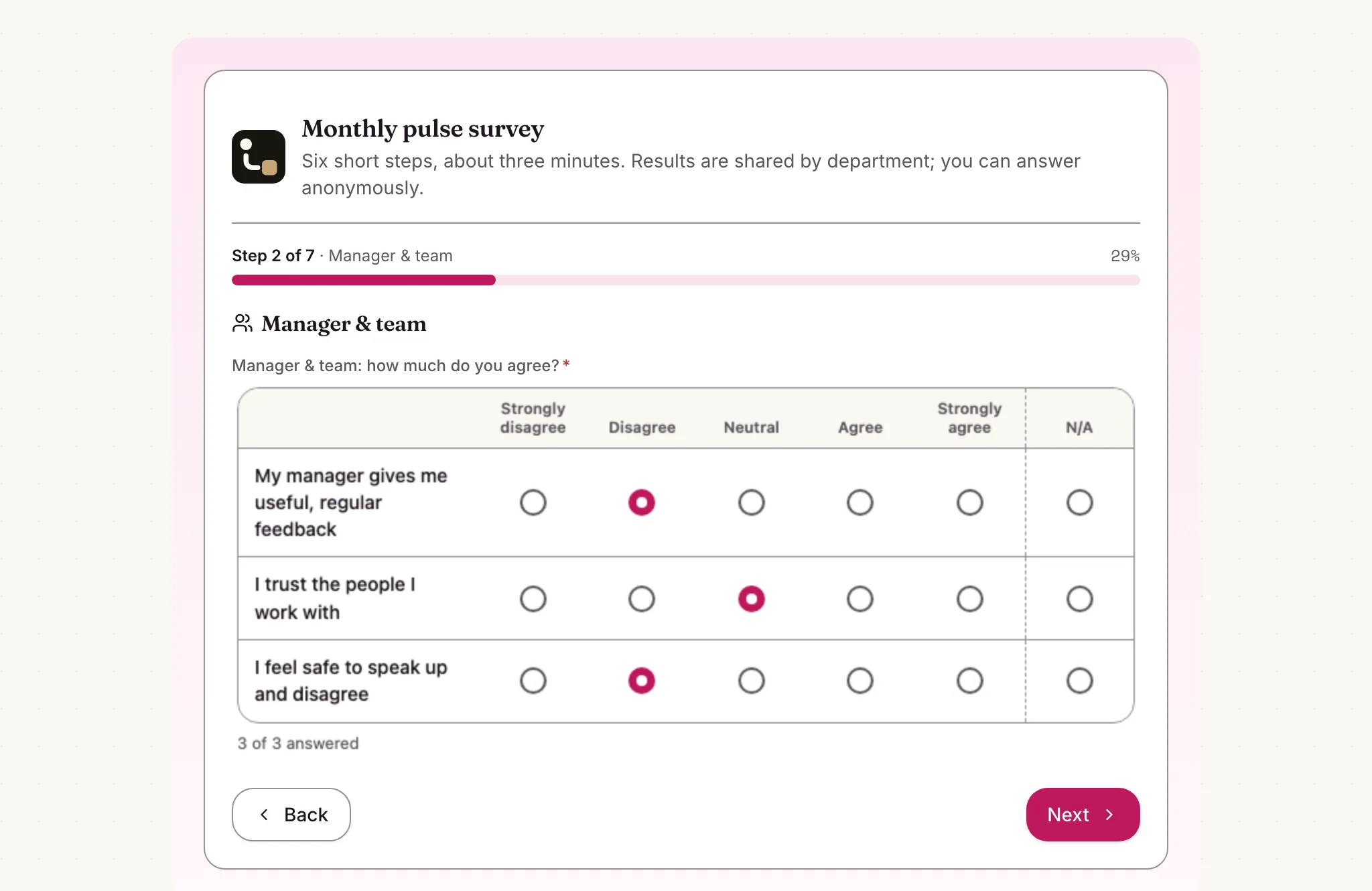
A step of the employee pulse questionnaire with a progress bar and a Likert matrix of agree-disagree statements
One section per step: a Likert matrix with a progress bar, and an anonymous option at the start.

The flow

From pulse to conversation

  1. STEP 1

    Employee answers

    Likert matrices per section, eNPS slider and mood rating, named or anonymous.

  2. STEP 2

    Score and band

    Section and engagement scores are calculated and a decision table sets the band.

  3. STEP 3

    Manager follows up

    Low named scores give the manager a task with the scores and an action plan table.

  4. STEP 4

    See the trend

    The results page charts engagement by department and eNPS by round.

Ready-made package

Employee pulse survey

A stepped engagement survey with Likert sections, an eNPS slider and mood rating; scores and risk bands are worked out, and named at-risk answers get a manager follow-up with an action plan.

Starts from a form · needs · about 5 minutes to set up · signed, free to install

See the package

Frequently asked questions

How anonymous are anonymous answers?

An anonymous answer is saved without the person's name or manager and never creates a follow-up task. The workflow run still records who submitted the form, as every form submission does, so decide who can see runs and set retention before you promise full anonymity.

Can I change the sections and statements?

Yes, in the form designer. The scores are Set Variable expressions over the Likert answers; update them when you add or rename statements.

Who receives the follow-ups?

The manager the employee names on the form, or the person who installed the package when no manager is given. Change the routing in the designer.

Related use cases

Building blocks:Complex workflows Integrations and AI Forms and attachments Document actions Images, audio and video Package gallery Deploy anywhere

Build it on an engine you control.

Open source under Apache-2.0. Use the cloud, or self-host it next to your own systems.