Identity checks (KYC)

ID document capture that keeps only what you need

Customers upload an ID photo and a selfie; the document is read, checked against the form by rules, the ID number is blacked out on the stored copy, and a person compares the photos and decides. No face recognition.

The problem

Identity checks collect more data than they keep a reason for.

Onboarding teams retype fields from ID photos, and full-resolution scans with every number end up stored for years, in more places than anyone intended.

  • Manual retyping of names, dates and numbers
  • Full ID images kept indefinitely
  • Black-box verification nobody can explain
How UserTasks solves it

Read, check, redact — and a person decides.

Analyze Image reads the printed fields and finds face boxes; a Regex and conditions compare them with the form and a decision table flags anything odd. Redact Image blacks out the number on the stored copy. The reviewer compares the selfie with the ID photo themselves.

  • Extracted fields as a structured answer
  • Rule checks you can read and change
  • ID number blacked out on the stored copy; masked to its last four characters in the table
  • No face recognition or face matching: a person compares the photos

Architecture

How the pieces fit

Identity document capture architectureA form page collects the ID photo and selfie. UserTasks reads the document, checks it with rules, stores a redacted copy and creates a review task; verified identities keep masked fields only.INVerify your identity formPhone cameraID photo and selfieAttachmentsOUTVerified identitiesMasked fieldsRedacted copyStorageCustomer emailOutcomeUserTasks engineAnalyze Image: fields, face boxesRegex, conditions, rulesRedact Image: numberReviewer task
A form page collects the ID photo and selfie. UserTasks reads the document, checks it with rules, stores a redacted copy and creates a review task; verified identities keep masked fields only.

In practice

Black out the number before you store the copy

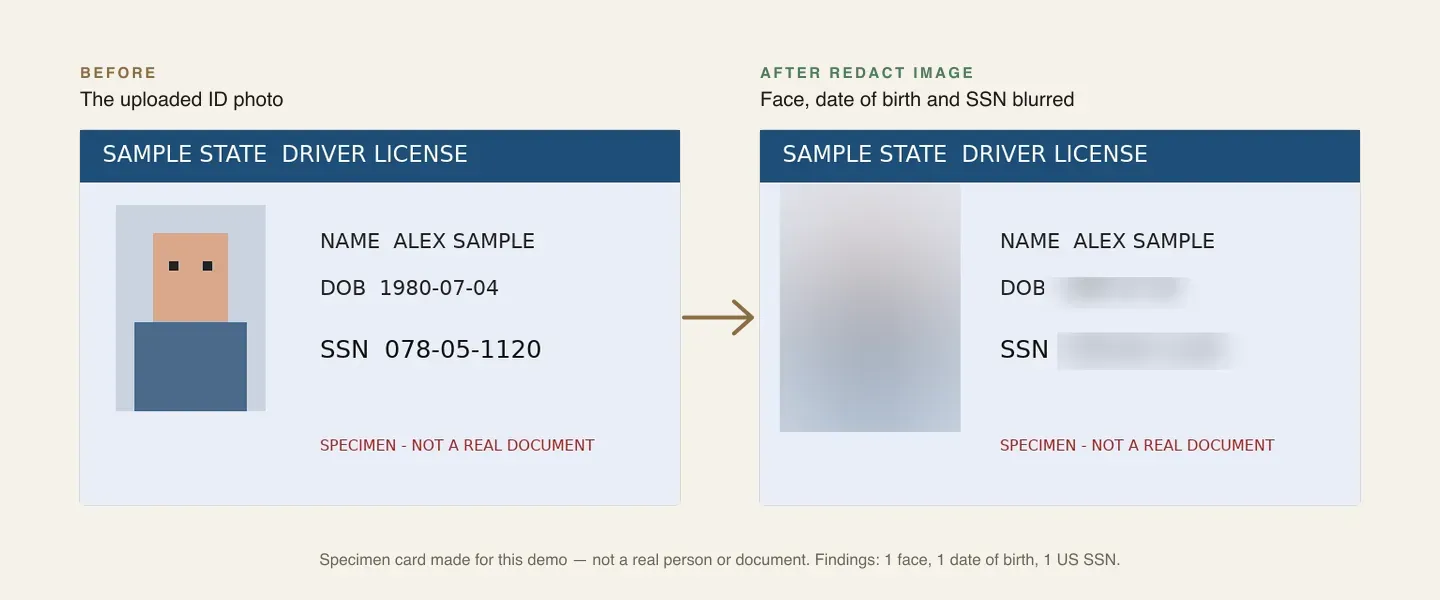
Redact Image finds sensitive text on the document and writes a new PNG; the original stays a restricted attachment.

json
{
  "type": "media_redact_image",
  "config": {
    "source": "{{form.id_photo}}",
    "targets": ["text_pii"],
    "info_types": ["@high"],
    "style": "box",
    "output_var": "redacted_id"
  }
}
A specimen ID card before and after Redact Image
A specimen card before and after redaction. The package keeps a copy with the number blacked out.

The flow

From upload to a verified record

  1. STEP 1

    Upload

    The customer adds an ID photo and a selfie on the form page.

  2. STEP 2

    Read and check

    Fields are read, the number format checked and name and date of birth compared with the form.

  3. STEP 3

    Redact

    The number is blacked out on a stored copy and masked in the table.

  4. STEP 4

    Review

    A person compares the photos and verifies, asks for new documents or rejects.

Ready-made package

Identity document capture (KYC) with redaction for storage

Customers upload an ID photo and a selfie: the document is read, checked by rules, the number blacked out for storage, and a person compares the photos and decides.

Starts from a form · needs Media AI provider, Assignees, Email · about 20 minutes to set up · signed, free to install

See the package

Frequently asked questions

Does UserTasks match the selfie to the ID photo?

No. The media steps only find face boxes and read text; they never identify a person or compare faces. The reviewer compares the photos and records that they did.

Is this a complete KYC / AML solution?

No. It handles document capture, reading, rule checks, redaction and human review. Liveness checks, sanctions screening and document authenticity checks need specialist providers, which you can add as integrations.

What is kept after verification?

The masked fields and a redacted copy in the Verified identities table, under a retention policy. Purge the original uploads on your own schedule.

Related use cases

Building blocks:Complex workflows Integrations and AI Forms and attachments Document actions Images, audio and video Package gallery Deploy anywhere

Build it on an engine you control.

Open source under Apache-2.0. Use the cloud, or self-host it next to your own systems.