Insurance claims

Claim photos assessed in seconds, decided by an adjuster

Claimants upload damage photos; AI describes the damage and estimates severity, a decision table triages the claim and sets the SLA, an adjuster decides, and repairers only get copies with faces and licence plates blurred.

The problem

Every claim waits for someone to look at the photos.

Minor dents and serious damage arrive in the same queue. Adjusters open each claim to decide how urgent it is, and the photos that go to repairers carry faces and licence plates that have nothing to do with the repair.

  • Simple claims waiting behind complex ones
  • Triage rules that live in adjusters’ heads
  • Personal data shared with third parties by default
How UserTasks solves it

A structured first look, rules for the queue, a person for the decision.

Analyze Image returns a description and a structured assessment: severity, damaged parts, a rough cost range and whether the photo matches the story. A decision table turns that and the cover into a band and an SLA. The adjuster sees the assessment marked as a hint and approves, asks for an inspection or declines.

  • Structured answers you define: severity, parts, cost range, drivable, confidence
  • Triage bands and SLAs as an editable decision table
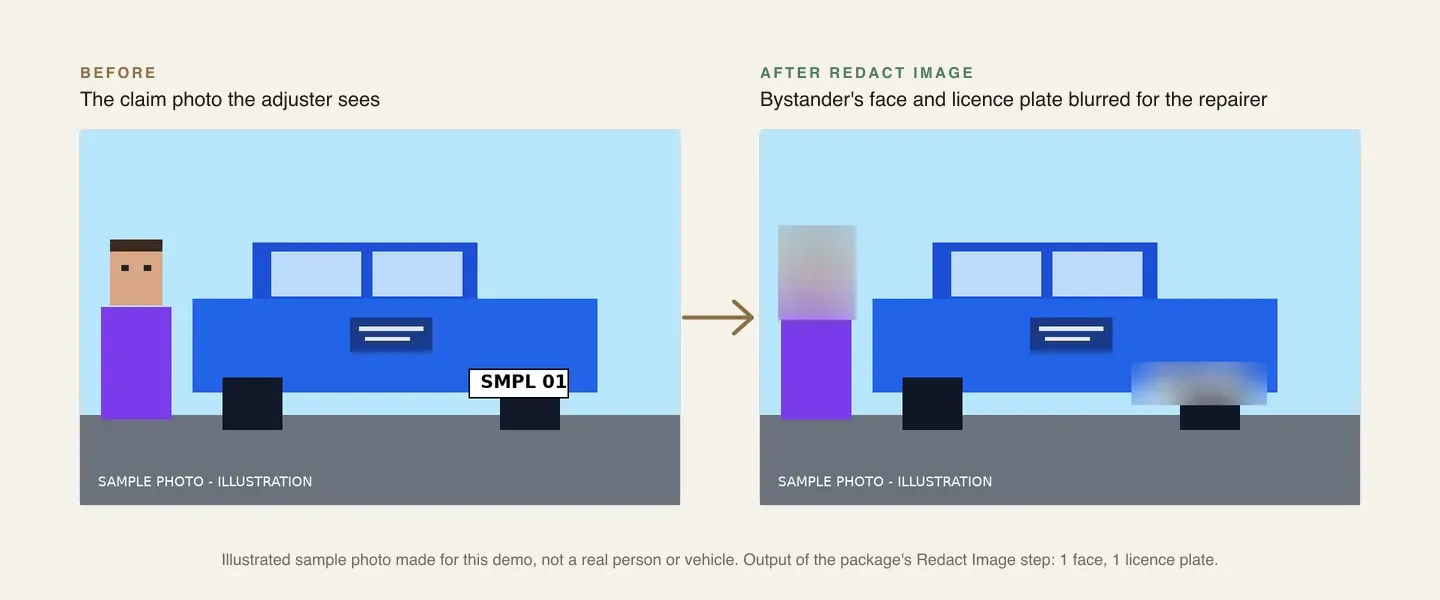
  • Faces and licence plates blurred on every copy that leaves the claim
  • Approval and decline letters generated as PDFs

Architecture

How the pieces fit

Claim photo assessment architectureA claim form with photos starts the run. UserTasks analyses the photos, triages with a decision table, blurs faces and plates on shareable copies and creates an adjuster task. Letters go to the claimant and blurred photos to the repairer.INClaim formPhotos from the phonePolicy and coverForm fieldsOUTClaimant lettersPDF · emailRepairer jobBlurred photosClaims registerData tableUserTasks engineAnalyze Image: damageDecision table: triage + SLARedact Image: faces, platesAdjuster task
A claim form with photos starts the run. UserTasks analyses the photos, triages with a decision table, blurs faces and plates on shareable copies and creates an adjuster task. Letters go to the claimant and blurred photos to the repairer.

In practice

Ask the photo a structured question

With fields set, Analyze Image answers as an object the decision table can read directly.

json
{
  "type": "media_analyze_image",
  "config": {
    "source": "{{form.damage_photos}}",
    "prompt": "Assess the visible vehicle damage for an adjuster.",
    "fields": [
      { "name": "severity", "type": "string" },
      { "name": "estimate_high", "type": "number" },
      { "name": "drivable", "type": "boolean" }
    ],
    "output_var": "damage"
  }
}
An illustrated damage photo before and after Redact Image, with the bystander’s face and the licence plate blurred
The adjuster keeps the original; the repairer gets the copy with the face and plate blurred.

The flow

From photos to a decision

  1. STEP 1

    Report damage

    The claimant fills in the claim form and adds photos from their phone.

  2. STEP 2

    Assess and triage

    Analyze Image returns the assessment; the decision table sets the band and SLA.

  3. STEP 3

    Blur for sharing

    Every photo gets a copy with faces and plates blurred.

  4. STEP 4

    Adjuster decides

    Approve repair, request an inspection or decline; letters and the repairer job follow.

Ready-made package

Insurance claim photo assessment

Motor claims with damage photos: AI damage assessment, decision-table triage and SLA, adjuster review, letters, and photos with faces and plates blurred for repairers.

Starts from a form · needs Media AI provider, Assignees, Email · about 20 minutes to set up · signed, free to install

See the package

Frequently asked questions

Is the AI estimate a settlement?

No. It is a hint for triage and for the adjuster, who decides every claim and sets the approved amount.

Can it detect fraud?

It flags whether the photo looks consistent with the description, which helps an adjuster decide where to look. It is not a fraud detector and should not be used to decline a claim on its own.

Who sees the original photos?

The claim file and the adjuster. Copies sent to repairers have faces and licence plates blurred.

Related use cases

Building blocks:Complex workflows Integrations and AI Forms and attachments Document actions Images, audio and video Package gallery Deploy anywhere

Build it on an engine you control.

Open source under Apache-2.0. Use the cloud, or self-host it next to your own systems.