Legal front door

Legal request intake and triage, with the right lawyer and an SLA on every request

One stepped form for NDAs, contract reviews, legal questions and disputes; routing to the right legal queue with an SLA; and a queue page where the legal team filters, assigns and follows every request.

The problem

Legal work arrives by email, chat and corridor.

Requests come in without the contract, without a deadline and without saying what is actually needed. Lawyers chase the basics, nobody knows which requests are overdue, and the business cannot see where its NDA is.

  • Requests missing the document or the deadline
  • No queue, no owner, no SLA
  • No view of what is open, by type or by lawyer
How UserTasks solves it

One form, routed by rules, tracked in one table.

The Legal request form asks only what each request type needs and checks it before it is sent. A decision table picks the queue, the SLA and whether the general counsel reviews the outcome. The lawyer works from a tabbed task, can ask the requester for more information, and the requester is told at every step. The legal team sees every request on a queue page.

  • Steps with a progress bar, questions that follow the request type
  • Rules: the contract must be attached, urgency needs a reason
  • Routing table for queues, SLAs and general counsel review
  • Queue page: badges, filters by type, status and assignee, row click for details

Architecture

How the pieces fit

Legal request intake architectureThe requester submits the stepped Legal request form. UserTasks routes it with a decision table, records it in the Legal requests table, gives a lawyer a task with an SLA, loops back to the requester for more information and closes it with an email.INLegal request formSteps · rules · documentsRouting tableQueue · SLA · GC reviewOUTLegal requests tableQueue page · filtersEmailsReceived · closedUserTasks engineRoute and set the SLALawyer task with tabsMore information loopGeneral counsel review
The requester submits the stepped Legal request form. UserTasks routes it with a decision table, records it in the Legal requests table, gives a lawyer a task with an SLA, loops back to the requester for more information and closes it with an email.

In practice

A rule that asks for the contract

Form rules run in the browser and again on the server at submit, so a contract review cannot reach legal without the contract.

json
{
  "id": "r_contract_docs",
  "event": "before_submit",
  "if": { "match": "all", "conditions": [
    { "column": "request_type", "operator": "eq", "value": "Contract review" },
    { "column": "documents", "operator": "is_not_set" }
  ] },
  "then": [{ "type": "field_error", "field": "documents", "text": "Attach the contract you want reviewed." }]
}
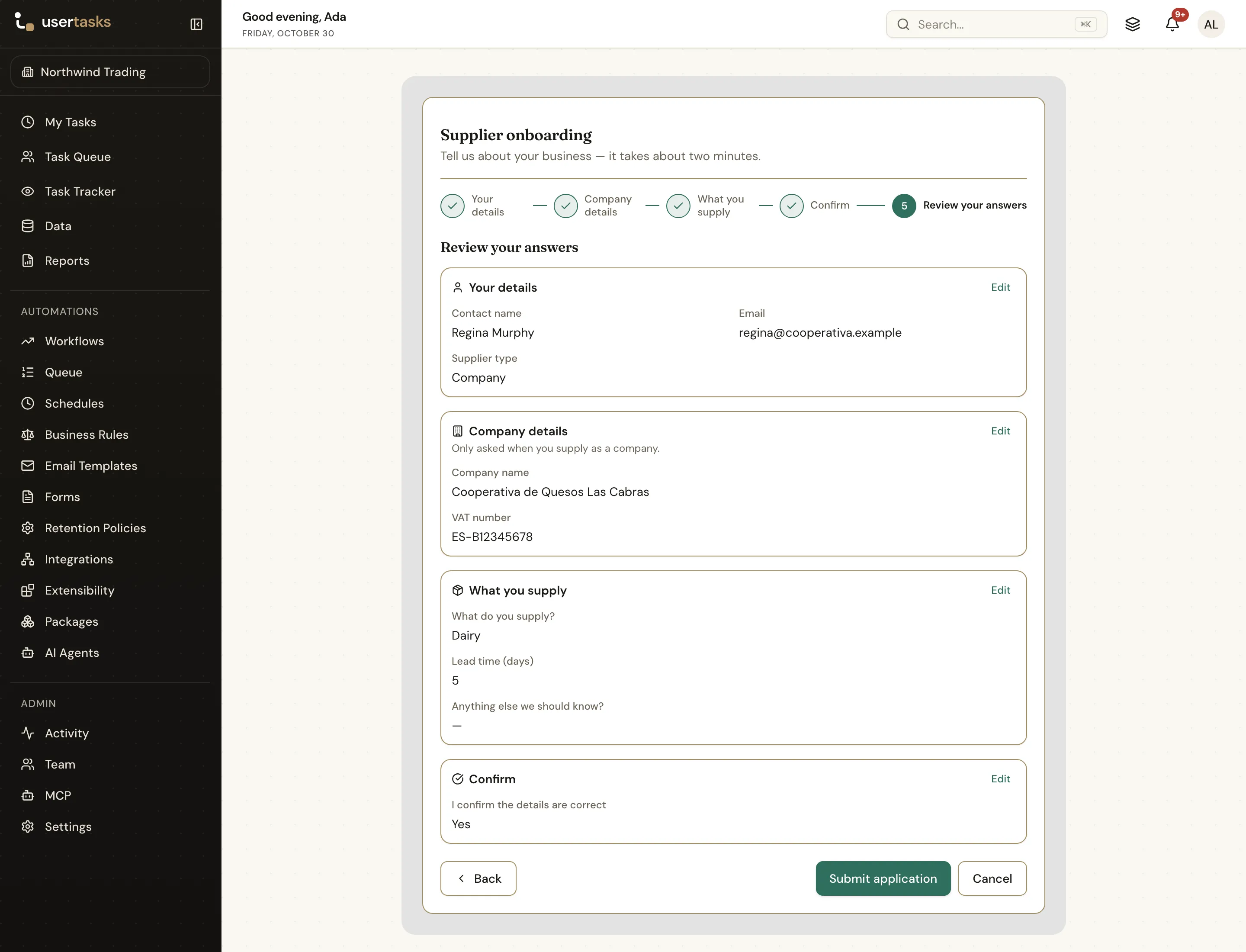
A standalone form page with a step indicator, the answers of each step and Back, Submit and Cancel buttons
A stepped form page: people see where they are and what is left before they send the request.

The flow

From question to answer

  1. STEP 1

    Ask

    The requester completes four steps; the questions follow the request type and rules check the essentials.

  2. STEP 2

    Route

    The routing table picks the queue, the SLA and whether the general counsel reviews the outcome.

  3. STEP 3

    Handle

    A lawyer completes it, asks the requester for more information, or declines it, from a tabbed task.

  4. STEP 4

    Track

    The Legal requests page shows what is open, what is due and who has it.

Ready-made package

Legal request intake & triage

One front door for NDAs, contract reviews, legal questions and disputes: a stepped intake form, routing to the right queue with an SLA, and a Data table for the legal team.

Starts from a form · needs · about 10 minutes to set up · signed, free to install

See the package

Frequently asked questions

Does it need a matter management system?

No. Requests are kept in a UserTasks data table and the queue page is a form with Data table fields. Export the table or send rows to another system with a workflow if you have one.

Can the routing match our legal team?

Yes. Queues, SLA days and general counsel review are rows in a decision table; tasks can go to a person, a team or a variable. The defaults are examples, not legal advice.

Who can see the requests?

The queue page reads the table with each person’s own access: give the legal team View data, and Manage rows if they should change a status from the page.

Related use cases

Building blocks:Complex workflows Integrations and AI Forms and attachments Document actions Images, audio and video Package gallery Deploy anywhere

Build it on an engine you control.

Open source under Apache-2.0. Use the cloud, or self-host it next to your own systems.