Contract review

Contract review against a clause playbook, with redlines between versions and a renewal register

Contract owners submit a draft on a stepped form; legal checks it against your clause playbook, every revision is compared with the last version, the approval chain follows risk and value, and a register shows renewals due in the next 90 days.

The problem

Contracts are reviewed from memory and tracked in a spreadsheet.

Each lawyer checks a draft against the standard positions they remember, revisions arrive without saying what changed, approvals happen in email, and the renewal date is noticed after the notice period has passed.

  • Deviations from standard terms found inconsistently
  • Revisions compared by eye
  • Renewal dates missed

How UserTasks solves it

A playbook in the task, a redline for every revision, and a register.

The owner fills in a numbered, four-step request with the draft. Legal reviews it with the Clause playbook as a Data table in the task, ticks the deviations and sets the risk. Requested changes go back to the owner; their revision is compared with the previous version and legal sees the similarity and a PDF redline. A decision table adds finance and general counsel approval when risk or value calls for it, and the Contract register records the renewal decision date.

  • Clause checklist: the playbook as a Data table in the task
  • Compare Documents: similarity and a PDF redline per revision
  • Approval route by risk, value and deviations
  • Register page with a "renewal within 90 days" filter

Architecture

How the pieces fit

Contract review and approval architectureThe owner submits a contract on a stepped form. UserTasks registers it, gives legal a review task with the clause playbook, compares each revision with the last, routes approvals by risk and value and keeps the register with renewal dates.INReview request formSteps · rules · the draftClause playbookPositions · fallbacksOUTContract registerRenewals due · badgesRedline PDFPer revisionUserTasks engineLegal review with a checklistRedline between versionsFinance and GC approvalEmails to the owner
The owner submits a contract on a stepped form. UserTasks registers it, gives legal a review task with the clause playbook, compares each revision with the last, routes approvals by risk and value and keeps the register with renewal dates.

In practice

Renewals due in the next 90 days

The register page’s base filter is set by the author and always applied on the server; people can only narrow it with their own filters.

json
"base_filter": { "match": "all", "conditions": [
  { "column": "renewal_date", "operator": "gte", "value": "{{today}}" },
  { "column": "renewal_date", "operator": "lte", "value": "{{today+90d}}" },
  { "column": "status", "operator": "in", "value": "Active,Approved" }
] }
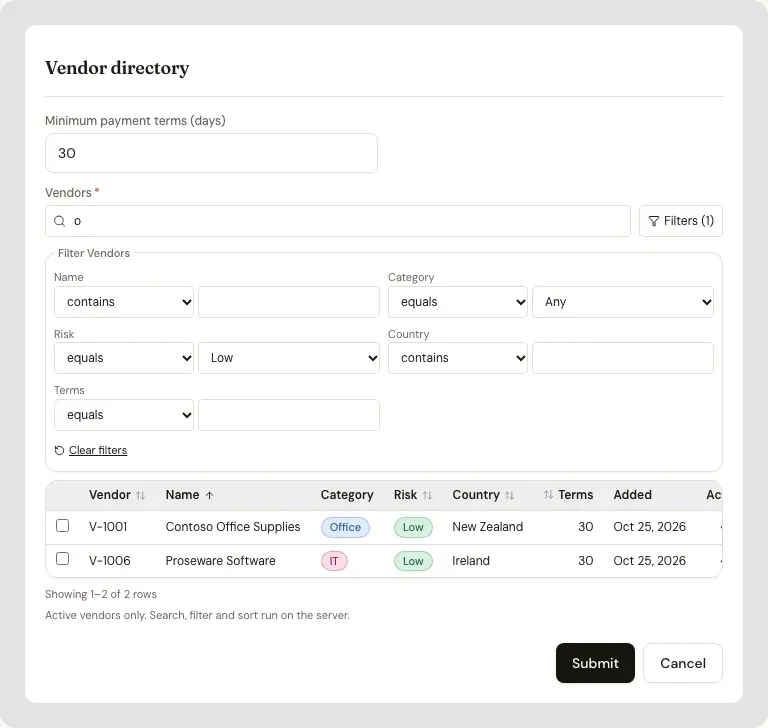
A form with a Data table: a search box, an open filters panel, a sort and status badges, with a row count
A Data table on a form page: search, filters, sorting and badges, run on the server.

The flow

From draft to register

  1. STEP 1

    Request

    The owner completes four numbered steps and attaches the draft; rules check dates, notice and board approval.

  2. STEP 2

    Review

    Legal ticks the playbook deviations, sets the risk and approves, rejects or asks for changes.

  3. STEP 3

    Revise

    The owner uploads a revision; it is compared with the last version and goes back to legal with a redline.

  4. STEP 4

    Approve and register

    Finance and the general counsel approve when needed; the register keeps the renewal decision date.

Ready-made package

Contract review & approval

Contract owners submit a draft on a stepped form; legal checks it against a clause playbook, redlines revisions, the right people approve it and a register tracks renewals.

Starts from a form · needs · about 15 minutes to set up · signed, free to install

See the package

Frequently asked questions

Does it sign the contract?

No. It takes the contract to an approved version; sign it with the counterparty the way you do today. For an internal sign-off with a drawn signature, see the policy and contract review use case.

Which files can be compared?

Word, PDF, OpenDocument, HTML, Markdown and text. The comparison works on the text, so a scanned PDF needs OCR first.

Can we change the playbook and thresholds?

Yes. The Clause playbook and the Contract approval route are a data table and a decision table you edit; the defaults are examples, not legal advice.

Related use cases

Building blocks:Complex workflows Integrations and AI Forms and attachments Document actions Images, audio and video Package gallery Deploy anywhere

Build it on an engine you control.

Open source under Apache-2.0. Use the cloud, or self-host it next to your own systems.