Documents
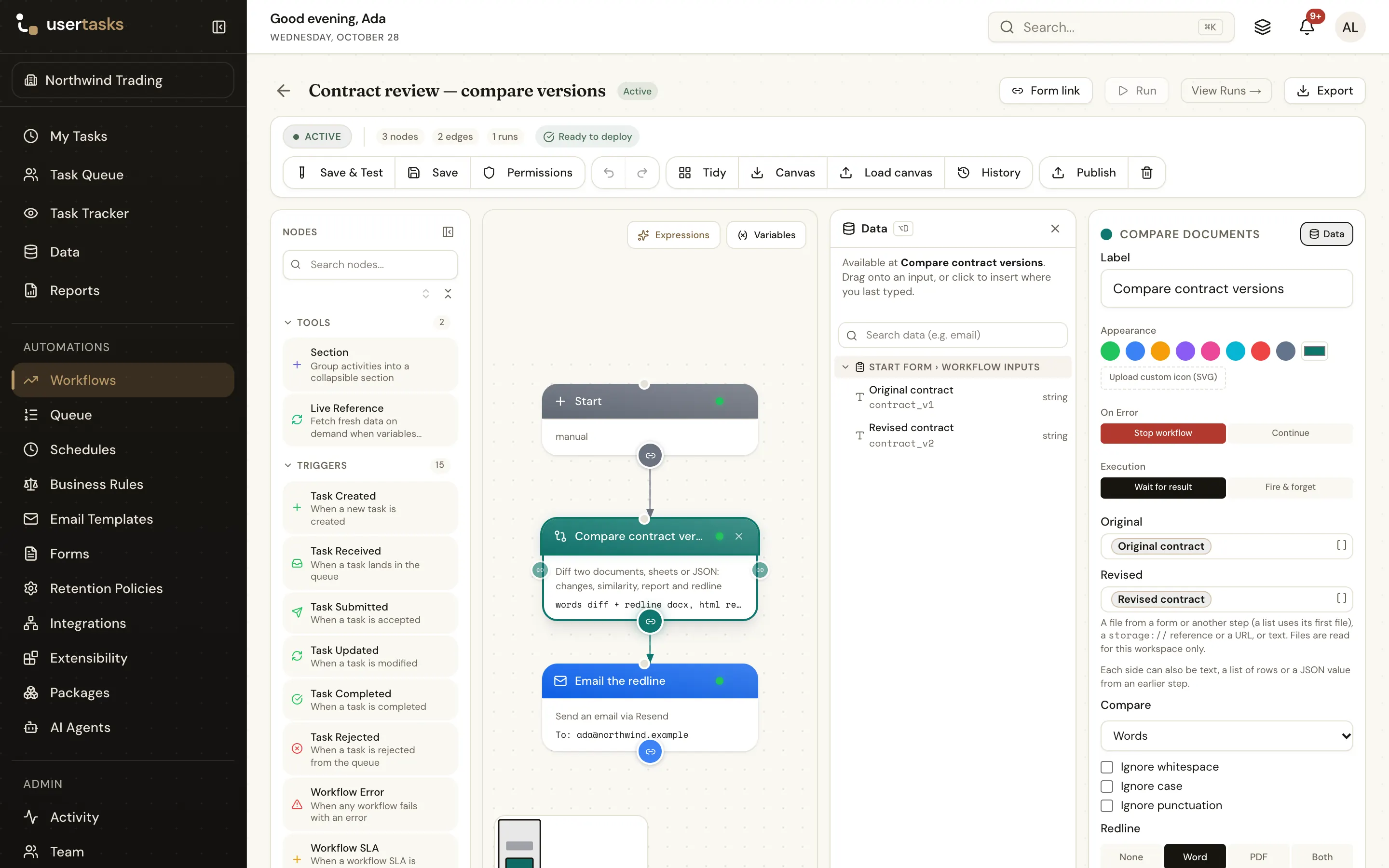
Compare Documents
Diff two documents, spreadsheets, row lists or JSON values — changes, statistics, similarity, a side-by-side HTML report and a Word or PDF redline.
Compare Documents (doc_compare) compares an original and a revised version and reports what changed: a list of changes, statistics, a similarity score, a unified diff, a side-by-side HTML report you can use as an email body, and optionally a redline (Word or PDF) and a report file.
It compares four kinds of input:
- Documents and text (Word, PDF, PowerPoint, OpenDocument, HTML, Markdown, RTF, plain text) — by lines, words, characters or sentences.
- Spreadsheets (Excel, OpenDocument, CSV, or two lists of objects such as
{{document_rows}}or a Data step's rows) — row by row, cell by cell, with rows matched on key columns. - JSON (JSON or YAML files, or two objects) — a deep diff with the path of every change.
Inputs
Original (original) and Revised (revised): each a file (a file object, a list → its first file, a storage:// reference, a URL or base64 content), text, a list of objects (rows) or a JSON object. See File inputs.
Options
| Setting | Key | Default | What it does |
|---|---|---|---|
| Compare | mode | auto | auto, lines, words, characters, sentences, sheet (spreadsheet rows, cell by cell) or json (deep, with paths). auto picks sheet when both sides are spreadsheets, CSV or row lists, json when both are JSON or YAML, words when either side is a document (Word, PDF, PowerPoint, ODT, HTML, Markdown, RTF), otherwise lines |
| Key columns | key_columns | row order | Spreadsheets: comma-separated columns that identify a row (ProductID, or CustomerID, OrderDate). Without keys, rows are compared by position |
| Only these columns | compare_columns | all | Spreadsheets: compare just these columns |
| Ignore columns | ignore_columns | none | Spreadsheets: columns to leave out, such as updated_at |
| Sheet | sheet | first sheet | Spreadsheets: a sheet name or number, used for both files |
| Number tolerance | numeric_tolerance | 0 | Spreadsheets: numbers that differ by no more than this are equal |
| Match list items by | array_key | position | JSON: a field that identifies list items (id, sku), so a reordered list is not a change |
| Ignore whitespace | ignore_whitespace | false | Runs of spaces and blank lines don't count |
| Ignore case | ignore_case | false | |
| Ignore punctuation | ignore_punctuation | false | Punctuation and symbols are removed before comparing |
| Context lines | context_lines | 3 | Unchanged lines around each change in the unified diff and the report (not shown in the designer) |
| Redline | redline | none | Text modes only: none, docx (Word), pdf or both |
| Redline style | redline_style | formatting | formatting: inserted text underlined in green, deleted text struck through in red. tracked: real Word tracked changes (author "UserTasks compare") that can be accepted or rejected in Word. PDF redlines always use colours |
| Report file | report | none | html (the side-by-side report as a file) or pdf (a summary of the changes) |
| Output file name | output_name | <revised>-comparison | Base name of the files: <name>.html / .pdf for the report, <name>-redline.docx / .pdf for the redline |
| Output variable | output_var | comparison |
Outputs
| Variable | Contents |
|---|---|
{{comparison}} | The whole result (below) |
{{comparison_identical}} | true when nothing changed (after the ignore options) |
{{comparison_similarity}} | 0–100 |
{{comparison_html}} | The side-by-side HTML report (inline styles, escaped text: ready for an email body) |
{{comparison_redline_docx}}, {{comparison_redline_pdf}}, {{comparison_report}} | The files, as file objects, when you asked for them |
No redline is made when the two versions are identical.
Documents and text
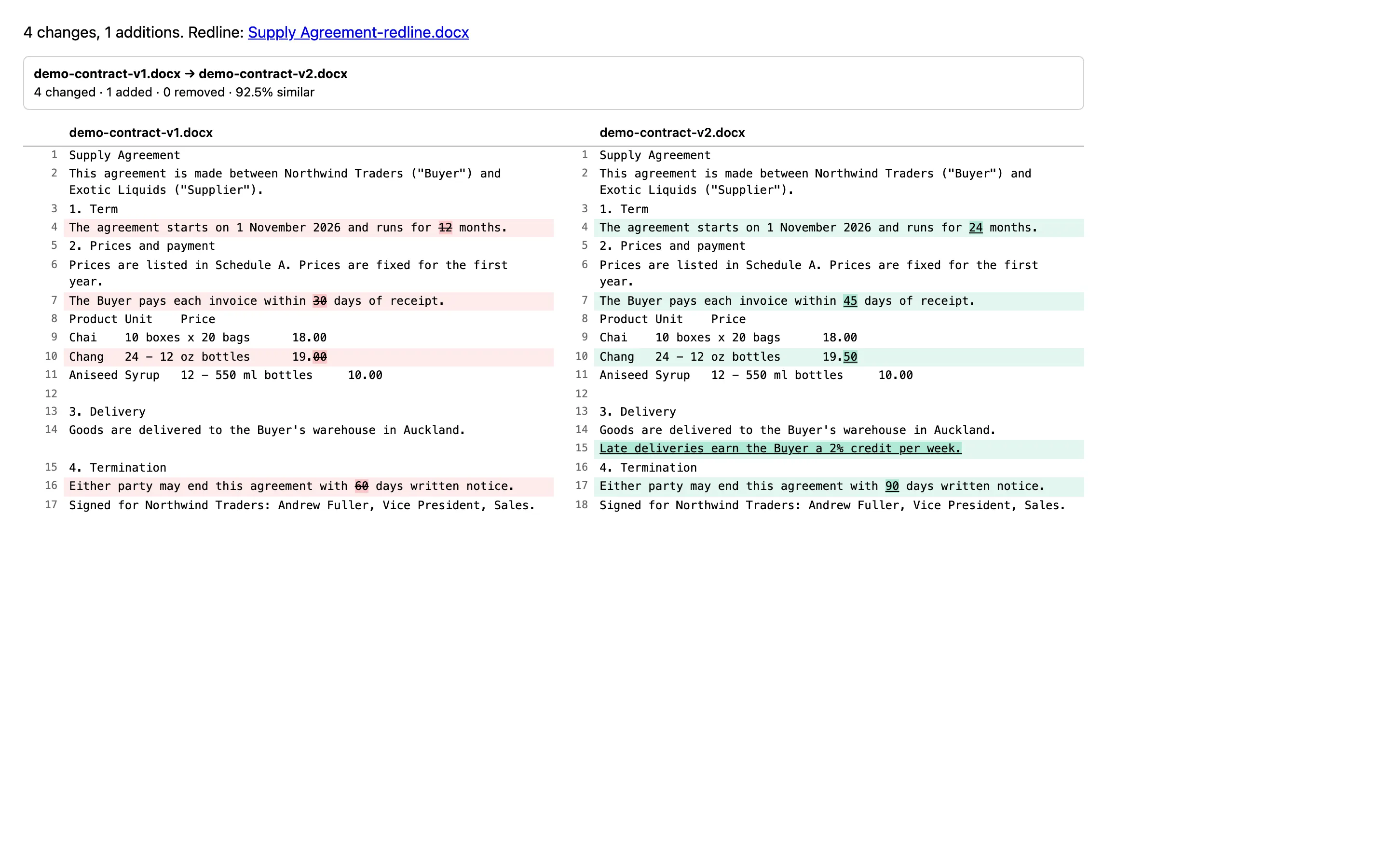
Two versions of a supply agreement where the term changed from 24 to 36 months, compared by words with a Word redline and an HTML report:
{
  "mode": "words",
  "identical": false,
  "similarity": 97,
  "stats": { "added": 0, "removed": 0, "changed": 1, "unchanged": 2, "added_lines": 1, "removed_lines": 1, "added_words": 1, "removed_words": 1, "added_characters": 2, "removed_characters": 2 },
  "changes": [{ "type": "changed", "old_text": "24", "new_text": "36" }],
  "changes_truncated": false,
  "unified": "===================================================================\n--- supply-agreement-v1.docx\n+++ supply-agreement-v2.docx\n@@ -1,7 +1,7 @@\n Supply Agreement\n Between Northwind Traders and Exotic Liquids. See the terms.\n Term\n-- The term is 24 months.\n+- The term is 36 months.\n …",
  "html": "<div style=\"…\"><p style=\"…\"><strong>supply-agreement-v1.docx → supply-agreement-v2.docx</strong><br>1 changed · 0 added · 0 removed · 97% similar</p><table …>…</table></div>",
  "inline_html": "Supply Agreement<br>…- The term is <del style=\"…\">24</del><ins style=\"…\">36</ins> months.<br>…",
  "original": { "name": "supply-agreement-v1.docx" },
  "revised": { "name": "supply-agreement-v2.docx" },
  "redline_docx": { "_file": true, "name": "supply-agreement-v2-comparison-redline.docx", "mime_type": "application/vnd.openxmlformats-officedocument.wordprocessingml.document", "size": 2311, "url": "…", "storage_ref": "storage://task-files/workflow-files/…", "checksum_sha256": "…" },
  "report": { "_file": true, "name": "supply-agreement-v2-comparison.html", "mime_type": "text/html", "size": 4180, "url": "…", "storage_ref": "storage://task-files/workflow-files/…", "checksum_sha256": "…" }
}changeslists each change:changed(withold_textandnew_text),added(new_text) orremoved(old_text); in lines mode alsoold_line/new_line. At most 2,000 are listed (changes_truncated).similarityis the share of words both versions have in common (characters mode: characters).htmlis a side-by-side, line-aligned table with changed words highlighted and long unchanged stretches collapsed;inline_htmlis the whole text with<del>/<ins>marks.- Documents are compared on their text (tracked changes read as accepted). The redline keeps unchanged paragraphs, word-diffs changed ones, marks inserted and deleted paragraphs, and shows a changed table cell with its previous value (
19.50 [was: 19.00]).
Spreadsheets and row lists
Two product lists keyed on ProductID:
{
  "mode": "sheet",
  "identical": false,
  "similarity": 25,
  "key_columns": ["ProductID"],
  "stats": { "rows_old": 3, "rows_new": 3, "added": 1, "removed": 1, "changed": 1, "unchanged": 1, "cells_changed": 2, "columns_added": [], "columns_removed": [] },
  "changes": [
    { "type": "changed", "key": { "ProductID": 2 }, "old_row": 2, "new_row": 2,
      "columns": [{ "column": "UnitPrice", "old": 19, "new": 19.5 }, { "column": "UnitsInStock", "old": 17, "new": 12 }] },
    { "type": "removed", "key": { "ProductID": 3 }, "old_row": 3,
      "old": { "ProductID": 3, "ProductName": "Aniseed Syrup", "UnitPrice": 10, "UnitsInStock": 13 } },
    { "type": "added", "key": { "ProductID": 77 }, "new_row": 3,
      "new": { "ProductID": 77, "ProductName": "Original Frankfurter grüne Soße", "UnitPrice": 13, "UnitsInStock": 32 } }
  ],
  "changes_truncated": false,
  "warnings": [],
  "html": "<div …>…</div>"
}
Without key columns, key is the row number. A key that appears twice is matched in order, with a warning. similarity is the share of rows that are unchanged.
JSON
{
  "mode": "json",
  "identical": false,
  "similarity": 66.7,
  "stats": { "added": 0, "removed": 0, "changed": 2, "unchanged": 4 },
  "changes": [
    { "type": "changed", "path": "status", "old": "open", "new": "shipped" },
    { "type": "changed", "path": "lines[sku=\"CHAI\"].qty", "old": 10, "new": 12 }
  ],
  "changes_truncated": false,
  "html": "<div …>…</div>"
}
The run history shows the mode, the result, the statistics, the number of changes and the file names:
{ "variable": "comparison", "mode": "words", "identical": false, "similarity": 97, "stats": { "added": 0, "removed": 0, "changed": 1, "unchanged": 2, "…": "…" }, "changes": 1, "files": { "redline_docx": "supply-agreement-v2-comparison-redline.docx", "report": "supply-agreement-v2-comparison.html" } }On the canvas
The mode, the files it makes and the output variable: words diff + redline docx, html report → contract_diff, or auto diff → comparison.
Limits
- Each side: 2,000,000 characters (characters mode: 100,000 — use words or lines for longer texts); spreadsheets 200,000 rows per side. Each file is also subject to
DOCUMENT_MAX_MBand the other read limits. - A text diff gives up after 15 seconds of work with "too different to compare in time — try lines mode".
- At most 2,000 changes are listed; the HTML report stops at 5,000 lines and the PDF report at 500 changes.
- The redline is built from the documents' text and structure (headings, paragraphs, lists, tables), not their layout. PDF redlines and reports use the standard PDF fonts, so characters outside Latin (Windows-1252) are shown as "?".
Security notes
The reports are built from escaped text only; nothing from the documents is inserted as HTML. Inputs are read for this workspace only. See Security.
Example
{
  "type": "doc_compare",
  "label": "Compare contract versions",
  "config": {
    "original": "{{form.current_contract}}",
    "revised": "{{form.proposed_contract}}",
    "mode": "words",
    "ignore_whitespace": true,
    "redline": "docx",
    "redline_style": "tracked",
    "report": "html",
    "output_name": "Exotic Liquids supply agreement",
    "output_var": "contract_diff"
  }
}
Canvas: words diff + redline docx, html report → contract_diff.
Works well with
- Send Email with
{{contract_diff_html}}as the body and the redline as an attachment — see Redline two contract versions. - A Condition on
{{comparison_identical}}(is true) to stop when nothing changed, or on{{comparison_similarity}}(less than 80) to ask for a full review. - Read Document (
tracked_changes: show) to see who changed what inside one Word file. - A Loop over
{{comparison.changes}}in sheet mode to update a data table row by row.