Event registration

Event registration with session choices, capacity and a waitlist

Register several attendees at once with an editable table, collect session preferences, check seats against your sessions table, confirm or waitlist automatically, email every attendee and follow the event on an organiser dashboard.

The problem

Registration spreadsheets overbook sessions.

Sign-ups arrive by form or email one person at a time, someone checks seats by hand, popular sessions are overbooked and waitlisted people are never offered an alternative.

  • Group sign-ups typed in one by one
  • Seats counted by hand, sessions overbooked
  • Waitlists without an owner

How UserTasks solves it

Seats are checked as people register, and the waitlist has an owner.

One person registers their group in an editable table with dietary and accessibility needs, picks sessions and rates their interest. The workflow counts the attendees, checks the seats left in the Sessions table, confirms and updates the seats, or waitlists and gives the organiser a task to offer an alternative. Every attendee gets a confirmation, and the organiser dashboard shows seats taken against capacity.

  • Editable table, Slider, Rating and Rich text on the registration form
  • Capacity from a data table, updated on every confirmation
  • Waitlist task for the organiser with an SLA
  • Seats, sessions and dietary needs on an organiser dashboard

Architecture

How the pieces fit

Event registration architectureA registrant submits attendees and session choices. UserTasks checks capacity in the Sessions table, confirms or waitlists, emails each attendee and records them; waitlisted registrations become a task for the organiser. A dashboard charts seats against capacity.INRegistration formAttendee table · sessionsEvents and sessionsData tablesOUTAttendeesConfirmation emailsOrganiser dashboardCharts · saved reportsUserTasks engineCount attendeesCheck seats leftConfirm or waitlistOrganiser task
A registrant submits attendees and session choices. UserTasks checks capacity in the Sessions table, confirms or waitlists, emails each attendee and records them; waitlisted registrations become a task for the organiser. A dashboard charts seats against capacity.

In practice

How many people did they register?

The attendee table is a list of rows: count it and compare with the seats left.

json
{
  "type": "condition",
  "label": "Seats left?",
  "config": {
    "branches": [{
      "label": "Confirm",
      "logic": "and",
      "rules": [{ "field": "{{=COUNT(form.attendees)}}", "operator": "lte", "value": "{{seats_left}}" }]
    }],
    "has_else": true
  }
}
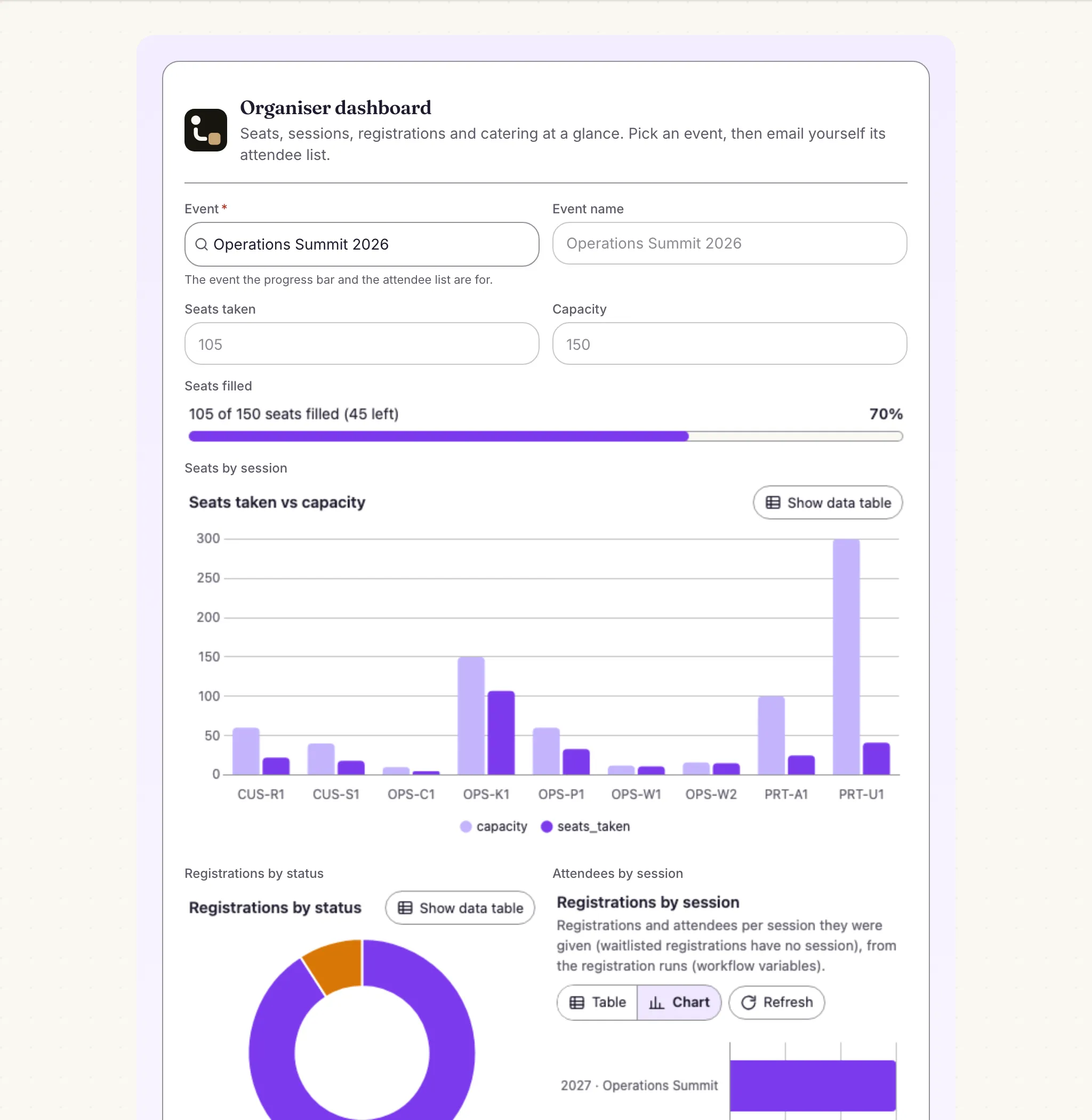
The organiser dashboard with a chart of seats taken against capacity per session and a saved report of registrations
The organiser dashboard: seats taken per session from the Sessions table, and registrations from a saved report.

The flow

From sign-up to seat

  1. STEP 1

    Register

    Event lookup, an attendee table, session choices and interest ratings, with a review step.

  2. STEP 2

    Check capacity

    Attendees are counted and compared with the seats left in the Sessions table.

  3. STEP 3

    Confirm or waitlist

    Confirmed seats are taken and every attendee is emailed; waitlisted groups get an organiser task.

  4. STEP 4

    Run the event

    The dashboard shows seats against capacity, registrations and dietary needs.

Ready-made package

Event registration with session choices

A four-step registration page with an attendee table, first and second session choices, slider, rating and rich text; seats are checked by a decision table and waitlisted groups go to the organiser.

Starts from a form · needs · about 10 minutes to set up · signed, free to install

See the package

Frequently asked questions

Can people outside the company register?

Form pages are for signed-in people. For external events, post the same form from your website with the forms API and the workflow runs the same way.

What happens when two people register for the last seats at once?

Each run reads the seats left and updates them in turn; for very popular sessions, keep a small buffer in the capacity or let the organiser confirm the last seats from the waitlist task.

Can attendees cancel?

Not in the package as shipped. Add a cancellation form that updates the Registrations row and frees the seats, and offer them to the waitlist.

Related use cases

Building blocks:Complex workflows Integrations and AI Forms and attachments Document actions Images, audio and video Package gallery Deploy anywhere

Build it on an engine you control.

Open source under Apache-2.0. Use the cloud, or self-host it next to your own systems.