CLI, SDK and config
Packages
Bundle a workflow and everything it uses into a signed, versioned .utpkg, install it in other environments, finish incomplete setups and upgrade in place.
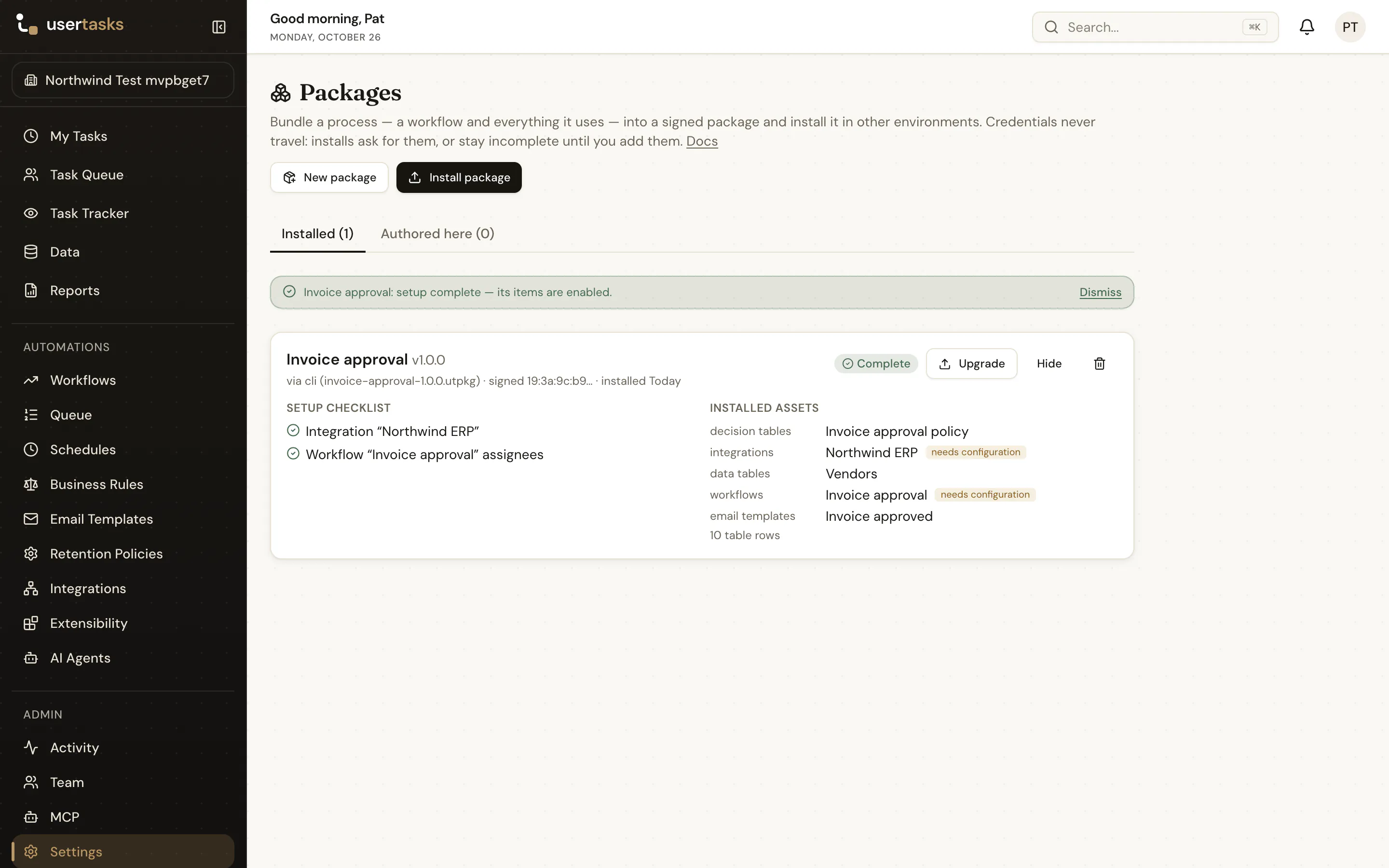
A package bundles a process — a workflow and everything it needs — into one signed, versioned file (.utpkg) that you install in other workspaces and environments: dev → test → prod, or from a vendor to its customers. Credentials never travel. When an install needs something the target environment must provide (database credentials, an API token, the URL of this environment's ERP), it asks for it — or installs incomplete and lets you finish the setup later.
Packages live in Automations → Packages (also under Settings → Packages), /api/v1/packages, /api/v1/package-installs and /api/v1/package-events, the MCP packages_* tools and usertasks packages ….
Concepts
| Package | Root artifacts (usually a workflow) plus everything they use, found automatically: sub-workflows, custom steps, decision tables, data tables, integrations and their references and objects, connectors, email templates, agents, custom roles, retention policies, MCP servers. You can add items and leave items out. |
| Version | An immutable build of the package: 1.0.0, 1.1.0, … Each build exports the current state of every item, removes secrets, signs the result and stores it as a published version you can download again. |
| Requirement | Something an install has to supply: connector credentials, integration auth, other secrets, ${env:VAR} references, environment-specific URLs and hosts, assignees and roles. Generated at build time from what was removed or is environment-specific. |
| Package library | The packages installed in a workspace, with version, source, signer and status — Complete or Incomplete with a setup checklist. |
| History | Every install, upgrade, reinstall, downgrade, reconfigure (Complete setup) and uninstall in the workspace — failed attempts too — with the plan that was applied. |
What travels is the same configuration config as code exports (see export coverage); the workspace theme does not travel in packages.
Authoring a package
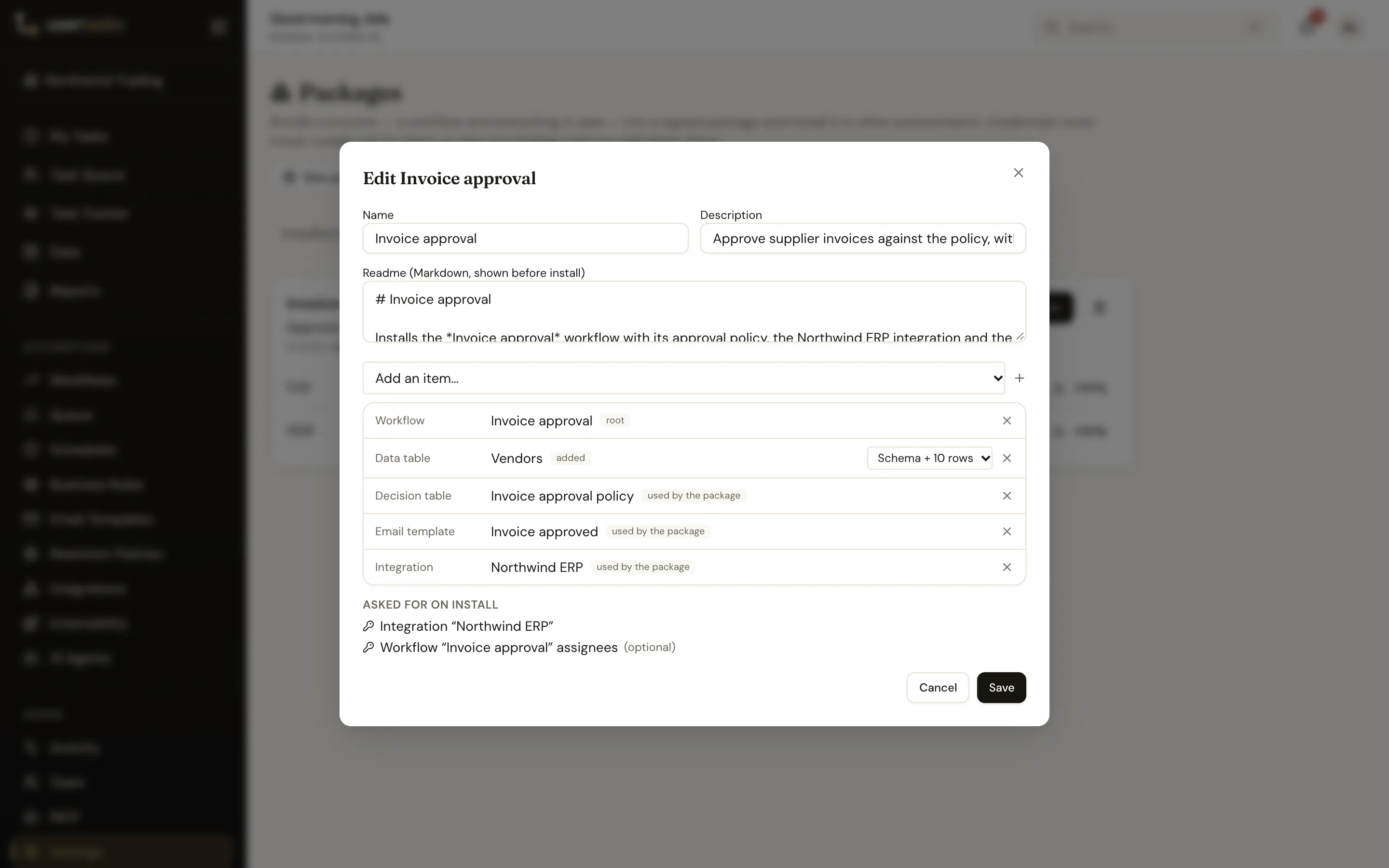
- Settings → Packages → New package, then Start from… a workflow (or any other artifact).
- Review the contents. Every item says why it is there (root, used by the package, added). Remove what should not travel — a removed dependency must then exist in the target workspace already.
- For each data table choose Schema only (default) or Schema + rows (lookup tables, reference data — at most 10,000 rows per table).
- Check Asked for on install: the requirements the package will generate.
- Build version: pick a version (default: the next patch) and release notes. The
.utpkgdownloads and the version is kept in the workspace.
From the CLI:
usertasks packages create --set name="Invoice approval" --set 'roots:=[{"type":"workflow","id":"<workflow id>"}]'
usertasks packages add invoice-approval data_table:<table id> --rows <table id>
usertasks packages contents invoice-approval
usertasks packages build invoice-approval --bump minor --notes "Clearer approval step"
usertasks packages inspect invoice-approval-1.1.0.utpkg      # offline: checksum, file hashes, signature
Requirements
Requirements are derived from the package itself, so every secret becomes one — nothing secret is ever written to a package file (builds refuse to complete if one is found).
| Kind | Generated for | Fields |
|---|---|---|
connector | every connector | its credential fields (secret, required) and connection settings such as host, port and database (optional, default = the source value) |
integration_auth | integrations with credentials | tokens, passwords, API keys and credential headers (secret) plus base URL / database host (environment-specific, optional) |
secret | any other removed secret | MCP server and log destination credentials, secrets inside workflow steps |
env | ${env:VAR} and secret://… references | the value for this environment |
user | assignees and teams in workflow steps | a user (id or email) in the target workspace — people never travel |
role | built-in roles referenced by id | bound by slug (manager, …) automatically |
Each requirement has an id such as connector:connectors:<id> and fields such as credentials.password; values are given as { "<requirement id>": { "<field key>": "value" } }.
Importing (installing)
Open Automations → Packages and drag a .utpkg file onto the page — or choose Import package and pick one. With nothing installed yet the page is one large drop zone. The import wizard opens with the file:
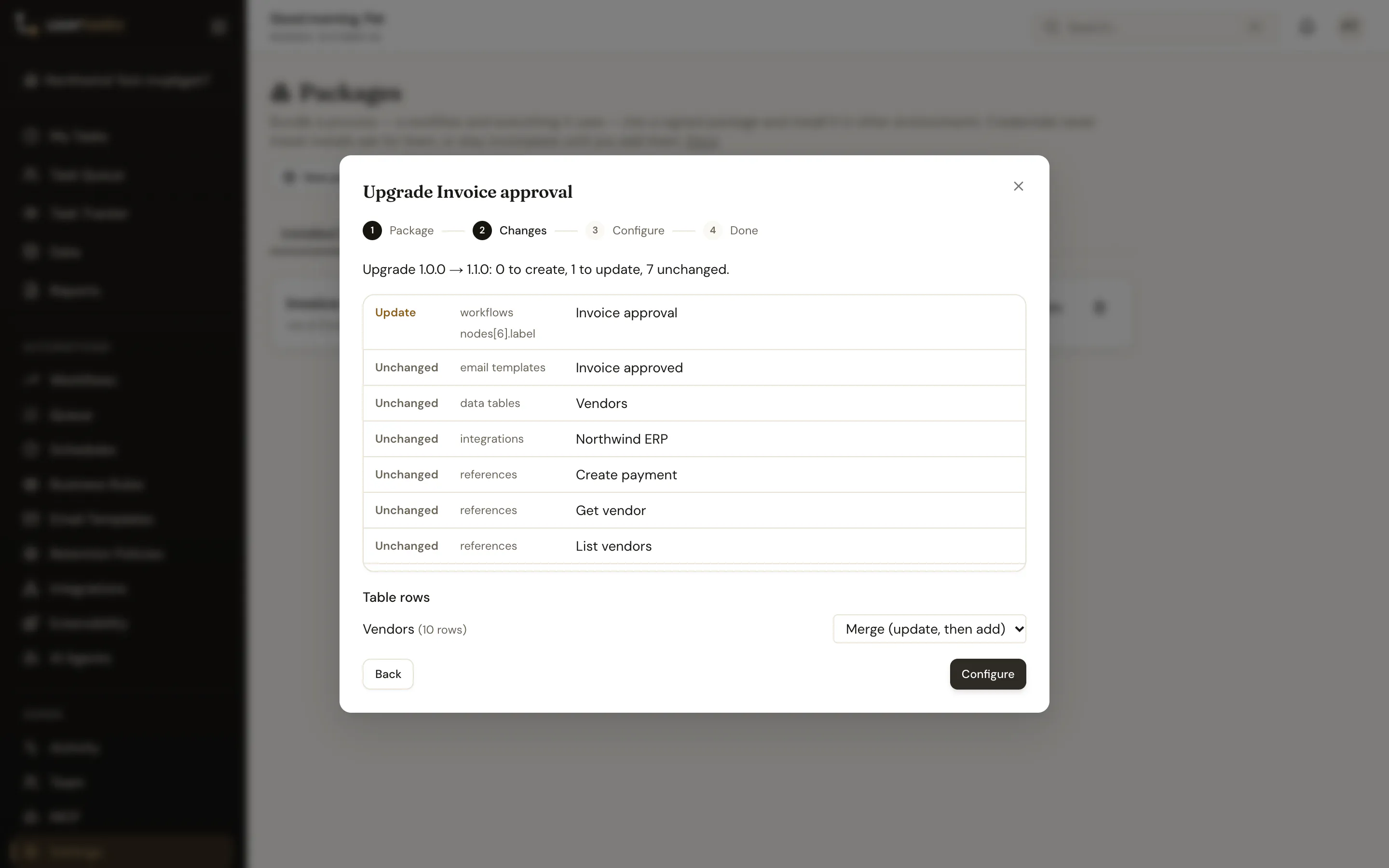
- Package — the file is verified (checksum, every file hash, signature) and its readme and contents are shown. A modified file is refused.
- Changes — the dry-run plan: what is created, updated or unchanged, assets changed locally since the last install, assets no longer in this version, and the row mode per packaged table (merge, replace or skip).
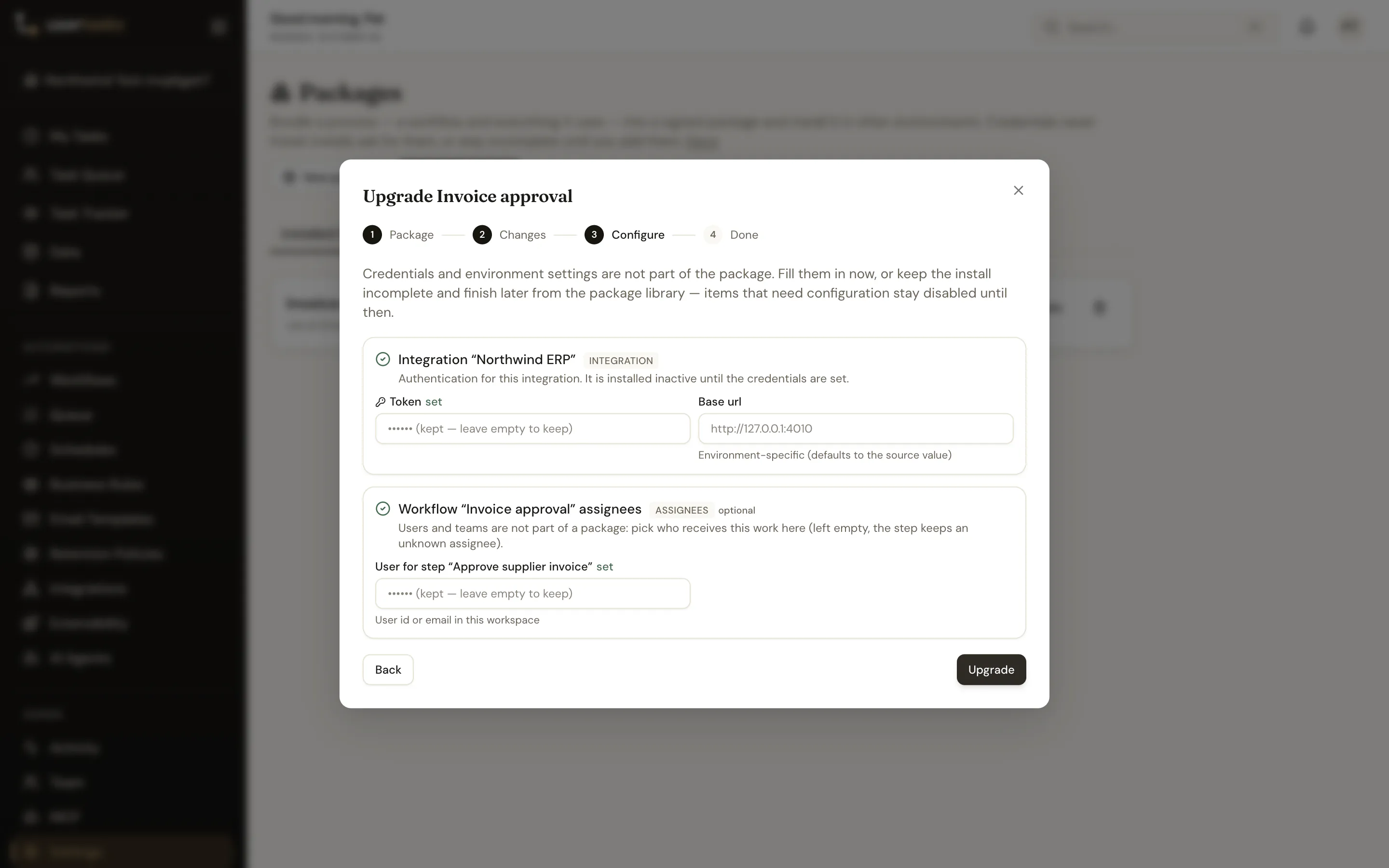
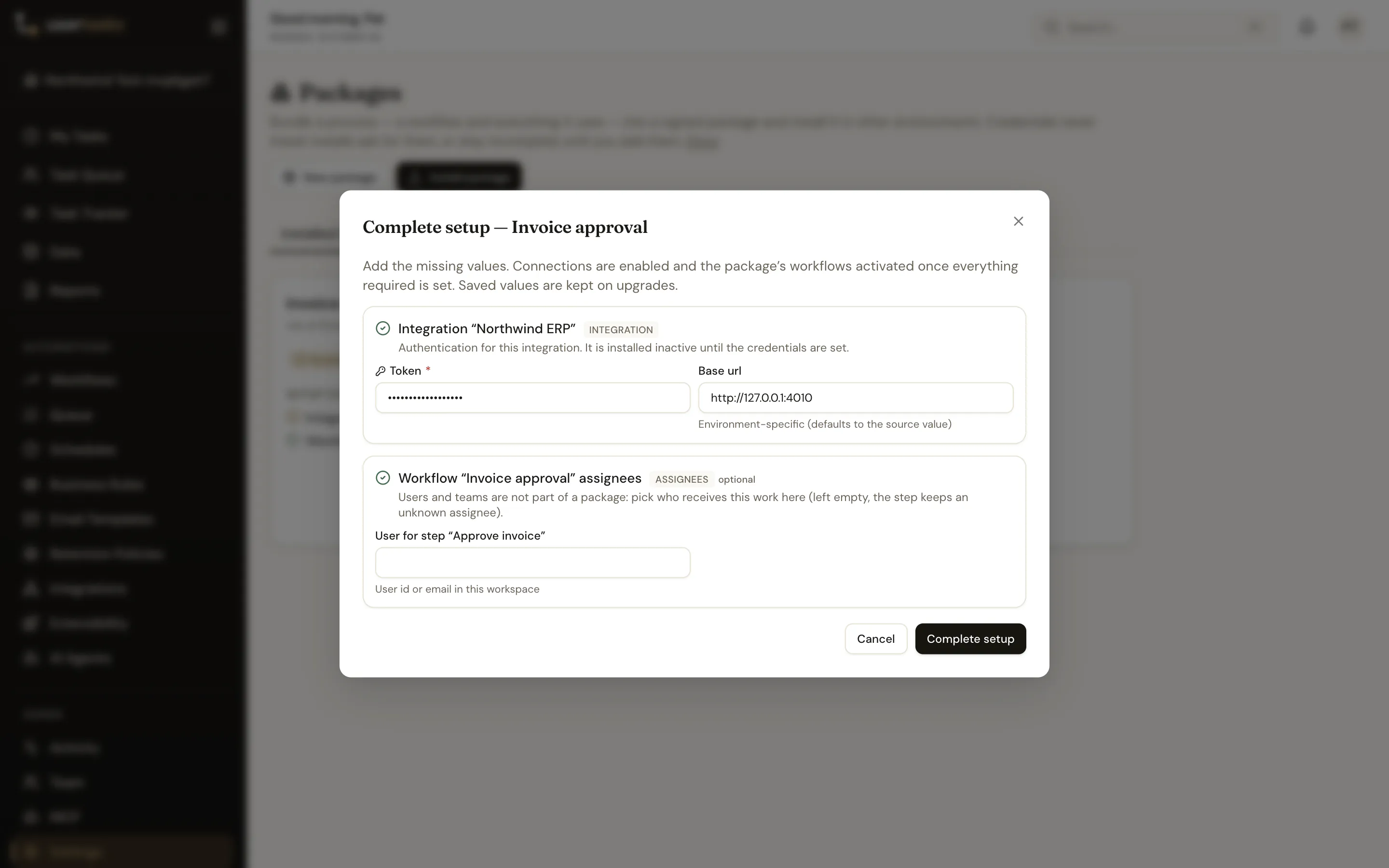
- Configure — the requirements form. Fill it in, or tick Keep incomplete.
- Done — the result, and the library entry.
With the CLI, missing values are prompted for on a terminal (secrets without echo); in scripts pass them as flags or a file — ${env:VAR} and ${file:path} are substituted locally:
usertasks packages install invoice-approval-1.1.0.utpkg --dry-run
usertasks packages install invoice-approval-1.1.0.utpkg \
  --set 'integration_auth:integrations:<id>.config.auth_config.token=${env:ERP_TOKEN}' \
  --set 'integration_auth:integrations:<id>.config.base_url=https://erp.test.example' --yes
usertasks packages install invoice-approval-1.1.0.utpkg -f values.yaml --yes
Without a terminal a missing required value fails the install (exit 6) and prints the --set to add — unless --keep-incomplete.
Into another workspace
If you belong to more than one workspace, a package authored here can be installed into another one without downloading the file: on the package's card in Authored here, choose Install in another workspace, pick the workspace and the version, and the same wizard runs against that workspace — its permissions (you need packages.install there) and its requirement values. The library entry there shows the source as library.
Incomplete installs and Complete setup
Installed with values missing, a package is Incomplete:
- connectors, integrations, MCP servers and log destinations that need configuration are created disabled;
- workflows that depend on them are installed inactive and cannot be activated or published until setup is complete — the designer says why;
- the library shows a checklist of what is missing.
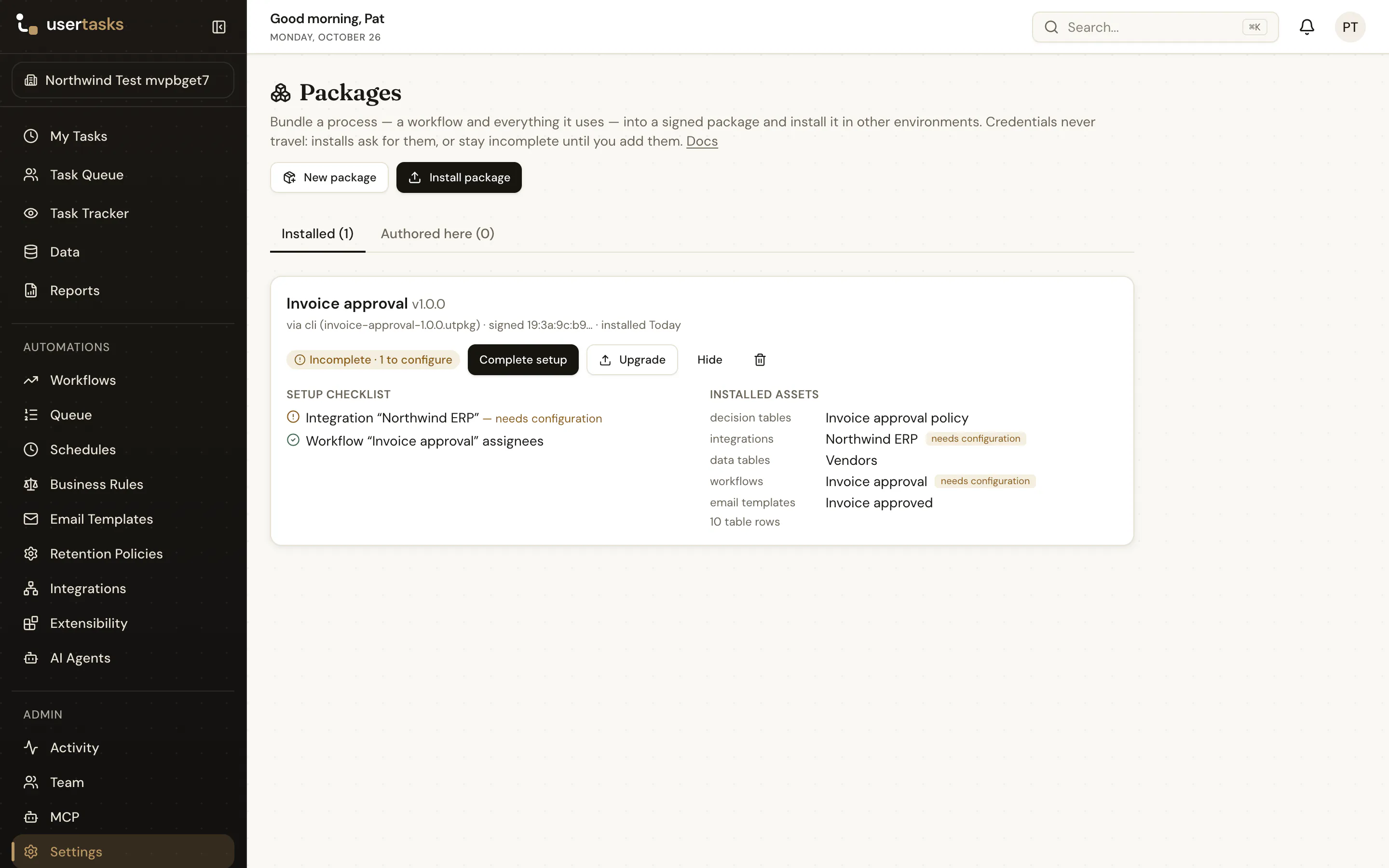
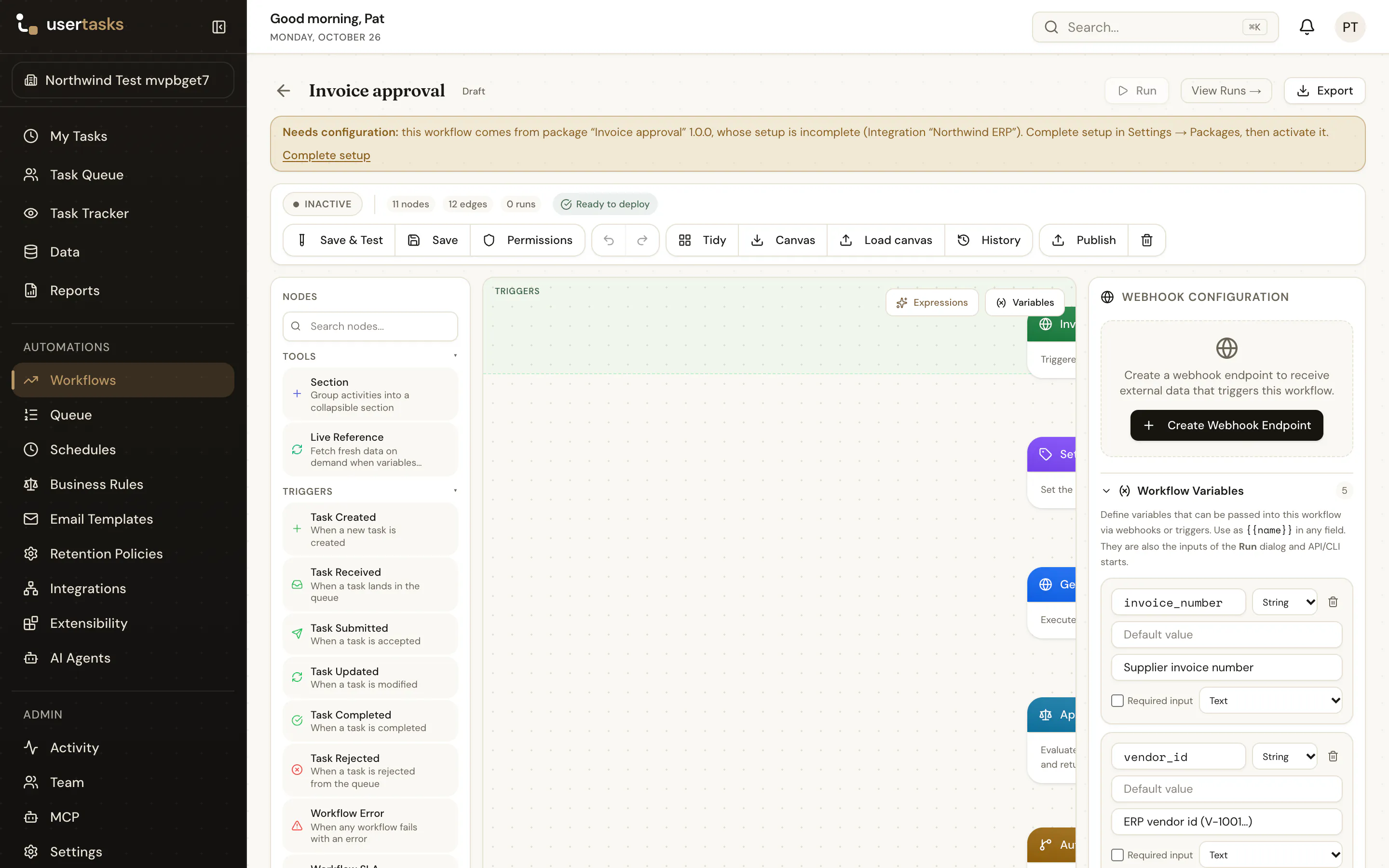
Complete setup opens the same requirements form. Once every required value is set, the disabled items are enabled and the package's active workflows are published and activated.
usertasks packages installs
usertasks packages complete invoice-approval --set 'integration_auth:integrations:<id>.config.auth_config.token=${env:ERP_TOKEN}'
Upgrades
Installing a newer version of an installed package upgrades it in place: every package asset maps onto what its earlier install created (package_install_assets), so nothing is duplicated.
- The plan comes first (wizard step 2,
upgrade --dry-run): field diffs per asset. - Local connection details are kept: credentials stay in the local rows, and non-secret requirement values (URLs, hosts, assignees) are stored with the install and reused. Only new requirements are asked for.
- Assets changed in this workspace since the last install are flagged; choose Keep assets changed here (
--keep-local-changes) to leave them alone. - Assets no longer in the package are flagged and kept — never deleted.
- Workflows that are active here are re-published so the new version goes live; inactive ones stay inactive.
- Data rows merge by default: rows installed before are updated, new ones added.
usertasks packages upgrade invoice-approval-1.2.0.utpkg --dry-run
usertasks packages upgrade invoice-approval-1.2.0.utpkg --yes
Removing a package and its artifacts
Uninstall (the bin icon on an installed package, usertasks packages uninstall <install>) first shows the plan: every artifact the package installed and what will happen to it — Remove, Keep (with the reason) or Gone (already deleted by hand) — including how many rows each data table holds and what goes with an item (an integration takes its references and objects with it). Nothing changes until you confirm.
By default an uninstall is cautious:
| Kept unless you choose otherwise | Option | CLI / API |
|---|---|---|
| Data tables that hold rows | Remove everything including data tables and their rows — every table the package installed is deleted with all its rows, also rows added since install. You must type the package name to confirm. | --delete-data / delete_data |
| Items changed in this workspace since install | Also remove items changed since install — your edits are lost. | --force / force |
The workspace's default email template is never removed.
Runs in progress. Deleting a workflow deletes its runs, so unfinished runs (running, waiting on a task or timer, paused) of the package's workflows block the uninstall. The dialog lists them with links; tick Cancel these runs (--cancel-runs, cancel_runs) to cancel them — their open tasks are closed, as with Cancel on a run — and then uninstall. Cancelling needs workflows.activate.
Permissions. Besides packages.install, removing each item needs its section's delete permission (workflows.delete for workflows and decision tables, data.delete for data tables, integrations.delete, workflows.edit for email templates, …). A missing one is reported in the plan and the uninstall is refused before anything is removed.
When it is done you get a summary per artifact. Integrations, email templates and similar items are deleted immediately; workflows, decision tables and data tables are removed by the background deletion worker within a minute.
usertasks packages uninstall invoice-approval --dry-run                       # the plan; exits 7 when something blocks it
usertasks packages uninstall invoice-approval --delete-data --force --cancel-runs --yes
History
The History tab (also History on an installed package) is the timeline of every install, upgrade, reinstall, downgrade, reconfigure (Complete setup) and uninstall in the workspace — including attempts that failed, such as a refused downgrade, a tampered file or an uninstall blocked by running workflows. Uninstalled packages keep their history.
Each entry records when and who, the channel (app, CLI, API or MCP), where the file came from, the version from → to, the signature status and signer fingerprint, the items created / updated / unchanged / removed / kept, rows written or deleted, runs cancelled, requirement changes (for example ERP token: missing → met), the options used and any errors. Filter by package, action, status, user and date; Export CSV downloads the filtered list. Click an entry for the detail drawer: everything above plus the full plan / diff that was applied — per artifact the action and field changes (credentials are never stored, only that they changed).
History needs packages.view. Installs from before history was introduced are reconstructed from the audit log (marked as such, without a plan).
usertasks packages history                                   # newest first
usertasks packages history invoice-approval --action upgrade,uninstall --since 2026-10-01
usertasks packages history --status failed --user ada@northwind.example
usertasks package-events get <event id> -o json              # one event with its plan
REST: GET /api/v1/package-events?package=&action=&status=&channel=&actor=&since=&until= and GET /api/v1/package-events/{id}; MCP: packages_history, packages_history_get.
Signing and trust
Builds are signed with the instance's ed25519 key: generated on first build and stored encrypted with ENCRYPTION_KEY, or provided as PACKAGE_SIGNING_KEY (PEM) from your secret store. Without either, packages are built unsigned.
The checksum is a SHA-256 over the canonical JSON of manifest.json (without checksum and signature), and manifest.json lists the SHA-256 of every other file — so any change to any file breaks verification, and re-signing needs the private key. Installs show Signed by this instance, Signed by a trusted key (fingerprints in PACKAGE_TRUSTED_FINGERPRINTS), Signed by an unknown key (installable; compare the fingerprint out of band) or Unsigned.
The file format
A .utpkg is a ZIP archive:
| Path | |
|---|---|
manifest.json | format_version, kind, package (stable id, name, slug, semver version, description, author, created_at, readme), data (mode per table), requirements, dependencies ({ package_slug, version_range }), files (path + sha256), checksum, signature |
README.md | the readme |
assets/… | one JSON file per asset in the config-as-code layout |
data/<table>.ndjson | rows of tables packaged with rows |
dependencies name other packages that must be installed first (^1.0.0, ~1.2, >=1 <2, …).
Permissions
| To… | You need |
|---|---|
| See packages, versions, the library and the history; plan an install or uninstall | packages.view (OAuth packages:read or config:read) |
| Create and edit packages, build and download versions | packages.manage (OAuth packages:write or config:write) |
| Install, upgrade, complete setup | packages.install (OAuth packages:write or config:write) — and the create / edit permission of every section the package writes, as for config apply |
| Uninstall | packages.install and the delete permission of every section it removes (plus workflows.activate to cancel runs) |
Owner, Admin and Manager have all three by default.
Promotion in CI
Build once in dev, promote the same signed file:
# dev
usertasks --profile dev packages build invoice-approval --bump patch --out invoice-approval.utpkg
# test, then prod: plan, then install with this environment's values
usertasks --profile test packages install invoice-approval.utpkg --dry-run
usertasks --profile test packages install invoice-approval.utpkg -f env/test.values.yaml --yes
usertasks --profile prod packages install invoice-approval.utpkg -f env/prod.values.yaml --yes
values.yaml maps requirement ids to fields; keep secrets out of it with ${env:…}:
"integration_auth:integrations:52deca14-…":
  config.auth_config.token: ${env:ERP_TOKEN}
  config.base_url: https://erp.prod.example
A missing value exits 6 in CI, so a new requirement in a new version stops the pipeline instead of installing something half-configured.